I’ve been writing about Windows Security Zones and the Mark-of-the-Web (MotW) security primitive in Windows for decades now, with 2016’s Downloads and MoTW being one of my longer posts that I’ve updated intermittently over the last few years. If you haven’t read that post already, you should start there.
Advice for Implementers
At this point, MotW is old enough to vote and almost old enough to drink, yet understanding of the feature remains patchy across the Windows developer ecosystem.
MotW, like most security primitives (e.g. HTTPS), only works if you use it. Specifically, an application which generates local files from untrusted data (i.e. anywhere on “The Internet”) must ensure that the files bear a MoTW to ensure that the Windows Shell and other applications recognize the files’ origins and treat them with appropriate caution. Such treatment might include running anti-malware checks, prompting the user before running unsafe executables, or opening the files in Office’s Protected View.
Similarly, if you build an application which consumes files, you should carefully consider whether files from untrusted origins should be treated with extra caution in the same way that Microsoft’s key applications behave — locking down or prompting users for permission before the file initiates any potentially-unwanted actions, more-tightly sandboxing parsers, etc.
Writing MotW
The best way to write a Mark-of-the-Web to a file is to let Windows do it for you, using the IAttachmentExecute::Save() API. Using the Attachment Execution Services API ensures that the MotW is written (or not) based on the client’s configuration. Using the API also provides future-proofing for changes to the MotW format (e.g. Win10 started preserving the original URL information rather than just the ZoneID).
If the URL is not known, but you wish to ensure Internet Zone handling, use the special url about:internet.
You should also use about:internet if the URL is longer than 2083 characters (INTERNET_MAX_URL_LENGTH), or if the URL’s scheme isn’t one of HTTP/HTTPS/FILE.
Ensure that you write the MotW to any untrusted file written to disk, regardless of how that happened. For example, one mail client would properly write MotW when the user used the “Save” command on an attachment, but failed to do so if the user drag/dropped the attachment to their desktop. Similarly, browsers have written MotW to “downloads” for decades, but needed to add similar marking when the File Access API was introduced. Recently, Chromium fixed a bypass whereby a user could be tricked into hitting CTRL+S with a malicious document loaded.
Take care with anything that would prevent proper writing of the MotW– for example, if you build a decompression utility for ZIP files, ensure that you write the MotW before your utility applies any readonly bit to the newly extracted file, otherwise the tagging will fail.
Update: One very non-obvious problem with trying to write the :Zone.Identifier stream yourself — URLMon has a cross-process cache of recent zone determinations. This cache is flushed when a user reconfigures Zones in the registry and when CZoneIdentifier.Save() is called inside the Attachment Services API. If you try to write a zone identifier stream yourself, the cache won’t be flushed, leading to a bug if you do the following operations:
1. MapURLToZone("file:///C:/test.pdf"); // Returns LOCAL_MACHINE2. Write ZoneID=3 to C:\test.pdf:Zone.Identifier // mark Internet3. MapURLToZone("file:///c:/test.pdf"); // BUG: Returns LOCAL_MACHINE value cached at step #1.
Beware Race Conditions
In certain (rare) scenarios, there’s the risk of a race condition whereby a client could consume a file before your code has had the chance to tag it with the Mark-of-the-Web, resulting in a security vulnerability. For instance, consider the case where your app (1) downloads a file from the internet, (2) streams the bytes to disk, (3) closes the file, finally (4) calls IAttachmentExecute::Save() to let the system tag the file with the MotW. If an attacker can induce the handler for the new file to load it between steps #3 and #4, the file could be loaded by a victim application before the MotW is applied.
Unfortunately, there’s not generally a great way to prevent this — for example, the Save() call can perform operations that depend on the file’s name and content (e.g. an antivirus scan) so we can’t simply call the API against an empty file or against a bogus temporary filename (i.e. inprogress.temp).
The best approach I can think of is to avoid exposing the file in a predictable location until the MotW marking is complete. For example, you could download the file into a randomly-named temporary folder (e.g. %TEMP%\InProgress\{guid}\setup.exe), call the Save() method on that file, then move the file to the predictable location.
Note: This approach (extracting to a randomly-named temporary folder, carefully named to avoid 8.3 filename collisions that would reduce entropy) is now used by Windows 10+’s ZIP extraction code.
Correct Zone Mapping
To check the Zone for a file path or URL, use the MapUrlToZone (sometimes called MUTZ) function in URLMon.dll. You should not try to implement this function yourself– you will get burned.
Because the MotW is typically stored as a simple key-value pair within a NTFS alternate data stream:
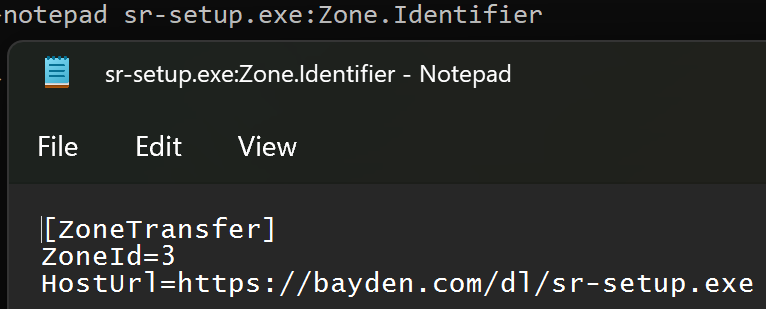
…it’s tempting to think “To determine a file’s zone, my code can just read the ZoneId directly.”
Unfortunately, doing so is a recipe for failure.
Firstly, consider the simple corner cases you might miss. For instance, if you try to open with read/write permissions the Zone.Identifier stream of a file whose readonly bit is set, the attempt to open the stream will fail because the file isn’t writable.
Aside: A 2023-era vulnerability in Windows was caused by failure to open the Zone.Identifier due to an unnecessary demand for write permission.
Second, there’s a ton of subtlety in performing a proper zone mapping.
2a: For example, files stored under certain paths or with certain Integrity Levels are treated as Internet Zone, even without a Zone.Identifier stream:
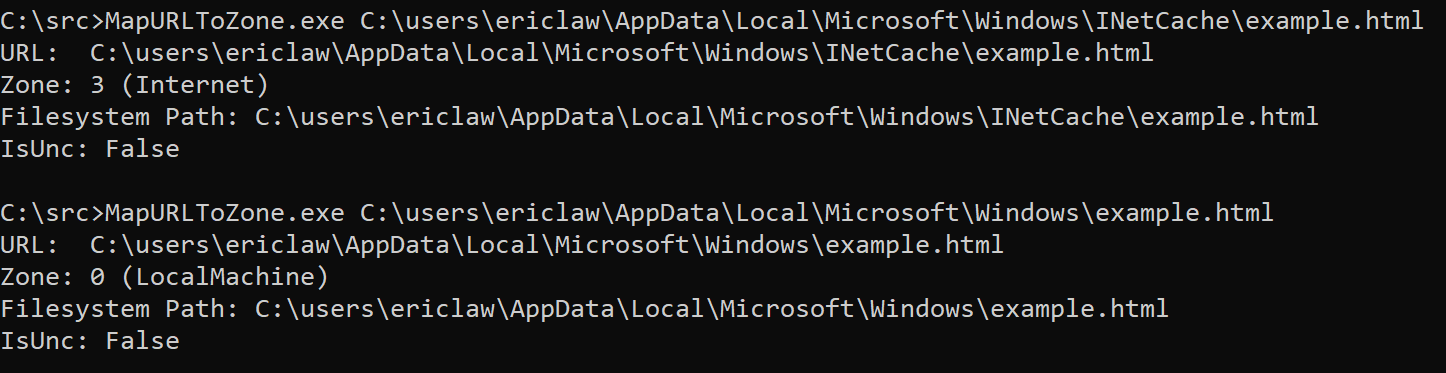
2b: Similarly, files accessed via a \\UNC share are implicitly not in the Local Machine Zone, even if they don’t have a Zone.Identifier stream. Origin information can come from either the location of the file (e.g. C:\test\example.txt or \\share.corp\files\example.txt), or any Zone.Identifier alternate data stream on that file. The rules for precedence are tricky — a file on a “Trusted Zone” file share that contains a Zone.Identifier containing a ZoneId=3 (Internet Zone) marking must cause a file to be treated as Internet Zone, regardless of the file’s location. However, the opposite must not be true — a remote file with a Zone.Identifier specifying ZoneId=0 (Local Machine) must not cause that file to be treated as Local Machine.
Aside: The February 2024 security patch (CVE-2024-21412) fixed a vulnerability where the handler for InternetShortcut (.url) files was directly checking for a Zone.Identifier stream rather than calling MUTZ. That meant the handler failed to recognize that file://attacker_smbshare/attack.url should be treated with suspicion and suppressed an important security prompt.
2c: As of the latest Windows 11 updates, if you zone-map a file contained within a virtual disk (e.g. a .iso file), that file will inherit the MotW of the containing .iso file, even though the embedded file has no Zone.Identifier stream.
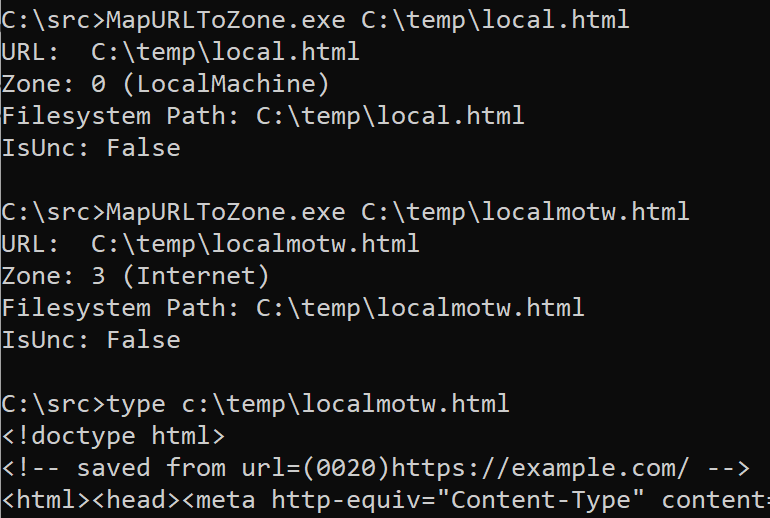
2d: For HTML files, a special saved from url comment allows specification of the original url of the HTML content. When MapUrlToZone is called on a HTML file URL, the start of the file is scanned for this comment, and if found, the stored URL is used for Zone Mapping:
Finally, the contents of the Zone.Identifier stream are subject to change in the future. New key/value fields were added in Windows 10, and the format could be changed again in the future.
Ensure You’re Checking the “Final” URL
Ensure that you check the “final” URL that will be used to retrieve or load a resource. If you perform any additional string manipulations after calling MapUrlToZone (e.g. removing wrapping quotation marks or other characters), you could end up with an incorrect result.
Respect Error Cases
Numerous security vulnerabilities have been introduced by applications that attempt to second-guess the behavior of MapURLToZone.
For example, MapURLToZone will return a HRESULT of 0x80070057 (Invalid Argument) for some file paths or URLs. An application may respond by trying to figure out the Zone itself, by checking for a Zone.Identifier stream or similar. This is unsafe: you should instead just reject the URL.
Similarly, one caller noted that http://dotless was sometimes returning ZONE_INTERNET rather the ZONE_INTRANET they were expecting. So they started passing MUTZ_FORCE_INTRANET_FLAGS to the function. This has the effect of exposing home users (for whom the Intranet Zone was disabled way back in 2006) to increased attack surface.
MutZ Performance
One important consideration when calling MapUrlToZone() is that it is a blocking API which can take from milliseconds (common case) to tens of seconds (worst case) to complete. As such, you should NOT call this API on a UI thread– instead, call it from a background thread and asynchronously report the result up to the UI thread.
It’s natural to wonder how it’s possible that this API takes so long to complete in the worst case. While file system performance is unpredictable, even under load it rarely takes more than a few milliseconds, so checking the Zone.Identifier is not the root cause of slow performance. Instead, the worst performance comes when the system configuration enables the Local Intranet Zone, with the option to map to the Intranet Zone any site that bypasses the proxy server:
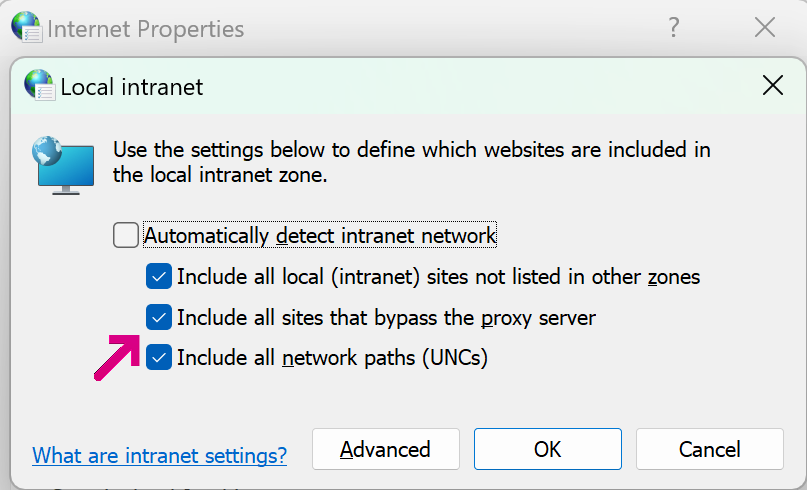
In this configuration, URLMon may need to discover a proxy configuration script (potentially taking seconds), download that script (potentially taking seconds), and run the FindProxyForURL function inside the script. That function may perform a number of expensive operations (including DNS resolutions), potentially taking seconds.
Fortunately, the “worst case” performance is not common after Windows 7 (the WinHTTP Proxy Service means that typically much of this work has already been done), but applications should still take care to avoid calling MapUrlToZone() on a UI thread, lest an annoyed user conclude that your application has hung and kill it.
Checking for “LOCAL” paths
In some cases, you may want to block paths or files that are not on the local disk, e.g. to prevent a web server from being able to see that a given file was opened (a so-called Canary Token), or to prevent leakage of the user’s NTLM hash.
When using MapURLToZone for this purpose, pass the MUTZ_NOSAVEDFILECHECK flag. This ensures that a downloaded file is recognized as being physically local AND prevents the MapURLToZone function from itself reaching out to the network over SMB to check for a Zone.Identifier data stream.
I wrote a whole post exploring this topic.
Comparing Zone Ids
In most cases, you’ll want to use < and > comparisons rather than exact Zone comparisons; for example, when treating content as “trustworthy”, you’ll typically want to check Zone<3, and when deeming content risky, you’ll check Zone>3.
Tool: Simple MapUrlToZone caller
Compile from a Visual Studio command prompt using csc mutz.cs:
Update: I wrote a whole post with further discussion of properly checking a file’s zone.
 text/plain