In the past, I’ve explained how security products combine sensors and throttles with threat intelligence to protect users and devices from attack. I’ve also outlined how the evolution of software, including increased complexity and a focus on privacy, have made it harder than ever for sensors and throttles to function effectively, leading to security and reliability risk.
The Current Landscape
Today in the Windows ecosystem, we have a few cases of “participatory extensible security” (PES). PES is extensible on both sides:
- An “enlightened” client can participate by asking for security help
- Any security product can extend protection to any client
One PES example is the IOfficeAntivirus interface, which gets called on file downloads and document opens to tell installed antivirus software “I got a new file. Scan it for viruses?” (This direct call isn’t entirely redundant behavior in a world with Real-time Protection, but it’s close).
The more prominent example of PES is an API called AMSI — the Antimalware Scan Interface. I’ve blogged about AMSI before but the tl;dr is that it is an API contract where an (arbitrary) AMSI client can ask an (arbitrary) AMSI security provider “Hey, what do you think of this. Does it look malicious?”
This allows the client application (a script engine, a document editor, etc) the ability to choose the best place to put a sensor/throttle pair– for instance, Word can call AMSI right after a document is decrypted and immediately before its powerful script content is about to be executed. This is great for several reasons:
- The client doesn’t need to know anything about the security provider.
- The security provider doesn’t need to try to hook the (potentially new or unknown) client.
- The security provider gets the content to be scanned in whatever form the client believes will best reveal signs of malice.
- If the content is determined to be malicious, the client can show a meaningful error message and/or offer advice or remediations.
That’s great stuff!
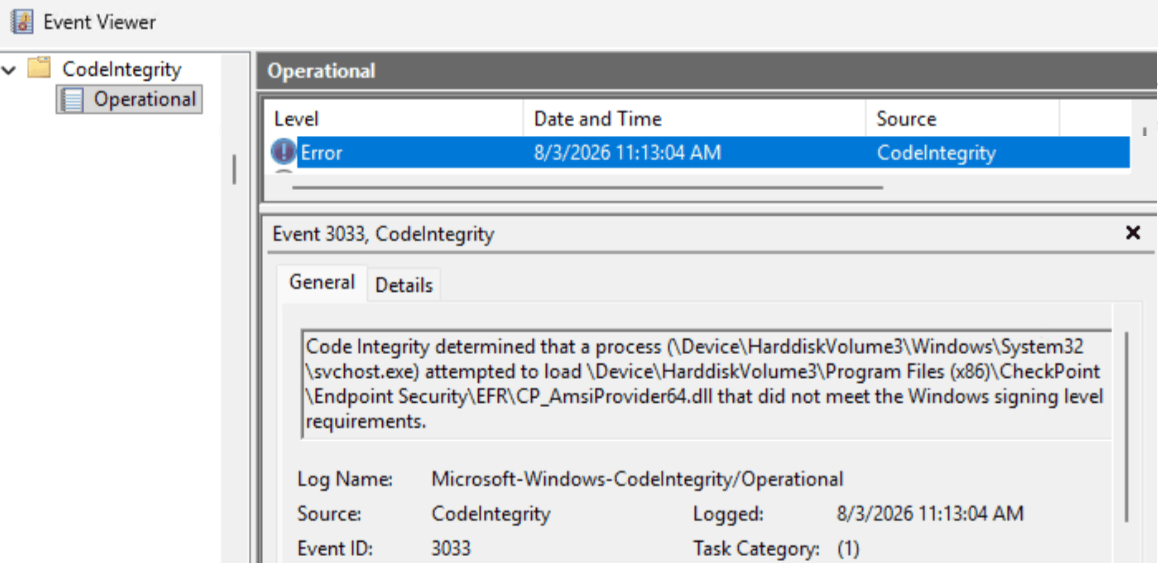
Unfortunately, the flexibility and simplicity of this API contract has its downsides. In particular, the API was designed in the style of most Microsoft extensibility APIs of the late 1990s: a series of registry keys point to a set of DLLs that are loaded and then executed in process of the calling app. This is theoretically good for performance because it means that an AMSI scan does not require spawning new processes or marshalling data cross-process. Unfortunately, it’s very bad for reliability. If an AMSI provider crashes or otherwise corrupts the memory of the process into which it was loaded, the AMSI client crashes. Because it’s a native code crash, there’s usually no meaningful error message, so a buggy AMSI provider can cause crashes across multiple clients without the user realizing what’s happening or that there’s a common culprit. Even if AMSI providers are rock solid in terms of reliability, implementations can silently degrade performance — most AMSI clients and providers do not show UI or any other indication that a scan is in progress or what provider is conducting it. A user could install a new product that dramatically hinders the performance of every AMSI client and suffer poor experiences for years without understanding why: “This PC is sometimes just slow, I guess.” In addition to the possibility of a single slow implementation, AMSI permits multiple providers on a single device. The performance impact of a single provider might be acceptable, but three or more? A final issue is that Windows now supports certain types of processes called Protected Processes (or Protected Process Lite) that rely on Windows Code Integrity enforcement to allow only DLLs bearing certain digital signatures to load. If an AMSI provider isn’t signed with the required signature, the LoadLibrary call will fail, that AMSI provider will be skipped, and the user’s Event Log will record a code integrity violation:
Beyond the mechanics of how AMSI providers load and run, another issue is that the API contract for AMSI is probably a bit too generic:
HRESULT AmsiScanBuffer( [in] HAMSICONTEXT amsiContext, [in] PVOID buffer, [in] ULONG length, [in] LPCWSTR contentName, [in, optional] HAMSISESSION amsiSession, [out] AMSI_RESULT *result );
AMSI callers calling AmsiScanBuffer in new scenarios means that AMSI providers can abruptly start getting data of sorts they’ve never seen before. For example, a few years back SharePoint started calling AMSI on inbound HTTPS request headers and bodies. In the latest Windows Insider builds, the Run dialog will call AMSI on content pasted in from the Internet to combat ClickFix attacks. AMSI’s flexibility meant that existing security products didn’t need to be redeveloped with awareness of the new call sources and data, but it also introduces the risk that one of those products might misunderstand what it’s scanning and cause a false positive, performance issue, or even a crash. Even if the scan call succeeds, the value of the call depends upon the security product having meaningful threat intelligence against whatever sorts of threats might be found in the caller’s buffer. Scanning for malicious Win32 native code in a buffer containing a command line string isn’t going to be very useful, for example.
The Fix?
None of the problems here are insurmountable, we just need to invest and adjust the engineering tradeoffs to reflect more modern needs. Off the top of my head, I’m hoping we’ll see:
- Telemetry for the AMSI providers to understand their real-world performance impact
- UX for the user to understand how their security software impacts performance and reliability
- An API contract that does not result in loading foreign code into every AMSI caller
- A richer API contract that allows for more context on what’s being scanned
- A richer API contract that allows for more result codes
I’m hopeful that one day we’ll be able to fold the legacy AMSI features into the upcoming Windows Endpoint Security Platform that is being built as a part of the Windows Resiliency Initiative.