Optimize PNGs using PngDistill

Unfortunately, many PNG image generators opt for minimum compression time, failing to achieve maximum compression. Even worse, the most popular PNG generation tools often include huge amounts of unnecessary metadata that can bloat images by thousands of percent!

Fiddler now includes PngDistill, a simple tool that removes unnecessary metadata chunks and recompresses PNG image data streams using the Zopfli compression engine. Zopfli-based recompression often shaves 10% or more from the size of PNG files. You can access the PngDistill tool from the context menu of Fiddler’s ImageView inspector:

Automation

While it is well-integrated into Fiddler, PngDistill, which is installed to C:\program files (x86)\Fiddler2\Tools folder, only requires PngDistill.exe (a .NET application) and zopfli.exe to run; you can use these tools without using Fiddler.

To run PngDistill against an entire local folder of images, you can do so from the command prompt:

   for /f "delims=|" %f in ('dir /b *.png') do PngDistill "%f" replace

This script runs PngDistill on every image in the current folder, replacing any image for which the distillation process saved bytes. You can then update the images on your server with the optimized images.

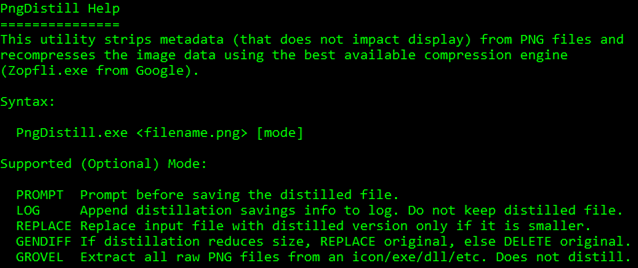
Running PngDistill.exe without any arguments will show the usage instructions:
image

Notes

  • The “Minify-then-compress” Best Practice applies to PNGs. While large fields of empty pixels compress really well, the browser must decompress those fields back into memory. So, if you’re building a sprite image with all of your site’s icons, don’t leave a huge empty area in it.
  • More advanced optimizations for PNG files are available using filters, color depth reduction, etc. PngDistill does not undertake these optimizations as its goal is to be 100% safe for automation, with no possibility of a user-visible change in the pixels of the image.
  • PngDistill partially supports .ICO files. Icon files may contain embedded PNGs; when run on a .ICO, PngDistill will extract the PNGs and save them externally; you will need to rebuild the .ICO file with the new PNG file(s).

-Eric

Meaningless Legalese

The folks @Wired would like to remind you that viewing their website in any browser violates of their terms-of-use.

wired tou

All web browsers cache content, by-design. And I’m pretty sure that “reading” is one just one of many ways that the material might be “otherwise used.”

For an otherwise forward-looking publication, seeing this garbage on the homepage is a depressing failure.

-E

Medical Bills

In April, Noah (22 months) fell on the playground. It wasn’t an especially bad fall, but he bumped his head pretty hard. He cried, but mostly because he dropped the ball he was carrying– he quickly stopped when it was returned to him. No big deal. He had a nasty bruise and some swelling, but he’s had worse.

Later that night, he threw up after dinner. This was worrisome, since he’s had a pretty strong stomach and has only ever done so a few times in two years. Googling around, the general consensus is you only need to call the doctor after the third instance of vomiting when no other symptoms are present. Whew!

Until he threw up three more times over the next hour.

So, Jane called the nurse’s line and they suggested we go to Dell Children’s Hospital, the best in Austin. We piled in the  car and headed over, convinced that we were probably worried about nothing, but still… He threw up in the lobby and we got into see a nurse a few minutes later. She offered an anti-nausea pill (“Zofran”) which we initially declined but went back to get after he threw up yet again. After more waiting, we got in to see a doctor, who probed at his bruise/bump a bit, reiterated his medical history, and had us give Noah some more water to see if he could keep it down. Eventually, he decided that we should do a CAT Scan just to be sure, and we all headed downstairs for the scan. Throughout the process, Noah was happy and wide awake, apparently excited about getting to hang out past his bedtime in a neat new place with lots of gadgets. We assumed this would end when he had to lay down for the CAT Scan machine, but he was the perfect patient, laying down as quietly as he ever had and not moving at all for the scan.

An hour or so later, we got back the results (no problems found, yay!) and we got discharged with a diagnosis of “mild concussion” and a prescription for more of the Zofran just in case he needed it.

A few hours after we got home, I apparently “caught Noah’s concussion” and began throwing up. Oops. Well, at least we ruled out any kind of real problem; there was no fever, just some nausea and difficulty in keeping food down.

We both got better within a few days.

Then we got the bill. The letter the hospital was pretty simple: “Hey, send us $2150. Got any questions? Talk to your insurance company.

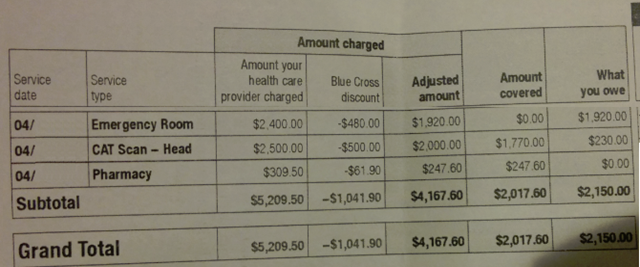
A few days later, the insurance company sent over their explanation of benefits, explaining that they’d covered $2017, we got a $1041 discount, and we owed the remainder of our annual deductible ($2150). They at least offered a slight breakdown of the charges:

image

Even still, we wondered about the $309 “Pharmacy” charge—Noah had only taken two tiny pills (dissolved) and they seem to have a street price of $2 to $12, depending on where you buy them. What’s up with that?

The lack of detail here made it seem almost as if the insurance company had no interest in preventing fraudulent billing. Weird.

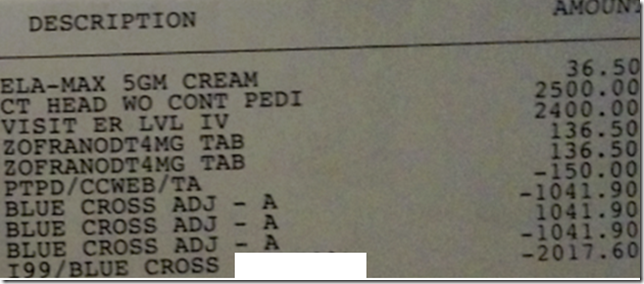
Jane called and nagged the hospital into sending over a detailed bill. That they didn’t send it on the back of the initial letter irritates me to no end, but it immediately becomes clear why they might not want you to know what you were charged:

image

The Zofran was marked up at least 1000%. The “5GM Cream” was some sort of topical anesthetic that the nurses had applied to his hand just in case he needed an IV if he didn’t keep down the water he drank—my guess it had at least the same level of markup.

Fortunately, my employer provides ridiculously good healthcare benefits (they even pay deductibles!) so the entire trip didn’t directly cost us anything. But I’m terrified of how broken the pricing model is for healthcare is in this country. I’m a big fan of the ACA, but if we as a country don’t find a way to rein in uncontrolled healthcare costs, we’re doomed anyway.

Time Magazine did an awesome story on this topic almost exactly two years ago: http://time.com/198/bitter-pill-why-medical-bills-are-killing-us/

-Eric

The Muse

There’s a writer living in my head, and he’s a genius.

Or so he tries to convince me, as his prose flows freely day in and out, filling most idle moments– while I’m showering, driving, dining, taking out the trash, or performing any of the other mundane tasks of daily life. His prose is brilliant– his points always well aligned, his recall of long-ago events and facts uncannily perfect, and his agility in seamlessly transitioning from one topic to the next is above reproach. He never needs spell-check or a thesaurus, and he never struggles to find the right way to approach the topic. His efforts are frequently interrupted by periods of basking in the glorious reception he imagines for his easy labors, and is certain that untold rewards are sure to follow.

Unfortunately, this genius is a huge jerk.

As soon as a spare moment is found in which hands can be placed upon a keyboard or a notepad, he’s either nowhere to be found, or not “in the mood” to rehash old topics that were perfectly formed in the ether… to commit such brilliance using a device so banal as a keyboard is an insult, it seems, and he won’t deign to be part of such an endeavor.

Over the years, I’ve found that the only way to write is to just type, painfully, whatever drivel comes to mind, scaffolding up the roughest of approximations of what he might say, providing nary a distraction to amuse him. With false start after false start, rewrite after rewrite, I suffer until he comes out, clucks his tongue at my pathetic efforts, and begins to guide my fingers on the keyboard. He bridles at the annoyance of checking facts (rolling his eyes in disdain each time an inaccuracy is found—“the piece would be better if I was right!” he argues) and groans each time my feeble mind grapples with a word choice.

When a throwaway tweet gets 300 times the pickup of a hard-scribed blog post, he groans and rants at the inanity of the mortal world.

But what alternative is there?

-Eric

Unsecure Content

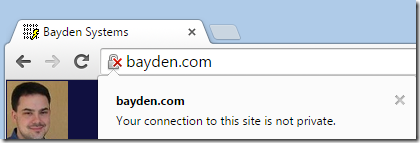
Chrome has landed their change that allows you to mark unsecure (HTTP) content as insecure or dubious. Visit chrome://flags/#mark-non-secure-as to set the toggle. You can choose to mark as Dubious:

image

…or as Non-Secure:

image

The expectation is that eventually one of these modes will be the default for sites that are transferred over insecure protocols like HTTP.

Personally, I’m not really a fan of either piece of iconography; to me, showing the lock at all implies that the site has some amount of security and maybe it’s just not perfect.

I’m hoping that after some transition period, we’ll end up with a more prominent notification that explains what the issue is and why humans might care.

In December of last year, I made the following proposal with tongue only slightly in cheek:

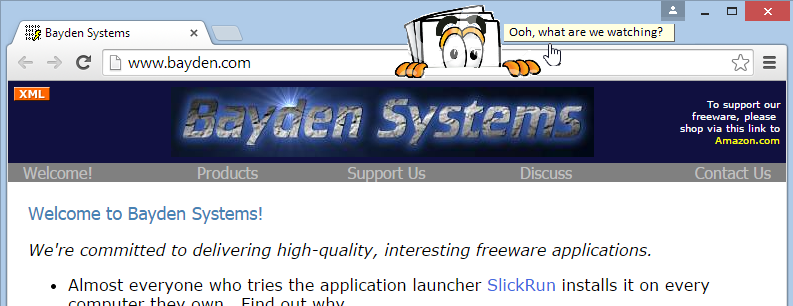
Meet “Nosy”, your HTTP-content indicator:

Of course, Nosy’s got a lot of things to say:

nosy2

Sites and services need to use secure protocols like HTTPS because users expect it. No, not all users will expect to see the letters HTTPS and probably don’t understand hashes, ciphers, and public key encryption. But they expect that when they visit your site, it was delivered to them unmolested, privately, and as you original designed it. And the only way to realistically ensure that these expectations are met is to use HTTPS.

Update: While the mock screenshot above was never built, Chrome Security’s Lucas Garron wrote the awesome Ugly HTTP Chrome extension, a very simple extension that helps make it much more obvious when you’re on a non-secure site by color-shifting the content of the page itself.

-Eric Lawrence