This document contains some thoughts about the storage and comparison of URLs, common operations crucial to the correct function of security software like Microsoft SmartScreen.
Importantly, URLs are also displayed on security surfaces to enable the user to make a decision based on their contents. Eight years ago, I wrote the Guidelines for URL Display.
Background
The Web allows linking and retrieval of various resources via an address known as a URL. A URL (Uniform Resource Locator) is an identifier used to locate a resource on the Internet. (Note: “URI” stands for Uniform Resource Identifier, and in the real world, the two terms are used interchangeably).
It’s tempting to think of URLs as plain strings because almost all clients (like web browsers) and servers accept URL input as strings. However, despite the existence of various standards for the representation of URLs, there is considerable variation in the handling of URLs that creates inconsistency and variability in the interpretation of URL values. Additional complexity arises because URLs can include seldom-used components that must be understood to properly interpret the URL, and the URL syntax varies between different URL protocol schemes (e.g. HTTPS/HTTP/FTP/mailto/blob/data, etc).
The complexity of URLs is often exploited by attackers, either to socially-engineer users (as in phishing attacks) or to bypass security checks in code.
URL Encoding as Strings
In their canonical form, HTTPS/HTTP URLs are meant to contain only a subset of US-ASCII characters, where characters outside of that subset (e.g. emojis; international character sets like Cyrillic, Hiragana, Katakana, Kanji, etc; and ASCII characters like :@/\?# that are reserved for use to delimit URL components) are meant to be escaped. Escaping is a system whereby a character’s UTF-8 octet (byte) representation is serialized to ASCII by preceding each octet’s value with a % character. For example, the URL:
https://webdbg.com/자연생?자연생=ΉЄլլՓ#활의집
…after escaping, is represented as: https://webdbg.com/%EC%9E%90%EC%97%B0%EC%83%9D?%EC%9E%90%EC%97%B0%EC%83%9D=%CE%89%D0%84%D5%AC%D5%AC%D5%93#%ED%99%9C%EC%9D%98%EC%A7%91
Within a browser, you can see both forms:

In this example, the 자 (Hangul Syllable Ja) character has the UTF-8 encoding 0xEC 0x9E 0x90, which is escaped in the URL to the sequence %EC%9E%90, while the Փ (Armenian Capital Letter Piwr) character with the UTF-8 encoding 0xD5 0x93 is escaped to %D5%93.
The hostname of the URL does not use %-escaping, instead relying on a much more complicated escaping mechanism (Punycode), wherein each DNS label component containing non-ASCII characters is prefixed by xn-- followed by ASCII text that encodes any non-ASCII characters. For instance, a URL containing hostname characters from Thai and Latin character sets:
https://தேடல்.example.baydengrátis.com/자
…is encoded as:
http://xn--mlcj7bwe6a.example.xn--baydengrtis-r7a.com/%EC%9E%90
Security Landmine: Inconsistent Client Support
However, not all clients properly support standards-based encoding behaviors– some clients aim to maintain legacy compatibility with behaviors that existed before the current standards were written.
In particular, Microsoft’s MSHTML (and the WinINET network stack beneath it) used by Internet Explorer, Web Browser Controls (WebOCs) and other common Windows platform features, only implements the standards-based behavior when certain flags are set. Otherwise, MSHTML can put raw UTF-8 octets in the hostname component, and put ANSI codepaged (ACP) octets in the path, query, and fragment components.

The snowman emoji is properly UTF-8 escaped in the path component, and it is thunked down to a question mark ? in the query component (as the target character doesn’t exist in the system codepage). However, if we instead pick a character in the system codepage, we see the path component is UTF-8 escaped, but the query string’s raw ACP octet is put out on the wire:

Furthermore, this path-escaping is sensitive to the checkbox in the Internet Control panel, such that even the path may be sent without escaping if the “Send URL path as UTF-8” checkbox is unticked:

From https://stackoverflow.com/a/18220123, variables involved (in the encoding determination) include:
- Where the URL was typed (e.g. address bar vs. Start > Run, etc)
- What the system’s ANSI codepage is (e.g. what locale the OS uses as default)
- The charset of the currently loaded page in the browser
WinINET exposes the following option flags to control what octets are “put on the wire”:
INTERNET_OPTION_CODEPAGE
INTERNET_OPTION_CODEPAGE_PATH
INTERNET_OPTION_CODEPAGE_EXTRA
The Default URLMon codepath sets those options inside based on conditional logic, while the EdgeHTML fork of URLMon more simply sets them. Computation of the options is complex: for instance, Edge Legacy checks not only the Zone but also allows a Microsoft-delivered CompatView list to weigh in on the proper encoding.
Beyond the WinINET behavior, it is believed that many other HTTP stacks do not properly handle corner-cases (e.g. being passed URLs that do not follow standards-based escaping rules, contain octet sequences that cannot be validly represented in Unicode, utilize overlong encodings, etc.
URL Components
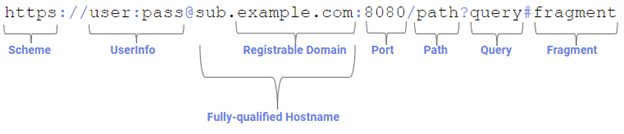
A URL is made up of a sequence of components. For example, an absolute URL containing all available components for the HTTPS protocol scheme might look like this:
In contrast, a relative URL, as seen within a web page, might be as simple as /file.html.
Making URLs Absolute: Combine
Relative URLs are rarely usable on their own; typically, the first thing that code must do before operating on a relative URL is convert it to an absolute URL by performing a combine operation on the relative URL with the absolute URL of its context (e.g. the web page in which it appears) to generate a new absolute URL. For example, combining https://user:pass@sub.example.com:8080/path?query#fragment with /file.html results in an absolute URL of https://user:pass@sub.example.com:8080/file.html. In this combination operation, the context URL’s path is overwritten, and its query and fragment components are dropped.
Deep Dive: Components
Let’s look at each of the URL components and explore how attackers might attempt to confuse code or humans with each component.
Component: Scheme

The scheme component of the URL designates what underlying protocol should be used to retrieve the information, as well as dictating the rules for interpreting the rest of the URL, including whether it uses the standard hierarchical syntax (e.g. HTTP/HTTPS/FTP/FILE) or the opaque generic syntax (e.g. mailto/data/blob).
Clients only support a limited set of URL schemes. Adding new schemes to browsers to retrieve resources or to open external applications generally requires installing native code; a web-platform mechanism allows adding schemes from JavaScript, but when invoked the custom-scheme URL is simply translated into a HTTPS URL for further use.
Security Considerations: Supported Scope
Each security-sensitive client must consider how it handles less common URL schemes; many clients will block all URLs except those using popular schemes (HTTP/HTTPS/mailto), but some clients (e.g. browsers) must support invocation of arbitrary URLs.
Because uncommon schemes are a common vector of security compromise, the decision of how to handle such schemes is an important one. If a security mechanism deems certain schemes out-of-scope, then the user could be exploited by those schemes. For example, mailto: links can be used in phishing:

Security Considerations: Parsing changes by Scheme
Each feature that attempts to analyze a URL for security purposes must understand the scheme of the URL and the rules by which it is parsed. For example, a mailto URL uses the format mailto:user@host.com?subject=messagecontent whereby the Internet address appears in the middle of the URL alongside other optional field content.
Security Considerations: Not All Schemes are Routable
Some URL schemes do not refer to a server on the internet; the most broadly supported and commonly used of these are the data and blob schemes.
A data: schemed URL contains the entire resource to which it refers. For example, if a client fetches the URL data:text/html;base64,PGgxPkhlbGxvIHdvcmxkPC9oMT4=, the result is the string <h1>Hello world</h1>, the base-64 decoding of the substring beginning PGg and ending with 4=.
A blob schemed URL refers to a resource which exists only in the memory of the JavaScript context that generated the URL via the createObjectURL() JavaScript method. JavaScript running inside a web page at https://webdbg.com/test/data.htm might generate a blob URL that looks like this:
blob:https://webdbg.com/1c179345-3c59-47bd-908d-2b2b5d198590
When fetched from JavaScript inside the originating webpage, that blob URL will return an object (anything from an image to a file download to a HTML document). However, attempting to fetch that same blob URL from any other device (or even another browser window on the same device) will not return any content, because the blob scheme is not globally routable.
Security Considerations: The FILE Scheme is Weird
The file scheme allows routing a request to a file on either the local file system or the filesystem of a remote server. A URL like file:///C:/test.html refers to a file on C: drive of the system where the fetch retrieval occurs, while file://serverhostname/docs/test.html refers to a file on the share named docs on the server named serverhostname.
Fortunately, use of the file scheme in modern browsers is somewhat restricted because retrieving file URLs can result in assorted security and privacy badness, including fingerprinting the apps on the user’s computer or leaking the user’s Windows password hash to a remote servers.
Component: Authority
The Authority component of the URL consists of three subcomponents: userinfo, the fully-qualified hostname, and the port.
Component: UserInfo

The userinfo subcomponent of a URL specifies a username and password that the client should use when authenticating to a server. This subcomponent is only defined for certain URL schemes (e.g. FTP), while it is officially invalid for others (e.g. HTTP and HTTPS) but nevertheless supported (e.g. Firefox and Chromium allow userinfo for HTTP and HTTPS URLs).
Security Considerations: UserInfo UI Spoofing
Way back in Internet Explorer 6, IE started forbidding HTTP/HTTPS URLs containing userinfo because this obscure subcomponent’s primary real-world use was to confuse the user as a part of phishing attacks. Because the UserInfo is typically not present in URLs, a user looking at the URL https://victim.com:80@random.text.evil.com/ will often assume that they are looking at content from victim.com rather than from random.text.evil.com.
This threat vector is not terribly common today: Chromium hides the UserInfo component in its address bar, while Firefox explicitly warns the user about this threat:

I wrote more about the UserInfo spoofing vector back in 2023.
Component: Fully-qualified hostname

The most security-relevant part of a URL is the fully-qualified hostname of the URL. The hostname is registered by an individual or business (e.g. PayPal, Inc. owns Paypal.com) with the relevant DNS registrar of the top-Level domain (e.g. Verisign controls the .com top-level domain).
Security Considerations: Transport Security
If the URL’s scheme is secure (e.g. HTTPS), content delivered from a given hostname is deemed to be under the control of the entity that registered the hostname (modulo compromised infrastructure, etc). However, if the scheme refers to a non-secure protocol like HTTP, and especially if the protocol traverses an untrusted network, the registrable domain information may not accurately describe the true source of the content because the content may have been modified by a man-in-the-middle on the network. The port number only needs to be specified if it is not the default for the scheme (e.g., 80 for HTTP, 443 for HTTPS).
Security Considerations: Parsing of IPv6 Literals
When the URL’s hostname is an IPv6 literal, the address is wrapped in square brackets, e.g. http://[::1]:8080/file.html is a reference to a file hosted on port 8080 of the current device’s IPv6 loopback interface. The fact that a colon character can appear before the colon delimiter representing the start of the Authority’s Port subcomponent can confuse a parser unfamiliar with IPv6 addresses.
While there’s no standard for including an IPv6 scope id within a URL, WinINET allows specification of the scope by %-encoding the % delimiter character, e.g. https://[::1%253]/
Security Considerations: Interpretation of IPv4 Literals non-canonical syntax
Most technically savvy users are familiar with IPv4 literal addresses in dotted decimal format, like http://127.0.0.2/. However, dotted decimal is not the only format; you can also express the same address by dropping the 0. components, like http://127.2, with extra 0s like http://127.000000002/, or in decimal notation http://2130706434/, octal notation http://0177.0.0.2/, or hexadecimal notation http://0x7f000002/.
The various serializations of addresses could be used to evade matching logic. Historically, we’ve also seen some code that assumes that any hostname lacking a dot must not be globally routable and belongs to the (more trustworthy) Intranet zone (leading to an MSRC case for Windows/IE in the early 2000s).
Security Considerations: IDN and PunyCode
Support for non-Unicode characters in URLs can lead to spoofing attacks.
https://chromium.googlesource.com/chromium/src/+/main/docs/idn.md
Security Considerations: eTLD+1
Usually, the security context that the user cares about is the registrable domain of the top-level page’s URL’s origin, even when a given page is made up of components from many different origins. The registrable domain typically consists of a subdomain of an entry on the Public Suffix list. For instance, bbc.co.uk is a registrable domain under the co.uk public suffix. The fully-qualified hostname consists of a registrable domain, and optionally one or more subdomain labels.
See https://publicsuffix.org/ for more discussion.
Component: Port

The port component of the URL indicates which TCP/IP port should be contacted to send the request.
Security Considerations: Shared Servers and “Well-Known” Ports
In general, a server operator is deemed to be in control of all ports on the server, although notably some systems (e.g. Unix) allow low-permissioned users to perform TCP/IP listen operations only on certain ports (>1024) while requiring administrative permissions to listen to “low ports” (<1024) which are the default ports used by popular services (HTTP/HTTPS/FTP).
Security Considerations: Canonicalization Drops Default Port
When canonicalizing a URL, if the specified target port is the default port for the scheme, it should be removed from the URL entirely. For example,
| Input URL | Canonical URL |
| http://example.com:80/ | http://example.com/ |
| https://example.com:443/ | https://example.com/ |
| ftp://example.com:21/ | ftp://example.com/ |
| https://example.com:4567/ | https://example.com:4567/ |
Meta-Concept: Origin
The Web Platform security model uses a term called “Origin” which is comprised of the triplet scheme+fullyQualifiedHostname+port.
Challenges and Threats
Malicious websites are motivated to misrepresent their provenance in order to trick visitors into performing an unsafe action (e.g., phishing, malware install) or to otherwise grant unwarranted trust in the information provided by the site (e.g., “fake news”).
Other components of the URL (subdomain, userinfo, path, query, and fragment) are completely under the control of the website and may be crafted in an attempt to spoof the user by misrepresenting the registrable domain.
Component: Path

The path component of the URL is a case-sensitive string between the end of the origin and the start of the query string.
The path component is case-sensitive under web standards (so /SoMeThInG.html and /something.html) technically refer to different resources and must be cached individually. However, many servers will return the same file for regardless of the case of the path because their underlying filesystem operates in a case-insensitive mode.
Component: Query
The Query component appears after the path and is preceded by a ?. It typically contains a set of name/value pairs split by ampersands, like op=lookup&id=1234.
Component: Fragment
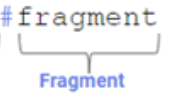
The URL Fragment portion appears after the query component. The Fragment component is not sent to web servers and is instead typically interpreted by the browser itself to scroll to a particular location in the document after it is fetched from the server.
Sometimes, web applications will use JavaScript to update the fragment to reflect a “state” of the app (e.g. #activeTab=Records) although this is non-standardized and newer alternatives (e.g. pushState) are now available.
URL Comparison
A critical thing security software needs is a consistent function that turns “a pile of octets that some client is treating as a URL” into “a string that the security software considers to be the canonical / common form that we will use in all subsequent matching logic, even if that string would not be accepted by a real server.”
That function will need to handle things like bare-ACP octets appearing anywhere in the string, invalid UTF-16 sequences, raw (non-encoded) UTF-16 codepoints, and anything else we devise.
Canonicalization and Normalization
We’ll also need comparison functions that work correctly both with and without the most common forms of canonicalization/normalization performed by servers (e.g. https://example.com/blah/..///thisisafile.htm matches https://example.com/thisisafile.htm. Similarly, there are many ways to represent equivalent IPv6 literals, and so on.
Matching and “Rollups”
Beyond that, the software needs to decide how closely two URLs must match to be considered equivalent.
For example, http://example.com/PaTH and http://example.com/path are technically different URLs, but in actual practice, they will return the same content on from most servers.
While the port component in the URL is technically a part of the web origin, in actual practice, it is very uncommon for an arbitrary port to be controlled by a different entity than the default port, and there’s no evidence to suggest that any human being will make a different security decision based on the target port number. As such, security software will often ignore the port when comparing URLs. In Microsoft SmartScreen, for example, a rule set to block https://x.com (implicitly port 443 due to the HTTPS scheme) will also block requests to http://x.com:12345.
Any URL matching function needs to decide how closely two URLs must match; in SmartScreen, we call this roll-up, meaning “Will a block for X.com block X.com/something? What about sub.x.com/anything?” We call these “path rollup” and “domain rollup”, respectively.
Challenge: Supporting URL “Scrubbing”
URLs often contain sensitive information, ranging from PII to document titles, to security nonces that are intended to be available only for a single client computer. In an attempt to limit the privacy impact of URL transmission/telemetry, software may attempt to “scrub” the URL, replacing private data with a replacement character (e.g. https://phone.com/425-830-6600/call is masked as https://phone.com/XXX-XXX-XXXX/call).
Because scrubbing logic is, at best, based on imprecise heuristics, it is subject to false negatives (sensitive values not masked) and false positives (PII-looking values that are e.g. actually just meaningless numbers formatted as if they were telephone numbers).
Any attempt at scrubbing creates a mechanism by which an attacker can easily interfere with URL matching logic. The attacker can “cloak” their endpoint such that it responds only with innocuous content when a “PII-looking” value is omitted from the request URL (e.g. by a server-side detonator that is using a scrubbed URL).
Any attempt at using scrubbed values in threat intel feeds creates problems if the components creating and consuming the feed do not recognize how sensitive data is masked within that data, potentially leading to URL matching ambiguities.
Challenge: Inconsistent Length Limitations
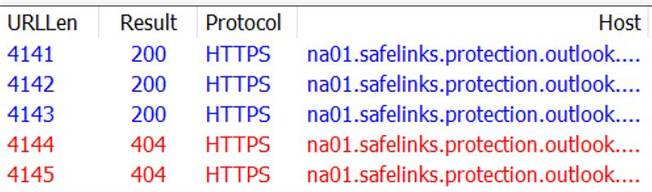
URLs do not have a consistent length limit. Chromium limits URLs to 2MB for navigation (and 32kb for display, in some contexts), while various components of Windows use 2083 characters, and some servers and security software have URL length limits that are longer and shorter.
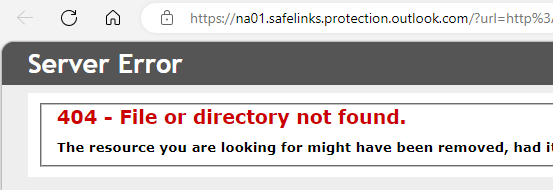
Some security software imposes a lower limit on URL length, returning error pages if the URL length exceeds their limit (e.g. 4096 characters):