If you offer web developers footguns, you’d better staff up your local trauma department.
In a prior life, I wrote a lot about Same-Origin-Policy, including the basic DENY-READ principle that means that script running in the context of origin A.com cannot read content from B.com. When we built the (ill-fated) XDomainRequest object in IE8, we resisted calls to enhance its power and offer dangerous capabilities that web developers might misconfigure. As evidence that even experienced web developers could be trusted to misconfigure almost anything, we pointed to a high-profile misconfiguration of Flash cross-domain policy by a major website (Flickr).
For a number of reasons (prominently including unwillingness to fix major bugs in our implementation), XDomainRequest received little adoption, and in IE10 IE joined the other browsers in supporting CORS (Cross-Origin-Resource-Sharing) in the existing XMLHttpRequest object.
The CORS specification allows sites to allow extremely powerful cross-origin access to data via the Access-Control-Allow-Origin and Access-Control-Allow-Credentials headers. By setting these headers, a site effectively opts-out of the bedrock isolation principle of the web and allows script from any other site to read its data.
Evan Johnson recently did a scan of top sites and found over 600 sites which have used the CORS footgun to disable security, allowing, in some cases, theft of account information, API keys, and the like. One of the most interesting findings is that some sites attempt to limit their sharing by checking the inbound Origin request header for their own domain, without verifying that their domain was at the end of the string. So, victim.com is vulnerable if the attacker uses an attacking page on hostname victim.com.Malicious.com or even AttackThisVictim.com. Oops.
Vulnerability Checklist
For your site to be vulnerable, a few things need to be true:
1. You send Access-Control-Allow headers
If you’re not sending these headers to opt-out of Same-Origin-Policy, you’re not vulnerable.
2. You allow arbitrary or untrusted Origins
If your Access-Control-Allow-Origin header only specifies a site that you trust and which is under your control (and which is free of XSS bugs), then the header won’t hurt you.
3. Your site serves non-public information
If your site only ever serves up public information that doesn’t vary based on the user’s cookies or authentication, then same-origin-policy isn’t providing you any meaningful protection. An attacker could scrape your site from a bot directly without abusing a user’s tokens.
Warning: If your site is on an Intranet, keep in mind that it is offering non-public information—you’re relying upon ambient authorization because your sites’ visitors are inside your firewall. You may not want Internet sites to be able to be able to scrape your Intranet.
Warning: If your site has any sort of login process, it’s almost guaranteed that it serves non-public information. For instance, consider a site where I can log in using my email address and browse some boring public information. If any of the pages on the site show me my username or email address, you’re now serving non-public information. An attacker can scrape the username or email address from any visitor to his site that also happens to be logged into your site, violating the user’s expectation of anonymity.
Visualizing in Fiddler
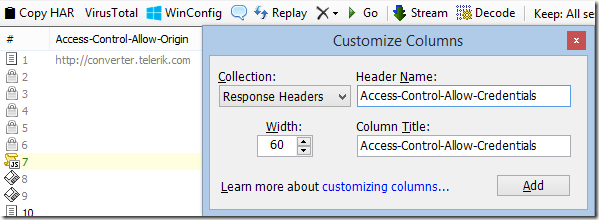
In Fiddler, you can easily see Access-Control policy headers in the Web Sessions list. Right-click the column headers, choose Customize Columns, choose Response Headers and type the name of the Header you’d like to display in the Web Sessions list.
For extra info, you can click Rules > Customize Rules and add the following inside the Handlers class:
public static BindUIColumn("Access-Control", 200, 1)

function FillAccessControlCol(oS: Session): String {

  if (!oS.bHasResponse) return String.Empty;

  var sResult = String.Empty;

  var s = oS.ResponseHeaders.AllValues("Access-Control-Allow-Origin");

  if (s.Length > 0) sResult += ("Origin: " + s);
if (oS.ResponseHeaders.ExistsAndContains(
"Access-Control-Allow-Credentials", "true"))
{
sResult += " +Creds";
}
var s = oS.ResponseHeaders.AllValues("Access-Control-Allow-Methods");
if (s.Length > 0) sResult += (" Methods: " + s);
var s = oS.ResponseHeaders.AllValues("Access-Control-Allow-Headers");
if (s.Length > 0) sResult += (" SendHdrs: " + s);
var s = oS.ResponseHeaders.AllValues("Access-Control-Expose-Headers");
if (s.Length > 0) sResult += (" ExposeHdrs: " + s);
Windows 10’s IE11 continues to send your keystrokes over the internet in plaintext as you type in the address bar, a part of the “Search Suggestions” feature:
“But I don’t search from the address bar,” you might say.
That may be, but if you fail to type or paste a URL (sans protocol) into the address bar, all of that text gets leaked too:
This problem doesn’t exist in Edge (which always gets search suggestions from Bing, regardless of your Search Provider, but it at least uses HTTPS). It also doesn’t occur in Firefox’s or Chrome’s provider for Bing Search, or if you use Google or Yahoo search providers in Internet Explorer.
In 2005, one of my first projects on the Internet Explorer team was improving the user-experience for HTTPS sites (“SSLUX”).
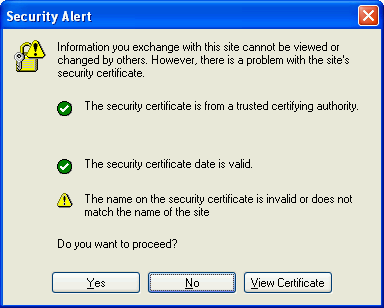
Our first task was to change the certificate error experience from the confusing and misleading modal dialog box:
… to something that more clearly conveyed the risk and which more clearly discouraged users from accepting invalid certificates. We quickly settled upon using a blocking page for bad certificates, a pattern seen in all major browsers today.
Next, we wanted to elevate the security information from the lowly lock buried at the bottom of the window (at best, since the status bar could be hidden entirely):
As a UI element, the lock resonated with users, but it wasn’t well understood (“I look for the lock and if it’s there, I’m safe”). We felt it was key to ensure that users not only saw that the connection was secure, but also with whom a secure connection had been made. This was especially important as some enterprising phishers had started obtaining HTTPS certificates for their spoofing sites, with domain names like BankOfTheVVest.com. Less urgently, we also wanted to help users understand that a secure connection didn’t necessarily mean the site is safe – the common refrain was that we’d happily set up a secure connection to a site run by the Russian Mafia, so long as the user recognized who they were talking to.
We decided to promote the HTTPS certificate information to a new UI element next to the address bar1. Called the “Trust Badge”, the button would prominently display the information about the owner and issuer of the HTTPS certificate, and clicking it would allow users to examine the certificate in full:
Displaying the Issuer of the certificate was deemed especially important– we knew some CAs were doing a much better job than others. High-volume-Low-vetting CAs’ $20 certificates were, to users, indistinguishable from the certificates from CAs who did a much more thorough job of vetting their applicants (usually at a much higher price point). The hope was that the UI would both shame lazy CAs and also provide a powerful branding incentive for those doing a good job.
We were pretty excited to show off our new work in IE7 Beta 1, but five months before our beta shipped, Opera beat us to it with Opera 8 beta 2 with a UI that was nearly identical to what we were building.
During those five months, however, we spoke to some of the Certificate Authorities in the Microsoft Root CA program and mentioned that we’d be making some changes to IE’s certificate UI. They expressed excitement to hear that their names would no longer be buried in the depths of a secondary dialog, but cautioned: “Just so long as you don’t do what Opera did.”
“Why’s that?” we asked innocently.
“Well, they show the Subject organization and location information in their UI.”
“And that’s a problem because…” we prompted.
“Well, we don’t validate any of the information in the certificate beyond the domain name.” came the reply.
“But you omit any fields you don’t validate, right?” we asked with growing desperation.
“Nah, we just copy ‘em over.”
After the SSLUX feature team picked our collective jaws off the floor, we asked around and determined that, yes, the ecosystem “race to the bottom” had been well underway over the preceding few years, and so-called “Domain validation” (DV) of certificates was extremely prevalent. While not all DV certificates contained inaccurate information, there was no consistent behavior across CAs.
Those CAs who were doing a good job of vetting certificates were eager to work with browsers to help users recognize their products, and even the “cheap” CAs felt that their vetting was better than that of their competitors2. Soon the group that evolved into the CA/Browser forum was born, pulling in stakeholders of all types (technologists, policy wonks, lawyers) from all over the industry (Microsoft, Mozilla, Konquerer, etc). Meetings were had. And more meetings. And calls. And much sniping and snarking. And more meetings. Eventually, the version 1.0 guidelines for a new sort of certificate were adopted. These Extended Validation (nee “Enhanced Validation”, nee “High Assurance”) certificates required specific validation steps that every CA would be required to undertake.
EV certificates were far from perfect, but we thought they were a great first step toward fixing the worst problems in the ecosystem.
Browsers would clearly identify when a connection was secured with EV (IE flood-filled the address bar with green) to improve user confidence and provide sites with a business reason to invest (time and money) in a certificate with more vetting. For the EV UI treatment, browsers could demand sites and CAs use stronger algorithms and support features like revocation checking. Importantly, this new class of certificates finally gave browsers a stick to wield against popular CAs who did a poor job—in the past, threats to remove a CA from the trust store rang hollow, because the CA knew that users would blame the browser vendor more than the CA (“Why do I care if bad.com got a certificate, good.com should work fine!”); with EV, browsers could strip the EV UX from a CA (leading their paying customers to demand refunds) without issuing an “Internet Death Sentence” for the entire CA itself.
Our feature was looking great. Then the knives really came out.
1 Other SSLUX investments, like improving the handling of Mixed Content, were not undertaken until later releases.
2 Multiple CAs who individually came to visit Redmond for meetings brought along fraudulent certificates they’d tricked their competitors to issue in our names, perhaps not realizing how shady this made them look.
The following are some random notes about moving to Austin; previously, I’d spent 11 years in Redmond, Washington working for Microsoft. I grew up mostly in Maryland, except for a three year stint in Michigan. I’m sharing my thoughts here mostly to avoid retyping them each time a friend says they’re thinking about moving to town– something that seems to be happening more and more frequently as the rest of the country notices what a gem Austin is.
My wife and I moved to Austin 1207 days ago (October 2012); I’d meant to write a post a thousand days in, but I’m just getting around to it now.
Housing The city is a great one for the young and young at heart and TX in general is definitely very much a place for young families. Families with three or more kids aren’t unusual. The area is growing rapidly with very low unemployment and tons of construction, both downtown and in the ever-expanding suburbs. Housing prices downtown are extremely high, but they fall off exponentially as you get further away from the core of the city. Real estate prices are much better than Redmond overall, but are very tightly tied to distance to the city center. In Redmond, we had a 1560sq foot house 0.5 miles from Microsoft; the house was built in 1968. We basically traded it for our house here, built in 1993 and almost 3k square feet. If we were willing to go another 15 miles out, we could have added another 500 square feet and saved ~$100K on a house five or ten years newer.
We live in the northwest in a neighborhood called “Jester”; it’s a nice neighborhood of wide streets and sidewalks built mostly in the early 1990s.
The east is pretty underdeveloped and historically the cheaper place to live. But it is starting to build out with new planned communities and amenities. The west, south of Lake Travis is the hot area for middle/upper middle class… Tons of huge new neighborhoods in the $300-600k range. The north (toward Round Rock) tends to offer significant savings on housing with the tradeoff of (typically) longer commutes.
Finding a house? Kevin Bown was the agent we were recommended when we were pondering a move here. He helped us get up to speed on the different areas and tradeoffs and whatnot. He did a good job of helping us find our house (which we love) in just a few visits, and he works really well over email, which was very helpful since we only visited Austin twice before we moved.
Traffic and Driving – Your perspective on traffic largely depends on where you’re moving from. If you’re coming from a major metropolitan area like D.C. or New York, you’ll laugh about how light it is, but it can be one of the bigger hassles of living here. For many years, the city tried to constrain its growth by refusing to build roads, which only would’ve worked if folks weren’t coming from places with worse traffic congestion. Roads are slowly getting widened and tolling is starting in some areas.
Mass transit is nearly non-existent, although there is a verylimited rail service from Leander (in the north) to downtown. Before I started at Google, my commute to the Telerik office (downtown) was ~12 miles; the drive took 23 minutes best case and around 50 minutes at rush hour. Drivers are generally polite and less aggressive than you’ll find on the East Coast, but there are some crazies out there.
Cars are big; roads, lanes, and parking spots are wide. Gas is cheap; my last fill-up was under $1.60 a gallon. You will have tinted windows and daydream inventions to rapidly cool parked cars.
Tech Jobs Job wise, Austin is super-hot. While tons of tech companies are building major offices here, Austin is mostly getting used for sales/support/marketing/recruiting outposts. The market rate for Senior Developers here seems to be about $110k or so, although the range is very wide, with most startups on the low-end, while remote devs for companies headquartered in more expensive locales can be quite a bit higher.
As of 2021, Amazon is growing a large tech campus here, and Apple’s is coming soon.
Tech Seem to get good 4G LTE coverage around town. Cable internet is widely available from several providers; we used to pay ~$80 for 30mbps which was dumb; as of 2018 we have Spectrum Cable internet (200-400mbps for $50). Fiber (via Google Fiber or Grande Communications) is available mostly in the south side of the city, but it’s (slowly) spreading northward. We have a Fry’s Electronics. Three HDTV towers are about 3 miles from our house, so we don’t have cable and on the rare occasions that we watch TV (e.g. the Super Bowl) our tiny HD antennas work great.
Weather and Environs Weather is pretty awesome for about 8 months, bearable for 2 months, and hot as hell for 2 months. In 2012, there were 100 days over 100F. By my recollection, in 2013 there were 30. In 2014 there were 5. In 2015, there might’ve been one or two. It’s currently late January and around 80 degrees, but it’ll be around 60 later in the week.
If the goal is to make Austin look as good as possible, come in March/April; if you want to make it look as bad as possible, come in late August / early September. Unfortunately, many festivals (SxSW, etc) take place during the best times, so airline ticket prices can vary wildly.
People may try to tell you crazy stories about Texas wildlife/bugs/etc. Generally, that’s because such incidents are rare but can be memorable. (We’ve had two scorpions and two tarantulas in our 3 years here). Last year there were a ton of mosquitoes during the summer which was pretty nasty, but that seemed to be an outlier and we didn’t have issues our first two summers. Fire ants are a real problem if you like going barefoot or in sandals.
Hurricanes are east of Austin, tornadoes are north, so the only interesting thing we have is periodic thunderstorms which are intense but fun if you’re inside. Oh, and periodic flooding (only problematic in a few places), drought (when we’re not flooding), and damaging hail storms (even when it’s well above freezing at ground level).
Daylight
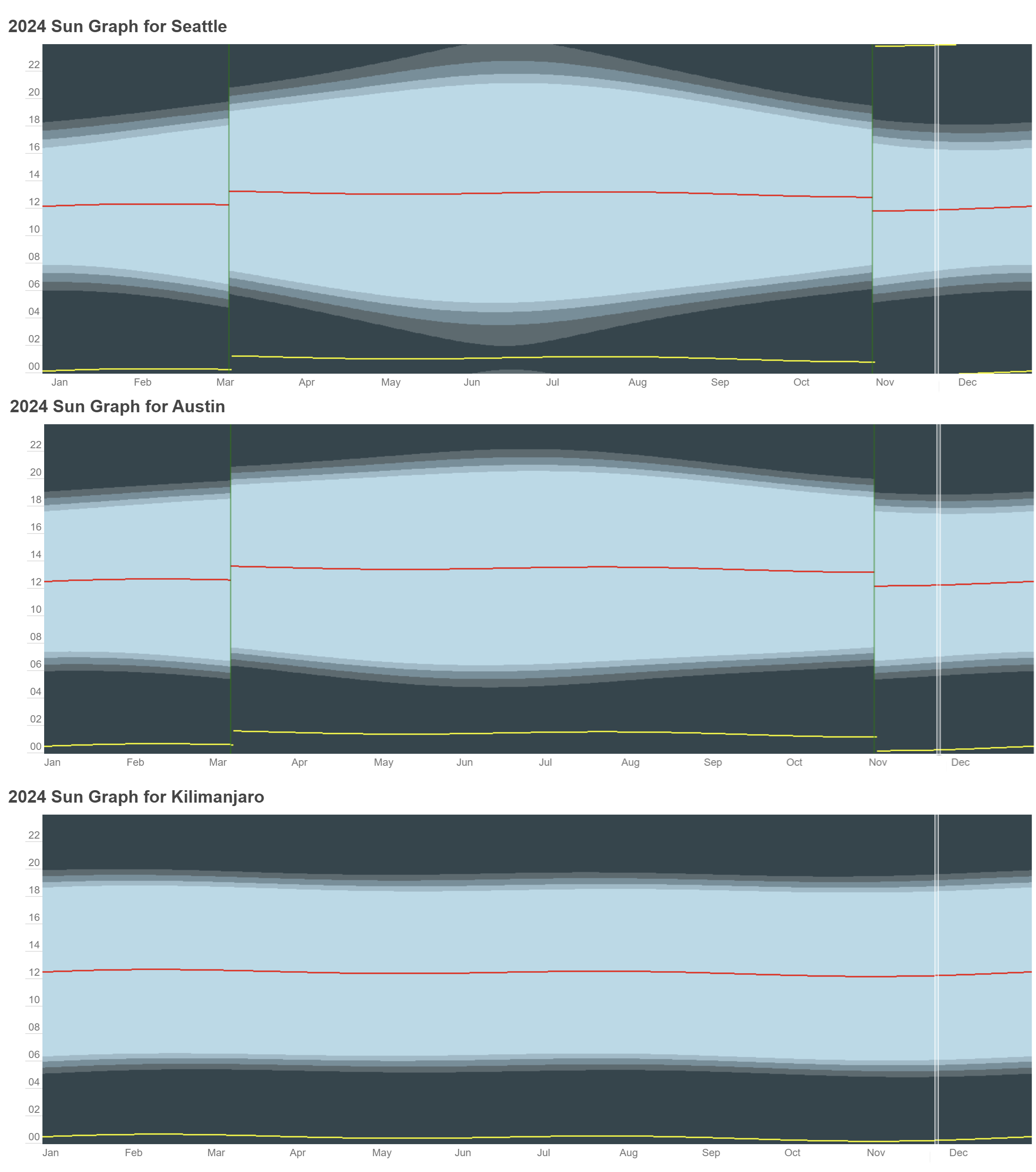
Daylight hours in Austin are more even than Seattle; Austin’s day ranges from 10h12m to 14h06m while Seattle’s ranges from a depressing 8h25m to an endless 15h59m.
Activities and Surroundings Nightlife in downtown Austin can be wild (due to the University, and Austin’s goal to be the “Live Music Capital of the World”). The river/lake running through Austin is fun for boating and water events.
Sports are a big deal, particularly college football. On our first trip to the doctor’s office, my wife and I both happened to be clad in maroon; this got us pegged as fans of the “Aggies” (Texas A&M) and led to some amusing misunderstandings.
Texas is stupid big (“the size of France” as the bumper sticker boasts), but San Antonio is only around 75 minutes away and has tons of stuff (SeaWorld, Six Flags, etc). you can drive to beaches (Galveston / Corpus Christi) in 3 or 4 hours. Neither is as nice as most east coast/California beaches but they’re nice enough for a few days in the sun and sand. Caribbean cruises leave from Galveston and are pretty cheap. Austin’s airport is growing fast, but many destinations require a quick stop in Houston or Dallas. Flights to the various resorts in Mexico and the Caribbean are pretty cheap. We haven’t taken advantage of either of these yet (due to young kids) but we hope to in a few years. (We did, a lot).
Kids Activities We have a 2.5 year old and a 2 week old; we haven’t discovered most of the activities in the area, yet.
There are lots of parks around town, some with splash pads for the summer. There’s a smallish Zoo south of town. There’s a kids’ museum out near the airport. Seasonal events like the holiday Trail of Lights and the spring kite festival take place in the enormous Zilker Park adjacent to downtown. Around Halloween/Thanksgiving, we started going to Sweet Berry Farm just west of town in Marble Falls to enjoy the festivities.
Food Food choices are decent; great BBQ, lots of good Mexican. Okay Chinese, about what you’d find in Redmond. They haven’t seemed to have figured out Thai food yet, to my disappointment (we have heard some good things about Chada Thai in Cedar Park).
Here are a few of my favorites:
Torchy’s Tacos. Our favorite taco spot. It’s not fancy or pretentious at all, but their tacos are, as they say, damn good. Breakfast tacos are a thing here, and if you’ve not had them before, you’ll soon wonder why not.
Mandola’s Italian. It’s an Italian grocery store with sit-down dining. Tasty.
Taxes No state income tax. Sales tax is 6.5% outside the city, 8.5% inside. Real-estate taxes are wildly variable and a big deal; they’re as low as ~1.5% to almost 3%, all significantly higher than we experienced in Redmond.
Politics and Vibe Austin is more of a county than a city, really; it’s spread over a huge area. The neighborhood / area makes a big difference in both prices and vibe.
Politeness quietly reigns supreme here; strangers will ask you how things are going and care about your answer. People apologize. You’ll quickly notice that, without regard to convenience, doors are almost always held, and women are always the first to get on and off elevators, an unspoken rule that seems to have almost universal compliance.
Austin is a bit of an oasis inside the craziness that is Texas… it definitely has the Seattle/Portland/California feel with plenty of hipsters and tattoo-bearing twenty-somethings.
The rest of Texas tends toward hardcore conservative, but avoid discussing politics, religion, and world events and we all get along just fine.
That’s weird. I know Telerik signs their code and I was pretty sure their code-signing certificate is SHA256, so the new restrictions on SHA1 in code-signing shouldn’t be a problem, right?
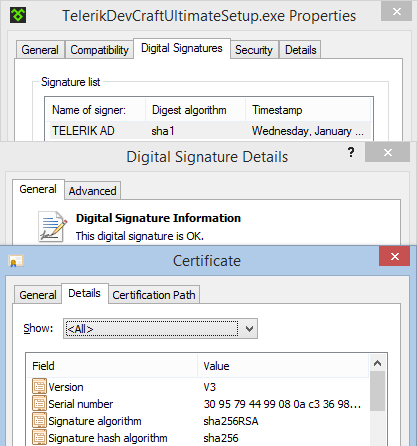
Sure enough, the code is signed with a SHA256 certificate:
… and we know that SHA1 file digests are still allowed (heck, MD5 digests are still allowed!). So what’s going wrong?
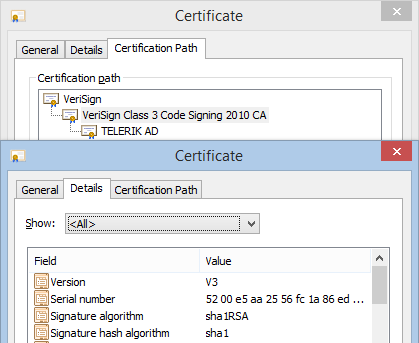
Check out the certificate chain:
The intermediate certificate is SHA1.
Other code, signed with the same chain, doesn’t fail, but that’s because that other code was time-stamped before the January 1st deprecation of SHA-1.
To avoid “Unknown Publisher” warnings for your software, you need to ensure that any intermediate certificates in your signing chain are also signed using SHA256. (Only the root certificate at the top of the chain may use SHA1).






 text/plain