On Defaults

Yesterday, Chris Beard, the CEO of Mozilla, wrote an open letter to Microsoft complaining about Windows 10’s behavior related to default applications. Reactions were all over the board, but in my Twitter feed, at least, they mostly skewed against Mozilla. With the perspective of having been both inside and outside Microsoft, I feel compelled to say a few things.

First, Defaults Matter

Defaults matter. Regardless of its relative merits, the default application is disproportionally likely to get used versus any alternative, even if those alternatives are all free. When I bought my car, it had floor mats— they seem fine; I’m sure they’re not the best floor mats, but I’m going to devote exactly zero thought to replacing them unless they fail me in some way.

It’s no accident that the Edge icon is a little blue “E”—that was the default browser icon for so many years that changing it would’ve been very foolish.

The most compelling argument for the fact that defaults matter is how much gets spent trying to influence them. Most obviously, Microsoft has spent billions in legal settlements and fines related to the default applications on Windows. “But,” you might argue, “that isn’t relevant because they didn’t choose to spend that money.” That’s true, but look at the budget that companies spend to get their software and services distributed and made default. Yahoo, Google, and Microsoft have paid organizations like Mozilla huge sums (on the order of $300,000,000 per year) for over a decade for the opportunity to be the default search engine in Firefox and other browsers.

By way of personal example, around 2010, I was approached with an offer of $1 per install to bundle the Bing Toolbar with Fiddler’s installer in order to increase the number of users defaulted to searching with Bing. I turned down this opportunity (worth somewhere between $300K to $3M per year) because I’m fundamentally opposed to bundling of this sort.

Want to learn more, or prefer your evidence in dead-tree form? Check out Nudge.

“It’s Easy To Change”

Even assuming the user does want to switch to a different browser, any friction in that process impedes change and makes a meaningful difference in adoption. This topic was deeply explored during the Microsoft-E.U. case that led to the browser ballot screen, and every tiny bit of friction was analyzed and negotiated at length. When we were redesigning how ClickOnce worked with IE in Windows 8, we were very constrained by being forbidden to add even a single click to the user flow by which Google Chrome was installed.

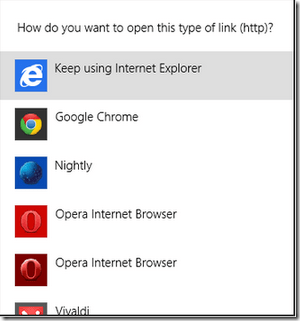
In Windows 8 and Windows 8.1, code was changed in Windows such that (well-behaved) applications could not automatically set themselves as the default handler. Instead, a prompt is shown:
image

In Windows 10, the same API call yields a very different result:

image

There are a number of significant problems with this. First, it’s not at all clear that this dialog is coming from Windows itself, not the caller, inviting the user to go on a wild goose chase around the app looking for some sort of “Settings” thing. More annoyingly, there’s no “Go there now” button—the computer should serve me, not the other way around. When Picard shouts “Computer: Shields up”, the Enterprise doesn’t reply with “To raise the shields, go to Ship > Controls > Security > Shields.” The omission of an entry point into the experience is glaring to the point of being offensive.

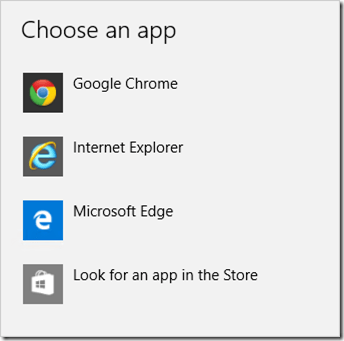
When you get to the “Default apps” controls, how do you change your browser to Chrome or Firefox? Perhaps amazingly, by clicking on Edge:
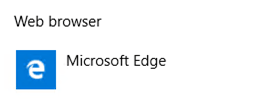
image

…only then do you see the alternatives:
image

Unfortunately, even if the user makes it all the way here, I think it’s likely to cause problems, and the reason is pretty subtle. In the Windows 8/8.1 UX, the “How do you want to handle this type of link” experience only assigns a “basket” of protocols (HTTP, HTTPS, and maybe FTP) to the selected application. In Windows 10, the “Choose an app” experience appears to give the target all of the protocols it requests. This is a problem, because Google Chrome lists itself as able to handle the mailto: protocol (used for opening email links). But unless you’ve followed some rather obscure steps, Chrome doesn’t actually do anything other than launch when you click a mailto link. So the user experience is bizarrely and confusingly broken.

Claims and Retorts

API Parity

In their blog post announcing the change, Microsoft makes the following (oddly phrased) argument for the change:

In Windows 8.1, Classic Windows applications (Win32) could invoke the prompt asking you to change your defaults, so you may have seen multiple prompts during install and after they launched. However, Windows Store apps could not invoke this prompt.
[…]
We know your defaults matter to you. With Windows 10, all apps – both Classic Windows apps and Universal Windows apps – will be unable to invoke a prompt to change your defaults, only Windows.

Some have leapt to the defense of the change noting that because Store apps couldn’t invoke this prompt, this means that Desktop APIs needed to change. I’d counter that there’s no reason why a similar API couldn’t be exposed for Store apps.

API Deprecation

In the same post, Microsoft notes that applications just need to update their code to avoid the new ugly and unactionable dialog. That’s true as far as it goes– Firefox and Chrome will probably update in their next builds, but this is a problem that could’ve been mitigated in the first place. We know from past experience that requiring applications to change is an adoption hindrance for a new operating system, and there are a long tail of applications which might take a long time to be updated.

What About ABUSE?

Some have argued that this change helps protect users from unwanted changes to their providers, the same argument made for the Windows 8 change. As far as I can tell, no evidence has been provided that the Windows 8 mechanism was ineffective.

“But what about ‘drive-by downloaded’ malware?” some have asked. The first law of computer security is still in effect: a malicious program running at Admin can do anything it likes, including circumventing the speed bumps introduced in Windows 10.

Is Microsoft Evil?

In my twelve years at Microsoft, I can’t recall any cases where anyone sat around twirling their mustache while planning some evil Machiavellian plot. Instead, the problem is that Microsoft too often fails to consider that they are a huge bull and the sole proprietor managing a tightly-packed consignment shop full of china. Any change, regardless of intent, can end up breaking a lot of nice things. For a time, this realization was formalized in the design tenet “Change is bad, unless it’s great.”

Is this Memo A PR Move for Mozilla?

Some commentators are noting that, since other operating systems are even more restrictive in terms of defaults, Mozilla is only complaining about Windows 10 to get attention from the press… as if this were somehow a clever line of argument.

Of course Mozilla is only releasing this complaint now to get attention!

You can’t build a great third-party browser for iOS because of Apple’s lockdowns, and both Google and Mozilla lament this. Mozilla is going so far as to tilt at the windmill of creating their own mobile OS in the hopes of having a shot at relevance in a mobile world. While I liken this to setting fire to a large pit of money and rate its chances of success in the neighborhood of zero, what choice does Mozilla have?

They’re at the mercy of Apple, Google, and Microsoft, companies whose market caps are measured in fractions-of-a-$Trillion USD. Failing to use their bully pulpit as the champion of openness to push back on lockout would represent severe negligence.

Why do I care?

I care because I want the best for Microsoft and I want the best for users. I think Edge is going to become a great browser, and it would be terrible if it were shackled with accusations of dirty tricks in the same way that IE4 and IE5 were, even if the “tricks” aren’t nearly as dirty this time around.

I care because I’m very worried about user-choice. I think Microsoft’s decision to make it much harder for humans to change the default search engine was an awful one and I hope they reverse course. As it stands, Microsoft’s browser share is standing on a precipice—because Edge is exclusive to Windows 10, its share has Windows 10 upgrade adoption shackled to its throat. If Windows 10 lags, Edge might well die with barely a whimper. Similarly, because Edge makes it so hard to switch away from Bing, users who like Edge but find Bing lacking are incentivized to switch to Chrome.

-Eric Lawrence
Stupid (useful) Windows Shell Tricks

RunAsUser

Back in the Windows Vista timeframe, the existing RunAs verb for ShellExecute was changed. Instead of prompting the user to run the target as a different user (e.g. the experience you get when you Shift-Right-Click on an app) it instead would treat the call as “Run the target as an Elevated Administrator”. Well, what if you wanted the old experience, where the user was prompted for an account to use?

It turns out there’s another (as far as I can tell, undocumented) verb, RunAsUser that has the old behavior.

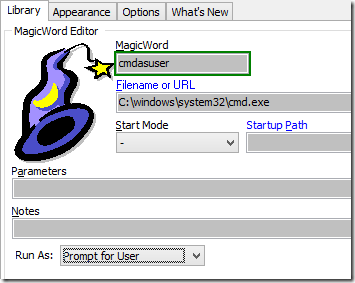
This trick has been integrated in SlickRun 4.3 and you can use it by hitting Ctrl+Alt+Shift+Enter when executing a command. The existing Ctrl+Shift+Enter shortcut for “Run as Administrator” remains unchanged. You can also configure any given MagicWord to always prompt for a user-account to use via the new checkbox at the bottom:

MagicWord UI


Launching Unelevated

A longstanding problem with SlickRun was that the Setup program launched it when installation was complete, and because the Setup program runs as Administrator, SlickRun itself ran as Administrator. And when SlickRun runs at Administrator, everything it runs launches at Administrator as well. This has horrific consequences for things like Internet Explorer, which disables its sandbox when run as Administrator. It’s just awful.

So, you’d expect that ShellExecute would’ve been updated to offer some sort of RunUnelevated verb that enabled an elevated application to run a target application without elevation. Sadly, it doesn’t; the Windows team considered this a really hard problem (the corner cases are ugly) so they punted on solving it. The problem with this approach, of course, is that leaves solving the problem to the poor ISV developers, who have even less understanding of how to solve it, and thus they typically don’t even bother trying, leaving their users at risk.

Fortunately, a while ago I discovered an ugly hack that works everywhere I’ve tried it. A kind developer on the Shell team confirmed that the fact that this works is basically a bug and they could remove it at any time. But they haven’t yet, and compared to the (absurd) alternatives, I think it’s the best option for most of us.

The trick is simple—just execute Explorer and pass in the path to your application. In a NullSoft Installer Script, it looks like this:

    exec '"$WINDIR\explorer.exe" "$INSTDIR\sr.exe"'

There are, of course, corner cases where this could fail (e.g. if the user isn’t using Explorer as their Windows shell) but in the last few years I’ve been using this trick there have been a total of zero complaints.

The famous Raymond Chen has provided a more robust approach that asks Explorer to launch your app for you, depending on COM rather than the “bug”, but that approach is only feasible if you can call arbitrary native code, which is rather complicated for NSIS scripts.


-Eric Lawrence

An A+ HTTPS site for $20

After the CEO of an Internet Security company “explained” that it didn’t matter that his company website was only accessible using insecure HTTP (“it’s only marketing pages so we don’t need security”), I decided to build out a new website: https://WhyTLS.com. Here, I’ll be making my case that all websites need to move to HTTPS, and providing links and resources to help site owners do so.

Naturally, I needed to use HTTPS for my site, but my current host already has a certificate for a different hostname, and changing the site to use a multi-domain certificate would be an expensive hassle. Fortunately, I have recently started migrating my domain registrations over to Namecheap, and it turns out that they offer a great deal on their first year of hosting and HTTPS; adding these to my order was as simple as clicking two buttons.

image

So, for under $20, I’m now the proud owner of a new HTTPS-secured site.

When I bought a certificate for my old site, it was a bit of a pain—I had to create an account with a Certificate Authority and do some complicated dances to prove my ownership of the domain. I then had to give the hosting company $20 to “install” my new certificate on the domain, and pay them the same amount each time I renewed to a new certificate.

Fortunately, Namecheap’s integrated process was much simpler—the form to obtain the certificate was on Namecheap’s Control Panel, and was completely pre-filled out except for “Job Title”, “Company” and “Phone Number” fields (the CA wanted these). With the click of two buttons and a wait of about 10 minutes, I got email telling me that my certificate was ready to install. I clicked “Activate” in the Control Panel and my HTTPS site was live!

I immediately headed over to SSLLabs.com’s Server Test to see how the security of my site measures up. It got an “A”, beating the “B” my other site gets (that one is hindered by running on Windows Server 2008, which only supports older ciphers). Now, an A is good, but I want an A+. That’s easy—I just need to add a HTTP Strict Transport Security (HSTS) policy to combat SSLStripping attacks.

Using my editor, I created /www/.htaccess and added the following lines:

RewriteEngine on
# force ssl
RewriteCond     %{SERVER_PORT} ^80$
RewriteRule     ^(.*)$
https://%{SERVER_NAME}%{REQUEST_URI} [R=301,L]
# Send HSTS policy
Header set Strict-Transport-Security "max-age=31536000; includeSubDomains; preload" env=HTTPS

I saved the file, and here we go– A+ HTTPS configuration, with minimal hassle, for under $20.

Now, is it perfect?

No. Let’s take a closer look at the SSLLabs report.

SNI Required

At the top, there’s a small banner: image. I’ve written about SNI before but SSLLabs’ “Handshake Simulation” report shows exactly what this means: My site will show a certificate error on Android 2.3, IE on Windows XP, and with Java 6, none of which support SNI.

The SNI TLS handshake extension allows a web hosting provider to cut costs by hosting multiple unrelated sites at a single IP address; without receiving the extension from the client, the server doesn’t know which certificate to return.

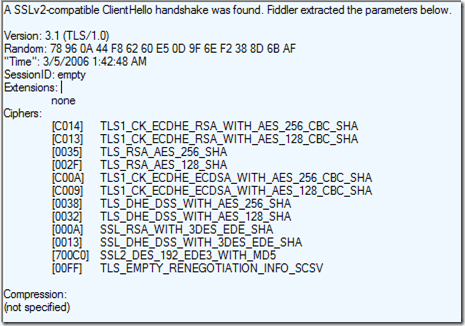
Fortunately for me, these platforms are fading in importance and I have the luxury of ignoring them. Or so I thought. I later tried to set up WebDAV support on this server so I could use Windows Explorer to manage its files and I found the SNI extension was not getting sent by the SvcHost process:

This bug was supposedly fixed in Windows 8.1, but my results here show otherwise; the problem was fixed in Windows 10 and Microsoft is looking at bringing the fix downlevel.

Extra Certificates

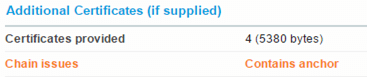
The configuration contains one other minor problem – it sends one certificate more than necessary in the certificate chain sent when the client connects:

The “Contains anchor” notice means that the server sent to the client the root Certificate Authority certificate:

This is an small waste of precious bandwidth, because either the client already has this certificate in its Trusted Root store, or the connection will fail anyway (because a client isn’t going to start trusting the root just because the server sent it). Note: There are some obscure cases (related to Extended Validation EV certificates) where sending a root may be useful to help a client recognize the certificate should get the “green bar” EV UI treatment, but those doesn’t apply here.

I’m excited to see that deployment of HTTPS is getting easier with each passing month, and I’m very much looking forward to the launch of the Let’s Encrypt project (certificates free of hassle and cost) later this year.

-Eric Lawrence

Organizational Awareness

I’ve found myself a bit stalled in writing my memoir, so I’m going to post a few stories here in the hopes of breaking free of writer’s block…

The use of first names and email aliases at Microsoft could easily lead to confusion for new employees. A few weeks into my first summer (1999) at Microsoft, the interns received an email from a Steven Sinofsky, announcing that there would be a party later that month “at Jillians.” The email was a bit short on details beyond the date and time, and I wanted to make a good impression. I’d hate to show up at some big shot’s fancy house in jeans and a T-shirt only to discover that corporate parties are always formal affairs. So I emailed Steven and asked “will the party at Jillian’s house require formal wear?”

A few minutes later, while musing that it was nicely progressive for Microsoft to have some executive named “Jillian” who had a male secretary/assistant named “Steven,” it occurred to me that I didn’t know who Jillian was or what she products she owned. Fortunately, at Microsoft, the Outlook Address Book (aka the GAL, Global Address List) contains both full names and titles, so I quickly looked up Steven to see who he worked for.

My heart leapt into my throat when I saw Steven’s title. It wasn’t “Administrative Aide,” “Executive Assistant,” or anything else I might have guessed. “Vice President” it said simply. With mounting alarm, I turned around to ask my office-mate: “Um, who’s Jillian?” He looked confused. “You know, the intern party’s at her place?” I clarified.

I watched as comprehension and then amusement dawned. “Oh, Jillian’s is a sports bar and billiards parlor downtown” he replied. Seeing the horror on my face, he continued “Why do you ask?”

I swiveled back to my computer and went to Outlook’s Sent Items folder to confirm that I had indeed made a huge fool of myself. I began frantically hunting through Outlook’s menus… surely there was some way to fix this. The command “Recall this message” leapt off the screen and for the first time in minutes my pulse began to slow. I invoked the command and gave a silent thanks to whomever had invented such a useful feature.

It was weeks before I learned that the way “Recall this message” works tends to increase the likelihood that someone will read your message. Instead of simply deleting the message, it instead sends the recipient a message indicating that you would like to recall your prior message, and requests their permission to delete the original. Most recipients, I expect, then immediately go read the original to see why you deemed a recall necessary. Fortunately for my fragile ego, either Steven didn’t do that, or he took pity on me and simply didn’t reply.

After this experience, I strived to never reply to an email from someone I didn’t know without first consulting the GAL.

Postscript

It was around 8am on a Saturday morning in the winter of 2010 and I’d just woken up. I got an email directly from Steven asking a deeply technical question (restrictions on Unicode endianness when parsing a Mark-of-the-Web in HTML) about some code he was writing. I was seriously impressed, both in that he was clearly writing code, but also that he’d somehow known exactly the most suitable person to send his question to, far down the organizational ladder. I confirmed the limitation and mentioned how inspirational I found it to be working in an organization where my Vice President wasn’t afraid to get his hands dirty.

The afternoon, I was reminiscing about that incident and my first-ever mail to Steven… then I got a sinking feeling. Popping open the GAL, I confirmed my belated recollection that he’d been promoted to President the year before. He never corrected me.

Microsoft Edge Bugs and Omissions

I tweet about the new Microsoft Edge browser quite a lot. I wanted to have a blog post to collect some of the feedback I’ve provided so I have it in one place and can update as needed.

Note: This post mostly focuses on the bad parts of Edge; there are plenty of good parts, including much improved standards support and a safer default security posture.

Last Update: November 2015 Update Most of the trivial issues are fixed; the bigger problems are mostly unfixed

Bugs

1. The “Should I trust this site” link in the HTTPS trust badge goes to page that doesn’t even attempt to answer that question. Update: Sorta fixed.

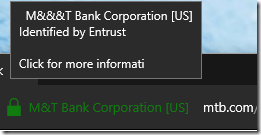
2. The hover “tooltip” on that site doesn’t do escaping of & properly and also has a text-truncation bug:

image Update: Fixed.

3. The RichText tests at www.browserscope.org hang the browser.

4. When Windows UAC is set to “Don’t dim my desktop”, launching a download (e.g. setup.exe) that requires elevation causes the consent window to appear behind the Edge window, effectively causing a denial-of-service condition that hangs the tab.

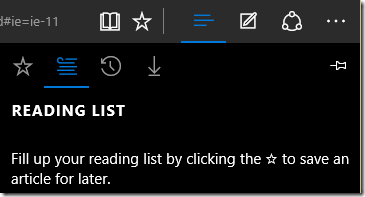
5. No, not that star, the other one!

image

6. Remember focus rectangles that show which button is active? Yeah, I miss those.

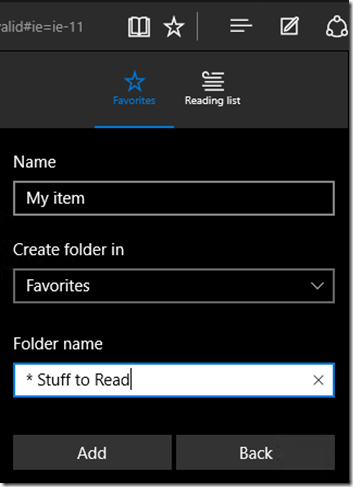
7. Adding a folder silently fails if the name chosen contains any “special filesystem characters” like ?, :, *, etc.

image

8. HTML5 Drag/Drop — You can’t drag/drop files into the browser (e.g. on OneDrive.com). Update: Fixed.

9. Microsoft Edge fixed the longstanding (and amusing, due to its root cause) bug whereby it exported HTTP Archive (HAR) files as XML instead of JSON. Unfortunately, the new JSON exporter omits the required encoding=”base64″ attribute when including binary bodies. Also unfortunate, F12 doesn’t write the creator version field in the JSON; a proper version number here would allow tools like Fiddler to better accommodate the buggy output.

10. CSS Animations that have been offloaded to the GPU (“independent animations”) cannot be stopped. The only workaround is to prevent them from being independently animated.

Omitted

1. Windows 7 Support – After strongly hinting that IE11’s successor would run on Windows 7, the team changed course and said that Edge wouldn’t appear on Windows 7 at release but they’d promise to “watch customer demand” for a Windows 7 version. From both mind-share and market-share perspectives, I think this is a very risky move.

2. Extensions – Edge was expected to contain a new Chrome-like extension model, but this slipped from the original release. There’s currently no ETA for its arrival. Update: Delayed to 2016.

3. Tracking Protection Lists –  A Tweet from an IE engineer implies that these will not be coming back to Edge and the future extension model is expected to serve as a replacement. This is unfortunate, as a good TPL dramatically improves the speed at which pages load and significantly reduces the number of pages that can cause the browser to hang or crash.

4. AddSearchProvider – Edge makes it quite cumbersome to add search providers, having removed the AddSearchProvider API supported by IE7-IE11, Chrome and Firefox.

5. Click-to-Play – There’s no way to configure the built-in Flash object to operate in a “click-to-play” manner.

6. Report Phishing – The old “SmartScreen > Report this Site” experience has been removed and replaced with a “Feedback and Reporting” widget that accepts all sorts of feedback about both the browser and the site. It is likely that this experience does not collect the same level of data as the old experience, meaning that some reported phish may escape.

7. Menus & Chords – When Microsoft Office dumped the menus in favor of the ribbon system, they ensured that the old accelerator keys and keyboard chords (e.g. Alt+F,C to “Close tab”) continued to work. Edge makes no such attempt, and thus my muscle memory built up for over a decade now fails.

8. JavaScript Uncontrollable — Unlike nearly every browser, Edge offers no way to disable JavaScript on a per-site or global basis, even to test <noscript> tags.

9. Certificate Inspection — There’s no way to inspect the certificate presented by a HTTPS site.

Bonus Gripes: Windows 10 Issues

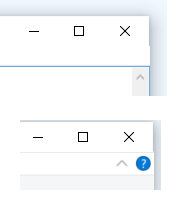
1. At 125% Zoom, the Window Title bar is one pixel too short. (Fixed in August)

Embedded image permalink

2. There’s no visual distinction between the title bar and the menu bar in some apps (like Notepad). As a consequence there’s no way to tell whether click & drag will drag the window or do nothing at all.

3. A background licensing service frequently crashes when resuming from sleep; it takes down the WiFi service which runs in the same service host which means you can’t access WiFi after resume. Update: fixed by the July 20th update.

4. The experience for making applications default has changed again in Windows 10. While the Windows 8/8.1 experience wasn’t awesome, the Windows 10 experience is a slap in the face to the user. Mozilla is complaining, justifiably.

5. Win10/.NET4.6 carries over the Shell/.NET bug whereby double-clicking any label control copies its text to the clipboard. The behavior change in the comctl32 label control was checked in during Windows Vista by a rogue dev without a spec or an explanation.

6. Windows 10 carries over the Windows 8 regression whereby proxy-change calls are ignored during shutdown.

-Eric