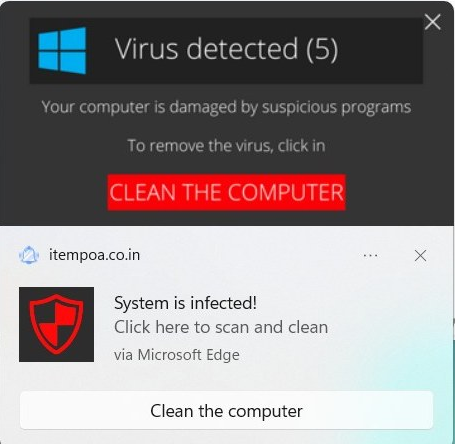
A colleague recently saw the following popups when using their computer:
Because they seemed to come from nowhere in particular, they seemed credible– either Windows itself had detected a virus, or perhaps their computer was infected with malware and it caused the popups?
The reality is more mundane and more much more common. These are notifications sent by a website (itempoa.co.in) that Windows dutifully displays as a part of the browser’s HTML5 Notifications API feature.
Permissions Abuse
Now, websites need permission to subscribe you to notifications, but this permission is often gained as a result of trickery — for instance, a page that claims you need to push a button to prove you’re a human.
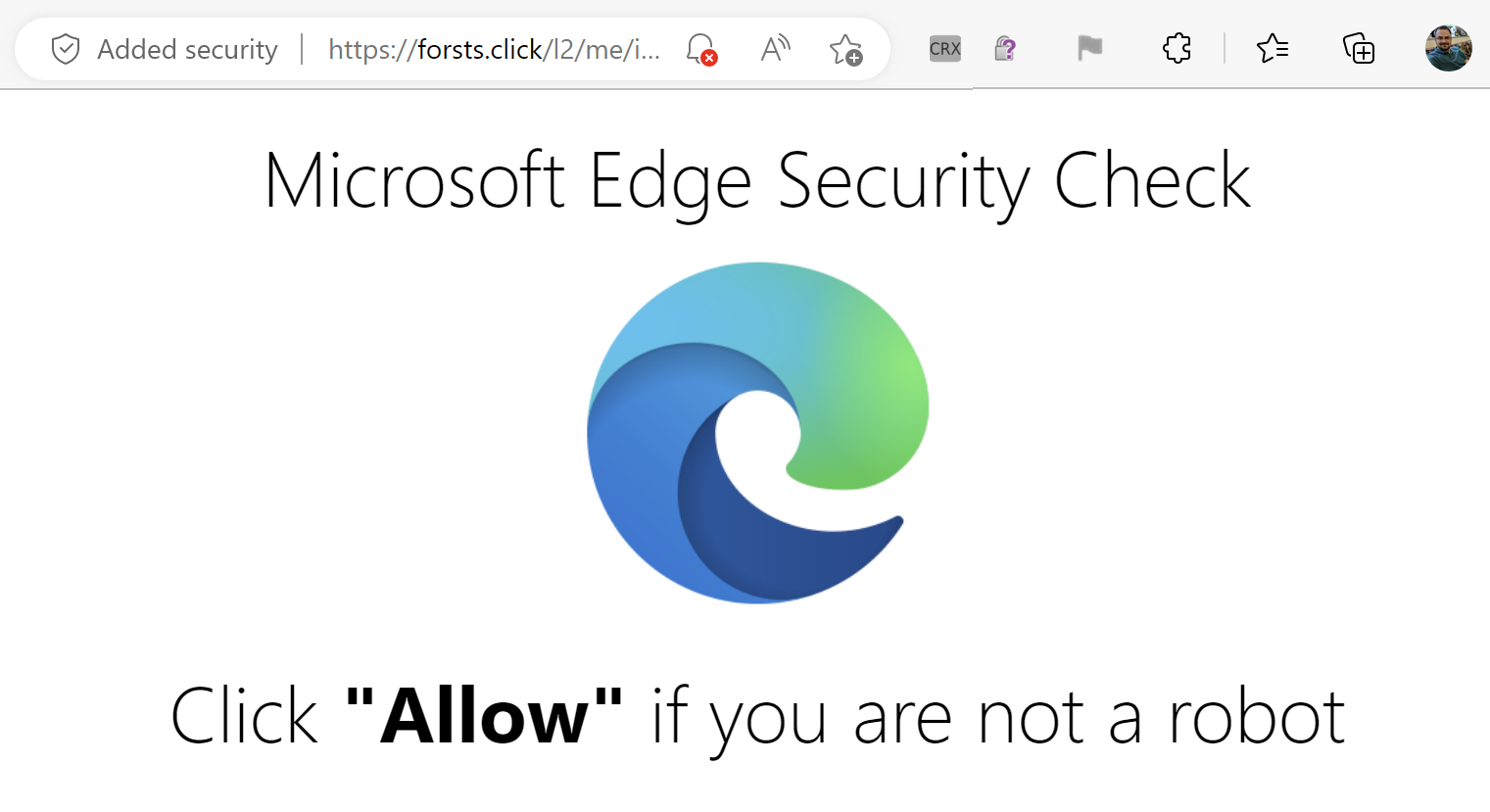
For example, I tried visiting an old colleague’s long-expired blog just to see what would happen. I was immediately redirected here:
Wat? What is this even talking about? There’s no “Allow” link or button anywhere.
The clue is that tiny bell with a red X in the omnibox– This site tried to ask for permission to spam me with notifications forevermore. The site hopes that I don’t understand the permission prompt, I will assume this is one of the billions of CAPTCHAs on today’s web, and that I will simply click “Allow”.
However, in this case, Edge said “Naw, we’re not even going to bother showing the promptfor this site” and suppressed it by default.
The resulting user experience isn’t an awesome one for the user, but there’s not a ton the browser can do about that in general– websites can always lie to visitors, and the browser’s ability to do anything reasonable in response is limited. The trulybad outcome (a continuous flood of spam notifications appearing inside the OS, leading the user to wonder whether they’ve been hacked for weeks afterward) has been averted because the user never sees the “Shoot self in foot” option.
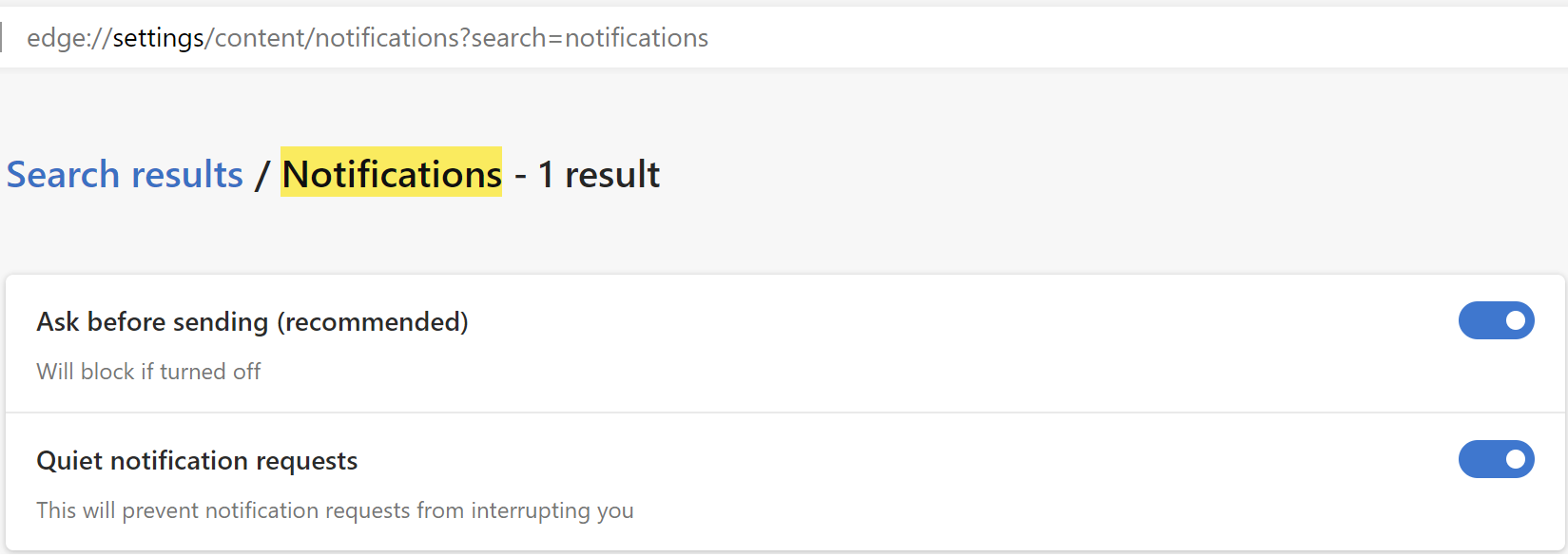
This “Quieter Notifications” behavior can be found in Edge Settings; you can use the other toggle to turn off Notification permission requests entirely:
Today, there’s no “Report this site is trying to trick users” feature. The current menu command ... > Help and Feedback > Report Unsafe Site is today only used to report sites that distribute malware or conduct phishing attacks for blocking with SmartScreen.
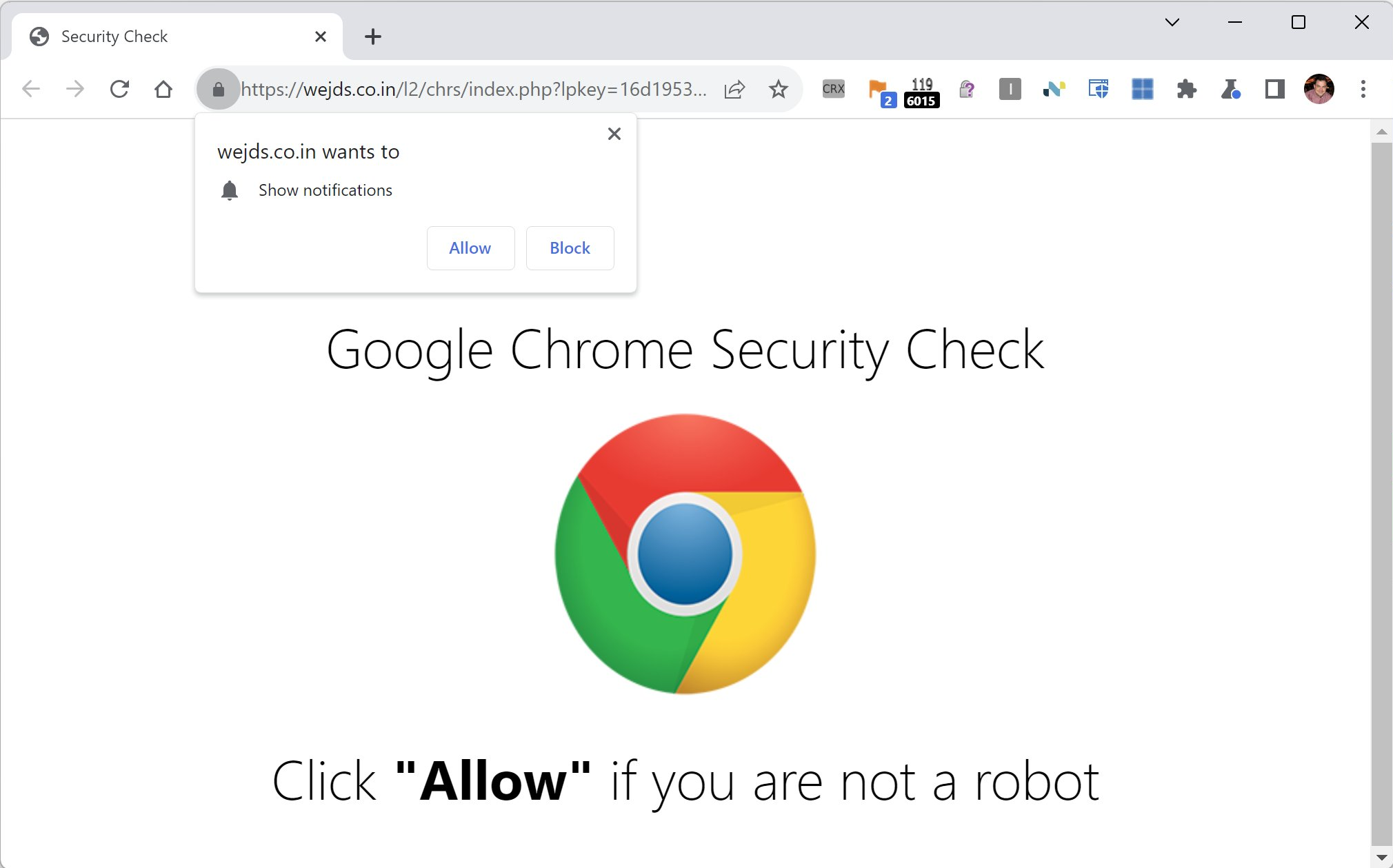
Here’s a similar attack site loaded in Chrome, which is showing the prompt. (Chrome does have a similar anti-abuse effort).
After the user is suckered into granting the Notifications permission, hours, days, or weeks later they’ll be subjected to the sorts of spam notifications seen at the top of this post.
Cleanup and Prevention
You can stop getting notifications from spammy sites by adjusting permissions in Edge Settings. If you don’t think Web Notifications are useful in general, you can visit edge://settings/content/notifications and set the toggle like so:
One interesting feature that the Edge team is experimenting with this summer is called “SuperRes” or “Enhance Images.” This feature allows Microsoft Edge to use a Microsoft-built AI/ML service to enhance the quality of images shown within the browser. You can learn more about how the images are enhanced (and see some examples) in the Turing SuperRes blog post.
Currently only a tiny fraction of Stable channel users and much larger fraction of Dev/Canary channel users have the feature enabled by field trial flags. If the feature is enabled, you’ll have an option to enable/disable it inside edge://settings:
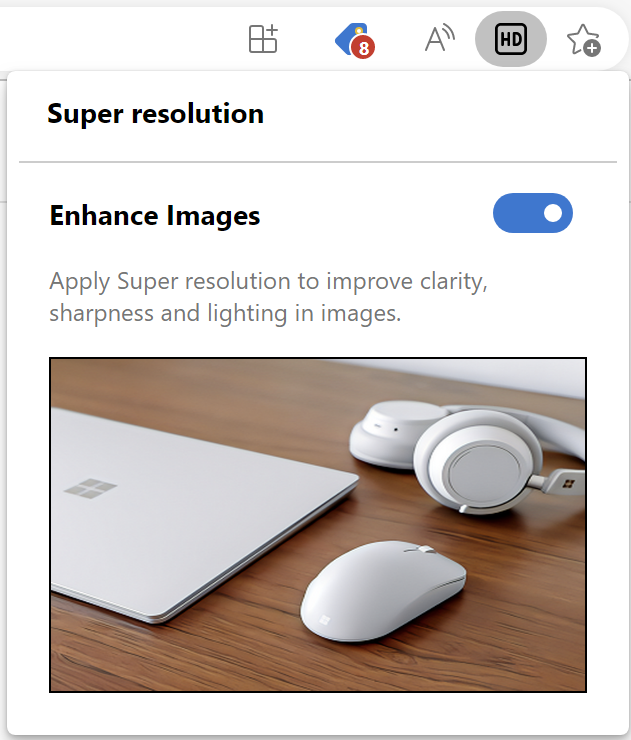
Users of the latest builds will also see a “HD” icon appear in the omnibox. When clicked, it opens a configuration balloon that allows you to control the feature:
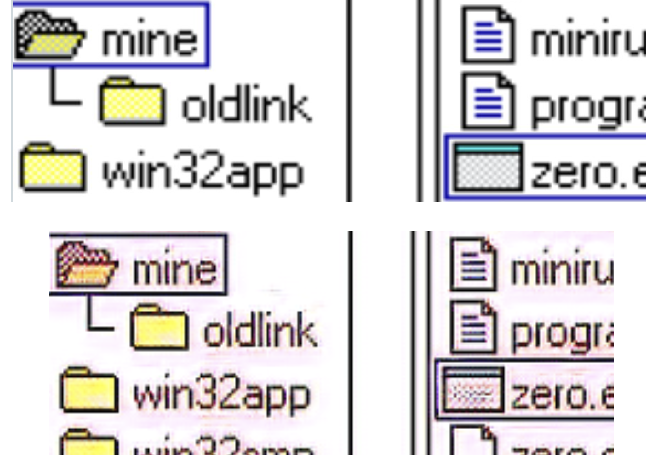
As seen in the blog post, this feature can meaningfully enhance the quality of many photographs, but the model is not yet perfect. One limitation is that it tends not to work as well for PNG screenshots, which sometimes get pink fuzzies:
If you encounter failed enhancements like this, please report them to the Edge team using the … > Help and Feedback > Send Feedback tool so the team can help improve the model.
On-the-Wire
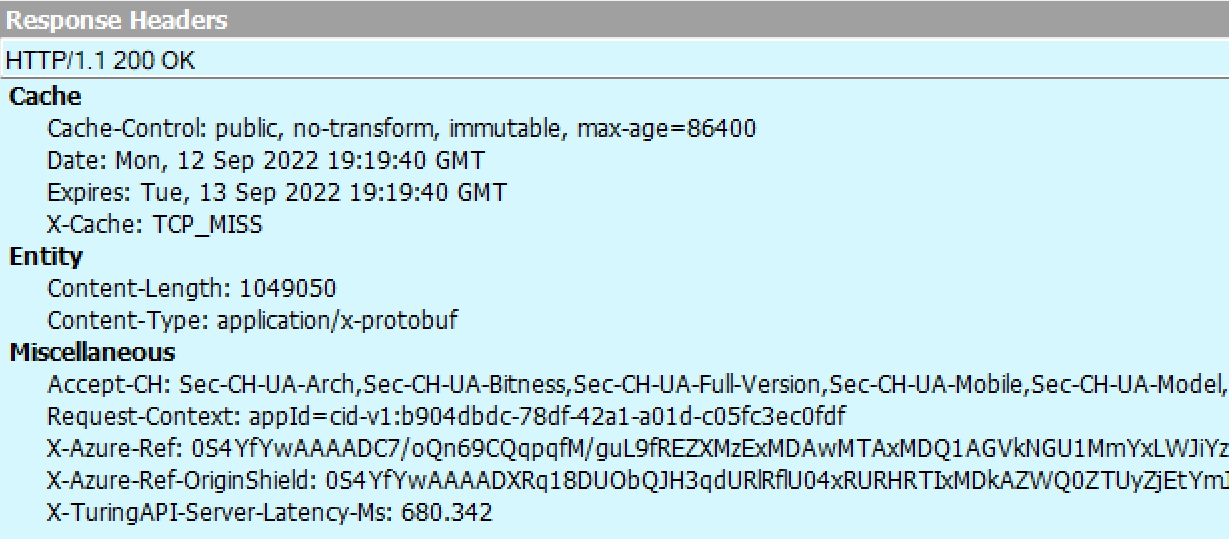
Using Fiddler, you can see the image enhancement requests that flow out to the Turing Service in the cloud:
Inspecting each response from the server takes a little bit of effort because the response image is encapsulated within a Protocol Buffer wrapper:
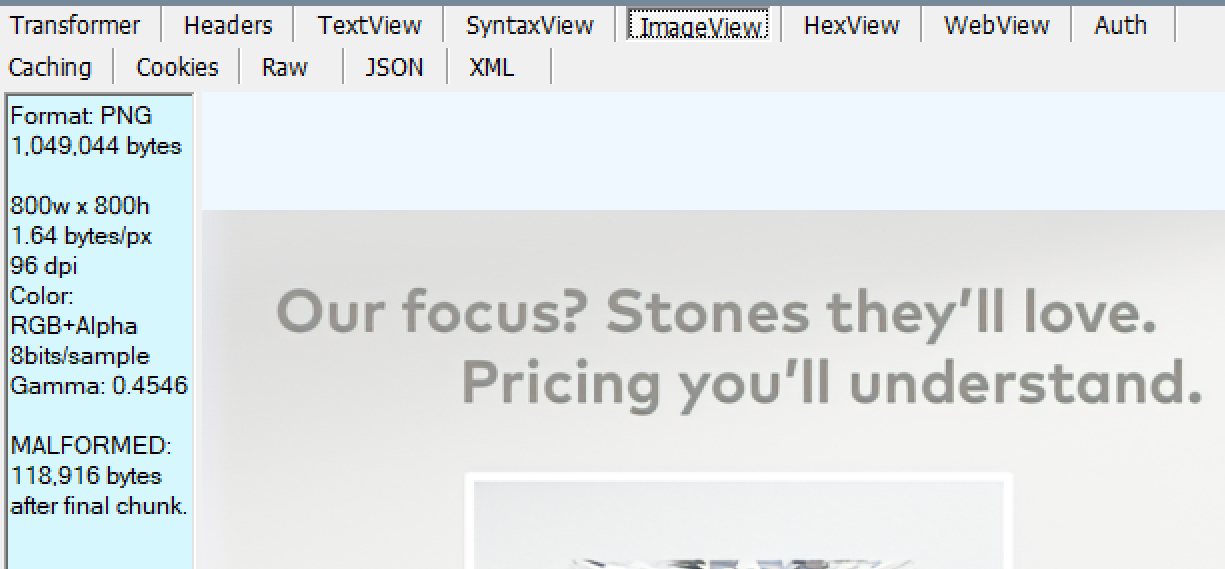
Because of the wrapper, Fiddler’s ImageView will not be able to render the image by default:
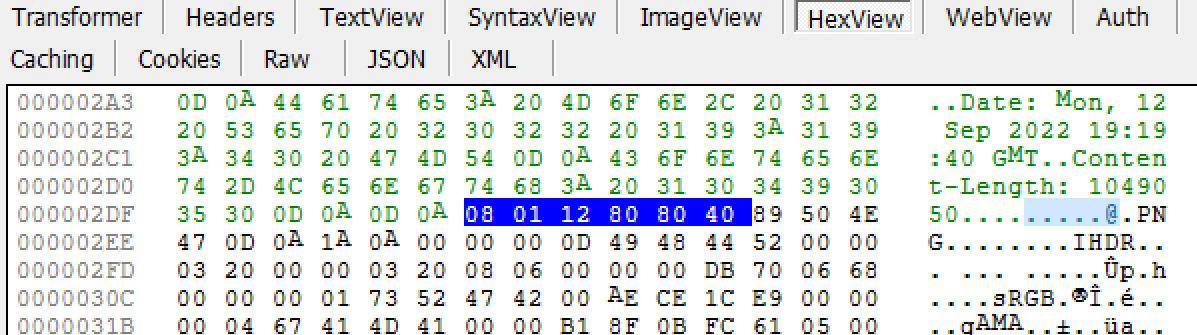
Fortunately, the response image is near the top of the buffer, so you can simply focus the Web Session, hit F2 to unlock it for editing, and use the HexView inspector to delete the prefix bytes:
…then hit F2 to commit the changes to the response. You can then use the ImageView inspector to render the enhanced image, skipping over the remainder of the bytes in the protocol buffer (see the “bytes after final chunk” warning on the left):
Stay sharp out there!
-Eric
PS: There is not, as of October 2022, a mechanism by which a website can opt its pages out of this feature.
Almost a decade before I released the first version of Fiddler, I started work on my first app that survives to this day, SlickRun. SlickRun is a floating command line that can launch any app on your PC, as well as launching web applications and performing other simple and useful features, like showing battery, CPU usage, countdowns to upcoming events, and so forth:
SlickRun allows you to come up with memorable commands (called MagicWords) for any operation, so you can type whatever’s natural to you (e.g. bugs/edge launches the Edge bug tracker) for any operation.
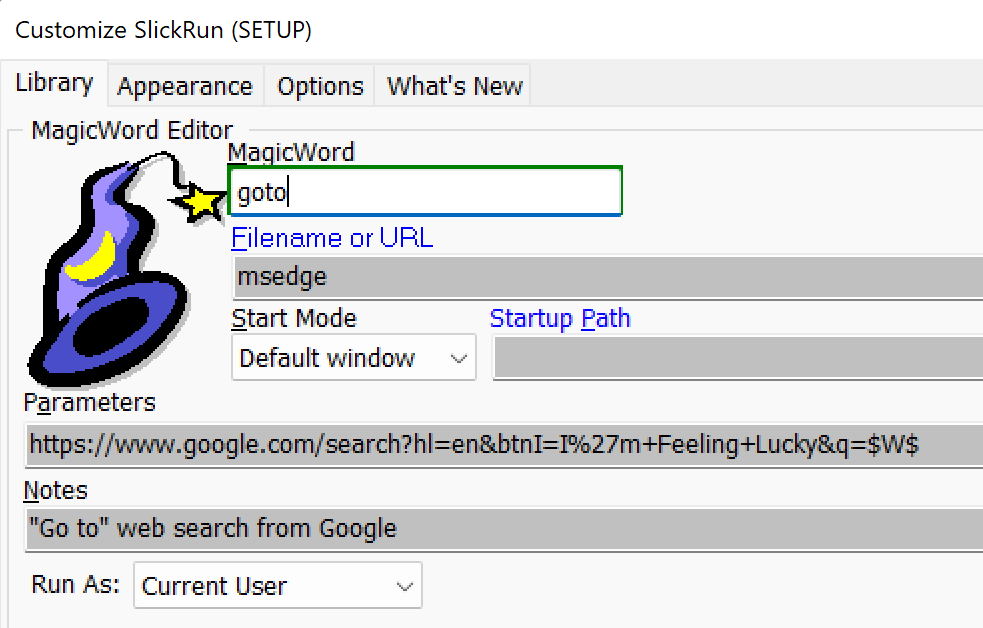
One of my favorite MagicWords, beloved for decades now, is goto. It launches your browser to the best match for any web search:
For example, I can type goto download fiddlerand my browser will launch and go to the Fiddler download page (as found by an “I’m Feeling Lucky” search on Google) without any further effort on my part.
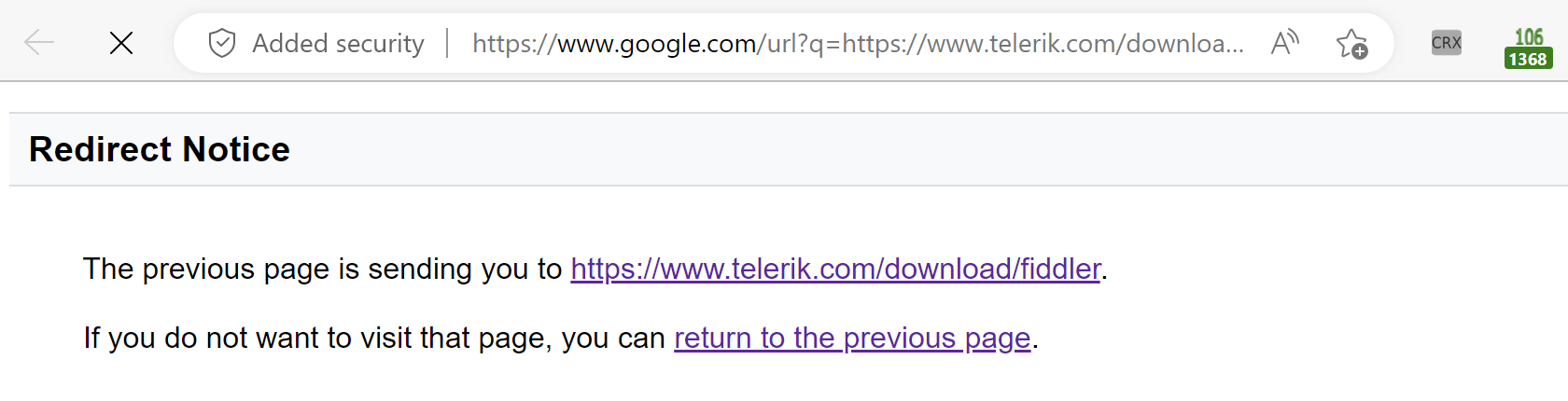
Unfortunately, back in 2020 (presumably for anti-abuse reasons), Google started interrupting their “I’m Feeling Lucky” experience with a confirmation page that requires the user to acknowledge that they’re going to a different website:
… and this makes the goto user flow much less magical. I grumbled about Google’s change at the time, without much hope that it would ever be fixed.
Last week, while vegging on some video in another tab, I typed out a trivial little browser extension which does the simplest possible thing: When it sees this page appear as the first or second navigation in the browser, it auto-clicks the continue link. It does so by instructing the browser to inject a trivial content script into the target page:
// On the Redirect Notice page, click the first link.
if (window.history.length<=2) {
  document.links[0].click();
}
else {
  console.log(`Skipping auto-continue, because history.length == ${window.history.length}`);
}
This whole thing took me under 10 minutes to build, and it still delights me every time.
Passwords have lousy security properties, and if you try to use them securely (long, complicated, and different for every site), they often have horrible usability as well. Over the decades, the industry has slowly tried to shore up passwords’ security with multi-factor authentication (e.g. one-time codes via SMS, ToTP authenticators, etc) and usability improvements (e.g. password managers), but these mechanisms are often clunky and have limited impact on phishing attacks.
The Web Authentication API (WebAuthN) offers a way out — cryptographically secure credentials that cannot be phished and need not be remembered by a human. But the user-experience for WebAuthN has historically been a bit clunky, and adoption by websites has been slow.
That’s all set to change.
Passkeys, built atop the existing WebAuthN standards, offers a much slicker experience, with enhanced usability and support across three major ecosystems: Google, Apple, and Microsoft. It will work in your desktop browser (Chrome, Safari, or Edge), as well as well as on your mobile phone (iPhone or Android, in both web apps and native apps).
Passkeys offers the sort of usability improvement that finally makes it practical for sites to seize the security improvement from retiring passwords entirely (or treating password-based logins with extreme suspicion).
PMs from Google and Microsoft put together an awesome (and short!) demo video for the User Experience across devices which you can see over on YouTube.
Microsoft Edge (and upstream Chrome) is available in four different Channels: Stable, Beta, Dev, and Canary. The vast majority of Edge users run on the Stable Channel, but the three pre-Stable channels can be downloaded easily from microsoftedgeinsider.com. You can keep them around for testing if you like, or join the cool kids and set one as your “daily driver” default browser.
Release Schedule
The Stable channel receives a major update every four weeks (Official Docs), Beta channel more often than that (irregularly), Dev channel aims for one update per week, and Canary channel aims for one update per day.
While Stable only receives a major version update every four weeks, in reality it will usually be updated several times during its four-week lifespan. These are called respins, and they contain security fixes and high-impact functionality fixes. (The Extended Stable channel for Enterprises updates only every eight weeks, skipping every odd-numbered release).
Similarly, some Edge features are delivered via components, and those can be updated for any channel at any time.
Why Use a Pre-Stable Channel?
The main reason to use Beta, Dev, or even Canary as your “daily driver” is because these channels (sometimes referred to collectively as “pre-release channels”) are a practical time machine. They allow you to see what will happen in the future, as the code from the pre-release channels flows from Canary to Dev to Beta and eventually Stable.
For a web developer, Enterprise IT department, or ISV building software that interacts with browsers this time machine is invaluable– a problem found in a pre-Release channel can be fixed before it becomes a work-blocking emergency during the Stable rollout.
For Edge and the Chromium project, self-hosting of pre-release channels is hugely important, because it allows us to discover problematic code before billions of users are running it. Even if an issue isn’t found by a hand-authored customer bug report submission, engineers can discover many regressions using telemetry and automatic crash reporting (“Watson”).
What If Something Does Go Wrong?
As is implied in the naming, pre-Stable channels are, well, less Stable than the Stable channel. Bugs, sometimes serious, are to be expected.
To address this, you should always have at least two Edge channels configured for use– the “fast” channel (Dev or Canary) and a slower channel (Beta or Stable).
If there’s a blocking bug in the version you’re using as your fast channel, temporarily “retreat” from your fast to slow channel. To make this less painful, configure your browser profile in both channels to sync information using a single MSA or AAD account. That way, when you move from fast to slow and back again, all of your most important information (see edge://settings/profiles/sync for data types) is available in the browser you’re using.
Understanding Code Flow
In general, the idea is that Edge developers check in their code to the internal Main branch. Code from Microsoft employees is joined by code pulled by the “pump” from the upstream Chromium project, with various sheriffs working around the clock to fix any merge conflicts between the upstream code pumped in and the code Microsoft engineers have added.
Every day, the Edge build team picks a cut-off point, compiles an optimized release build, runs it through an automated test gauntlet, and if the resulting build runs passably (e.g. the browser boots and can view some web pages without crashing), that build is blessed as the Canary and released to the public. Note that the quality of Canary might well be comically low (the browser might render entirely in purple, or have menu items that crash the browser entirely) but still be deemed acceptable for release. The Canary channel, jokes aside, is named after the practice of bringing birds into mining tunnels deep underground. If a miner’s canary falls over dead, the miners know that the tunnel is contaminated by odorless but deadly carbon monoxide and they can run for fresh air immediately. (Compared to humans, canaries are much more sensitive to carbon monoxide and die at a much lower dose). Grim metaphors aside, the Canary channel serves the same purpose– to discover crashes and problems before “regular” users encounter them. Firefox avoids etymological confusion and names its latest channel “Nightly.”
Every week or so, the Edge build team selects one of the week’s Canary releases and “promotes” it to the Dev branch. The selected build is intended to be one of the more reliable Canaries, with fewer major problems than we’d accept for any given Canary, but sometimes we’ll pick a build with a major problem that wasn’t yet noticed. When it goes out to the broader Dev population, Microsoft will often fix it in the next Canary build, but folks on the busted Dev build might have to wait a few days for the next Canary to Dev promotion. It’s for this reason that I run Canary as my daily driver rather than Dev.
Notably for Canary and Dev, the Edge team does not try to exactly match any given upstream Canary or Dev release. Sometimes, we’ll skip a Dev or Canary release when we don’t have a good build, or sometimes we’ll ship one when upstream does not. This means that sometimes (due to pump latency, “sometimes” is nearly “always”) an Edge Canary might have slightly different code than the same day’s Chrome Canary. Furthermore, due to our code pump works, Edge Canary can even have slightly different code than Chromium’s even for the exact same Chrome version number.
In contrast, for Stable, we aim to match upstream Chrome, and work hard to ensure that Version N of Edge has the same upstream changelists as the matching Version N of Chrome/Chromium. This means that anytime upstream ships or respins a new version of Stable, we will ship or respin in very short order.
In some cases, upstream Chromium engineers or Microsoft engineers might “cherry-pick” a fix into the Dev, Beta, or Stable branches to get it out to those more stable branches faster than the normal code-flow promotion. This is done sparingly, as it entails both effort and risk, but it’s a useful capability. If Chrome cherry-picks a fix into its Stable channel and respins, the Edge team does the same as quickly as possible. (This is important because many cherry-picks are fixes for 0-day exploits.)
Code Differences
As mentioned previously, the goal is that faster-updating channels reflect the exact same code as will soon flow into the more-stable, slower-updating channels. If you see a bug in Canary version N, that bug will end up in Stable version N unless it’s reported and fixed first. Other than a different icon and a mention on the edge://version page, it’s often hard to tell which channel is even being used.
However, it’s not quite true that the same build will behave the same way as it flows through the channels. A feature can be coded so that it works differently depending upon the channel.
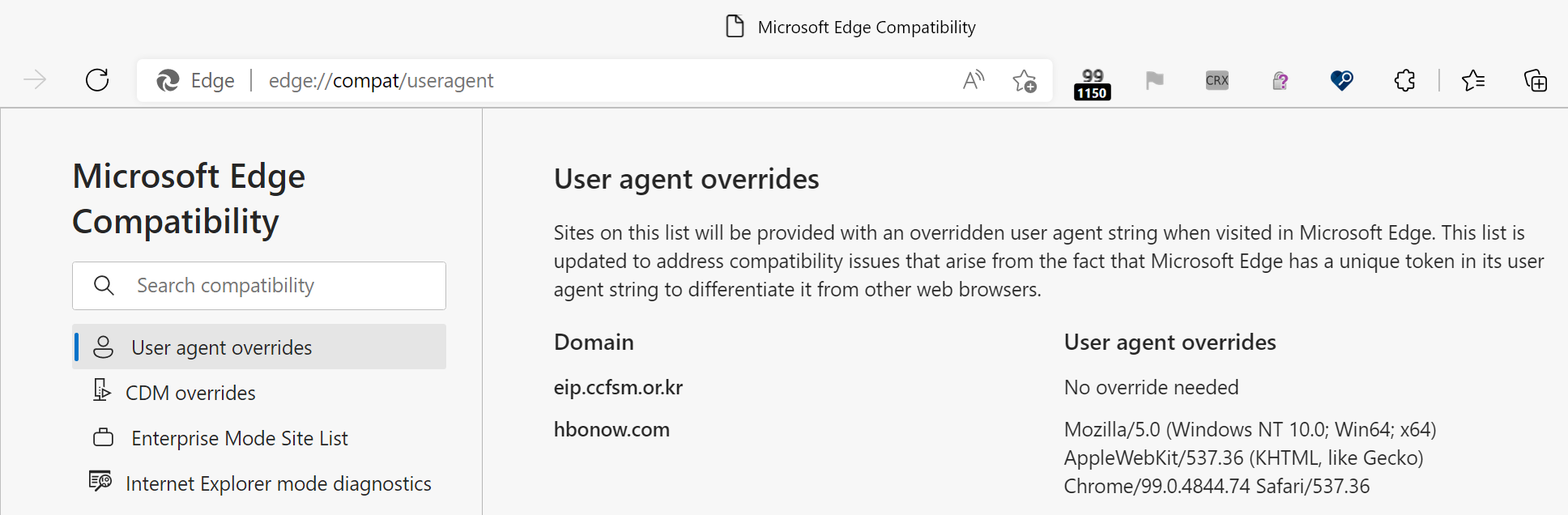
For example, Edge has a “Domain Actions” feature to accommodate certain websites that won’t load properly unless sent a specific User-Agent header. When you visit a site on the list, Edge will apply a UA-string spoof to make the site work. You can see the list on edge://compat/useragent:
However, this Domain Actions list is applied only in Edge Stable and Beta channels and is not used in Edge Dev and Canary. Update: The UA overrides originally were only used in Edge Stable and Beta channels but as of September 2025, there now exist User-Agent overrides that apply in all channels and which are not shown in edge://compat.
Edge rolls out features via a Controlled Feature Rollout process (I’ve written about it previously). The Experimental Configuration Server typically configures the “Feature Enabled” rate in pre-release channels (Canary and Dev in particular) to be much higher (e.g. 50% of Canary/Dev users will have a feature enabled, while 5% of Beta and 1% of Stable users will get it).
Similarly, there exist several “experimental” Extension APIs that are only available for use in the Dev and Canary channels. There are also some UI bubbles (e.g. warning the user about side-loaded “developer-mode” extensions) that are shown only in the Stable channel.
Chrome and Edge offer a UX to become the default browser, but this option isn’t shown in the Canary channel.
Individual features can also take channel into account to allow developer overrides and the like, but such features overrides tend to be rather niche.
Update: Back in 2023 (or so) the Edge team partnered with the Windows Insiders team to broaden use of faster channels of Edge. If you’re testing the “Insiders” builds of Windows, you may get a pre-release (Beta or Dev) channel of Edge as your default (rather than Edge Stable).








 text/plain