Update: ClickOnce support is now available in modern Edge; see the end of this post.
As we rebuild Microsoft Edge atop the Chromium open-source platform, we are working through various scenarios that behave differently in the new browser. In most cases, such scenarios also worked differently between 2018’s Edge Legacy (aka “Spartan”) and Chrome, but users either weren’t aware of the difference (because they used Trident-derived browsers like IE inside their enterprise) or were aware and simply switched to a Microsoft-browser for certain tasks.
One example of a behavioral gap is related to running ClickOnce apps.
ClickOnce is a Microsoft application deployment framework that aims to allow installation of native-code applications from the web in (approximately) one click.
Chrome and Firefox can successfully install and launch ClickOnce’s .application files if the .application file specifies a deploymentProvider element with a codebase attribute (example). After download, the user double-clicks on the downloaded .application file in the Downloads folder and the install proceeds:

However, it’s also possible to author and deploy an .application that doesn’t specify a deploymentProvider element (example). Such files will launch correctly from Internet Explorer and pre-Chromium Edge, but fail for downloads from Firefox and Chrome with an error message:

So, what gives? Why does this scenario magically work in Edge Legacy but not Firefox or Chrome?
DirectInvoke
The secret can be found in the EditFlags for the Application.Manifest ProgId (to which the .application filename extension and application/x-ms-application MIME type are mapped).

The EditFlags contain the FTA_AlwaysUseDirectInvoke flag, which is documented on MSDN as:
FTA_AlwaysUseDirectInvoke 0x00400000
Introduced in Windows 8. Ensures that the verbs for the file type are invoked with a URL instead of a downloaded version of the file. Use this flag only if you’ve registered the file type’s verb to support DirectInvoke through the SupportedProtocols or UseUrl registration.
I wrote more about DirectInvoke here; if you peek in the Application.Manifest‘s Shell\Open\Command value, you’ll find that it calls for running the ShOpenVerbApplication function inside dfshim.dll, passing along the .application file’s path or URL in a parameter (%1):
"C:\Windows\System32\rundll32.exe" "C:\Windows\System32\dfshim.dll",ShOpenVerbApplication %1
And therein lies the source of the behavioral difference.
When you download and open an Application.Manifest file from Edge Legacy, it passes the source URL for the .application to the handler. When you download the file in Firefox or Chrome, it passes the local file path of the downloaded .application file. With only the local file path, the ShOpenVerbApplication function doesn’t know how to resolve the relative references in the Application Manifest’s XML and the function bails out with the Cannot Start Application error message.
Setting FTA_AlwaysUseDirectInvoke also has the side-effect of removing the “Save” button from Edge Legacy’s download manager:

…helping prevent the user from accidentally downloading an .application file that won’t work if opened outside of the browser from the Downloads folder (since the file’s original URL isn’t readily available to Windows Explorer).
Advice to Publishers
If you’re planning to distribute your ClickOnce application from a website, specify the URL in Visual Studio’s ClickOnce Publish Wizard:

This will ensure that even if DirectInvoke isn’t used (e.g. from Chrome or Firefox), the invocation of the ShOpenVerbApplication function can still find the files needed to install your application.
Workarounds for Firefox & Chrome
A company called Meta4 offers a Chrome browser extension that aims to add fuller support for ClickOnce to Chrome. The extension comes in two pieces– a traditional JavaScript extension and a trivial “native” executable (written in C#) that simply invokes the ShOpenVerbApplication call with the URL. The JavaScript extension launches and communicates with the native executable running outside of the Chrome sandbox using Native Messaging.
Unfortunately, the extension is a bit hacky– it installs a blocking onBeforeRequest handler which watches all requests (not just downloads), and if the target URL’s path component ends in .application, it invokes the native executable. Alas, it’s not really safe to make any assumptions about extensions in URLs (the web is based on MIME types, rather than filenames).
WARNING: DO NOT INSTALL “ClickOnce” extensions like this one into Microsoft Edge. The extension will break Edge’s built-in ClickOnce handling.
Edge’s ClickOnce Support
ClickOnce support was added to Edge 77+, and is now on-by default.
The feature was disabled-by-default prior to Edge 87, but could be enabled via edge://flags/#edge-click-once or Group Policy. ClickOnce on Windows 7 was not working correctly until Edge 91.
Note that the ClickOnce implementation in Edge will always1 prompt the user before the handler is invoked:

In Edge Legacy/IE, sites in your Intranet/Trusted Sites Zone could spawn the .application handler without any prompt from the browser. That’s because these older browsers respect the FTA_OpenIsSafe bit in the EditFlags for the application.manifest progid. The new Edge tries to limit its use of Windows Security Zones, and it thus does not support the FTA_OpenIsSafe bit.
-Eric
Appendix A: IE Implementation
Notably, Internet Explorer (and thus IE Mode) doesn’t rely upon the DirectInvoke mechanism for ClickOnce; removing the EditFlags value entirely causes IE to show an additional prompt, but the install still succeeds. That’s because IE activates the file using a MIME handler (see the CLSID subkey of Application.Manifest) much like it does for .ZIP files. The DirectInvoke mechanism was invented, in part, to replace the legacy MIME handler mechanism.
Appendix B: Launch-from-Edge Problems?
If you have a problem whereby each time you click “Open” on the ClickOnce prompt, the browser simply opens a new tab to ask the same question, this is caused by buggy security software. Edge handles ClickOnce by passing the URL into ShellExecuteEx, with the SEE_CLASS_MASK flag set and the hkeyClass pointed at the ASSOCKEY_SHELLEXECCLASS for the .application file extension:
parameters.fMask = SEE_MASK_NOZONECHECKS | SEE_MASK_NOASYNC | SEE_MASK_CLASSKEY;
std::wstring lpFile = base::UTF8ToWide(url.spec());
parameters.lpFile = lpFile.c_str();
parameters.hkeyClass = handler_class;
parameters.nShow = SW_SHOWNORMAL;
ShellExecuteExW(¶meters);It appears that the security software’s thunk does not understand the significance of the SEE_MASK_CLASSKEY and it effectively strips it out. ShellExecuteEx, thus handed what is effectively a plain old HTTPS URL, then launches the default web browser passing the URL. We then end up with a new tab trying to invoke the ClickOnce URL, and the process repeats, creating a new tab each time you click the Open button. If your admin had set the policy to allow ClickOnce to automatically open without a prompt, I assume the browser will endlessly open tabs until your machine melts.
Appendix C: File URLs with non-ASCII characters
Recently, a user of Edge 120 noted that Edge doesn’t successfully launch ClickOnce applications from file:/// schemed URLs that contain non-English characters. The problem here is that Chromium %-escapes the non-English characters into UTF-8, such that a link to \\server\files\Testä.application is written as file://server/files/Test%C3%A4.application. Unfortunately, for historical reasons, Windows expects %-encoded octets in file URLs to be encoded as %-escaped into the client OS’ ANSI codepage, so for my US-English system, that would be file://server/files/Test%E4.application.
After the user clicks “Open” in Edge’s ClickOnce security prompt, they’ll see a dialog from Windows complaining that the file cannot be found:
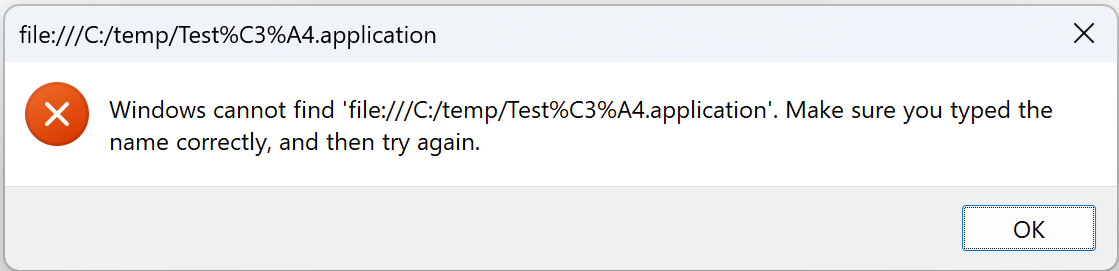
To workaround this problem, serve your files from HTTPS, or avoid using non-ASCII characters in your application’s filename.
1 Not really always. Starting in Edge 93, you can use the AutoOpenFileTypes and AutoOpenAllowedForUrls policies to bypass prompts for both ClickOnce and DirectInvoke. If you configure .application files to automatically open, the ClickOnce prompt will be bypassed and ClickOnce will launch from sites of your choosing.
I think configuring Edge in this way is a bad tradeoff (the convenience of removing one click doesn’t seem worth an increase in attack surface), but it is supported.



 text/plain