My Next Adventure

Back in 2004, I couldn’t get the tiny IE team interested in fixing caching bugs that were causing my team’s website to break in bizarre and unpredictable ways. I figured I’d hop over there, fix some bugs, and move along. I quickly realized that I was hopelessly in love with browsers in general and security in particular. The hours were long, the problems were immense, but it was easy to make a big difference.

After eight years on the IE team, mostly working in Security, I felt like I’d crafted my dream job. I got to work with smart people every day, and help protect the browsing public from some very bad guys. It was very difficult to leave, but Telerik offered me a different dream job—building my side-project, Fiddler, on a full-time basis.

I spent three years here, doing important work on Fiddler to help take it from a side-project to a professional-caliber tool with the features and polish that users expect. And I’ve had a blast.

Alas…

I’ve missed working on browsers. And on security. While Fiddler has kept me close to that scene, it wasn’t quite close enough. As one of my old leads on the IE team once observed: “No matter what you add to Fiddler, your work on a browser used by almost a billion people will always have a greater impact.”

In the midst of this nostalgic longing, a former colleague posted the following tweet:
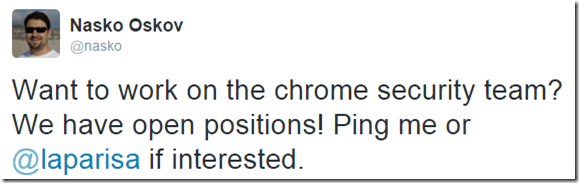
Tweet: Join the Chrome Security team

Casual conversations were had. Then more serious conversations. Then interviews. And more interviews.

Philip Su, a brilliant guy whose tech talk inspired me to apply at Microsoft once said: “The team you want to join is the one that’s hard to get into.

Every single person I talked to was smarter than I am. It was crazy-intimidating. And inspiring.

Tweet: Wanna grow? Be the dumbest guy in the room

For my first few years on IE, there was ample speculation that Google would release a browser, presumably some slick skinning of Firefox with all the Google services bolted on. Then Chrome shipped and it was so much more interesting. So many things were done “right” from day 1, and the pace of evolution was amazing. And it wasn’t just the technical guts– I was astonished to see things like the Chrome comic book, which explained things like process isolation and integrity levels in a way that mere mortals could understand. Chrome continued to evolve and grow to take on its role as a platform; ChromeOS now powers a third of the machines in my house. The Chrome team is driving the security of the web as a whole.

I want users to win. To achieve that, I want the web to win, and I want to make life harder for the bad guys every day.

I’m thrilled, excited, honored, and more than a little intimidated to be joining the Chrome Security team on January 4th 2016.

Let the firehose-drinking begin!

Boy being knocked over by a stream of water from a firehose directed at his face

-Eric

Update: I wrote about my experiences after Year One and Year Two.

Segue

My last day at Telerik is December 31st, 2015.

More soon


Here’s a copy of my “Last day” blog post for posterity.

Fiddler—A Segue

 by Eric Lawrence  December 22, 2015 ProductivityDebugging11 Comments

In September 2012, Telerik completed the acquisition of the Fiddler Web Debugger, and I announced that I would join Telerik to upgrade my side project to my full-time job.

It’s been a busy three years, as we evolved Fiddler from version 2.4.1 to 4.6.2—the changelog alone grew by 1701 entries as we added dozens of major features, hundreds of tweaks, and thousands of fixes. Nearly every line has been touched, and performance and functionality have been improved throughout. We brought Fiddler to Linux, simplified running it in a VM on a Mac and worked to ensure that it remains compatible with all of the latest-version mobile platforms and desktop browsers, including Microsoft Edge. I was able to make long-awaited improvements in areas like Image AnalysisWebSocket inspectionAPI TestingextensibilityUI customization, PCAP import and many more. In my off-hours, I even released a Second Edition of my best-selling book “Debugging with Fiddler.” Perhaps most rewarding of all, I had the opportunity to interact with thousands of customers via issue reports, and speak to thousands more at conferences and webinars.

Telerik has honored its commitment to keep Fiddler for Windows available for free, even as we introduced a new fully-supported commercial offering that allows companies to build Fiddler-like functionality into their applications via the FiddlerCore class library.

Behind the scenes, many engineering process improvements were introduced. We migrated from “xcopy-to-NAS source control” to a private repo on GitHub. A Jenkins CI server was introduced to catch build breaks across our many targets (Windows v2, Window v4, FiddlerCore v2, v3, and v4), and we added unit tests for critical functionality. Issue tracking moved from a pile of scrawled napkins to tagged and prioritized GitHub issues, and code-signing was upgraded to use a hardware token.

While I love featuresmore than anything else, it’s these engineering process improvements that give me the confidence that Telerik will be able to continue to improve Fiddler as I move on to pursue an exciting opportunity outside the company in 2016.

I had no idea what I was signing up for when I released the first build of Fiddler almost thirteen years ago—it’s been an incredible adventure, and it’s time for a change. While I expect to remain involved in the Fiddler community via ongoing updates to the Fiddler book, hopping in to answer questions on StackOverflow & the forum and building useful extensions, I’ll pass the development baton to my colleagues at Telerik who have been building indispensable tools and controls for developers since 2002. I’m excited to see what’s coming next—projects like Telerik PlatformTelerik® Kendo UI® and NativeScript all have some pretty fantastic plans for 2016 that I think you’ll enjoy.

Thanks for everything, and happy holidays!

-Eric Lawrence

Certificates Matter

Recently, my web host stopped supporting the FrontPage Server Extensions used by Microsoft Expression Web 4 for website publishing (FPSE is now out-of-support). FPSE allowed me to publish to my site over a HTTPS connection, helping keep my password safe and my uploaded files unmodified.

Unfortunately, the alternative FTP transport is completely insecure–passwords and data transfer in plaintext and can be stolen or tampered and Microsoft products generally don’t support FTPS. As a consequence, I had to stop using Expression Web to edit my various websites. Update: As it turns out, you *can* use FTPS inside Expression Web, but only via the Site > Open Site menu, not the File > Open menu. Expression then warns you that FTP is insecure (bizarrely implying HTTP is better), but network monitoring shows that it’s properly using FTPS under the covers.

Fortunately, my favorite text editor, EditPad Pro offers FTPS support and I quickly moved to using it to edit my site.

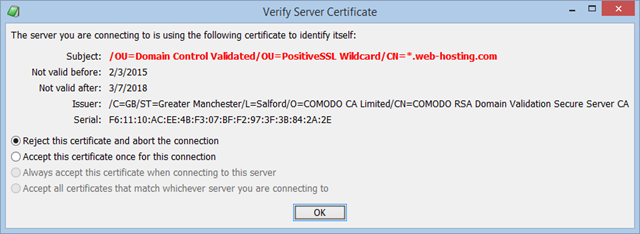
Except for one thing—even when using a shared host, the server always returned the same certificate, one whose Subject Name didn’t match the hostname of my website. Yet EditPad didn’t complain at all, it just silently accepted any certificate and sent my username and password. An active man-in-the-middle can easily intercept FTPS connections and return a dummy certificate which EditPad would happily use.

I reported this vulnerability to the developer and I’m happy to see that he’s fixed this problem in version 7.4.0; if the certificate presented isn’t valid for the target, a security prompt is shown every time:

TLS Name Mismatch warning

Ideally, my webhost will start using my installed certificate for FTPS and WebDAV connections, but in the interim manual certificate validation serves as a fallback.

If you build any TLS-protected client or server application, you should always validate the certificate presented during the handshake.

Stay safe out there!

-Eric Lawrence

Security Response Basics

Security response isn’t just about the “sexy” analysis of vulnerabilities, reverse-engineering of malware, and so on… it’s probably mostly about getting the basics right.

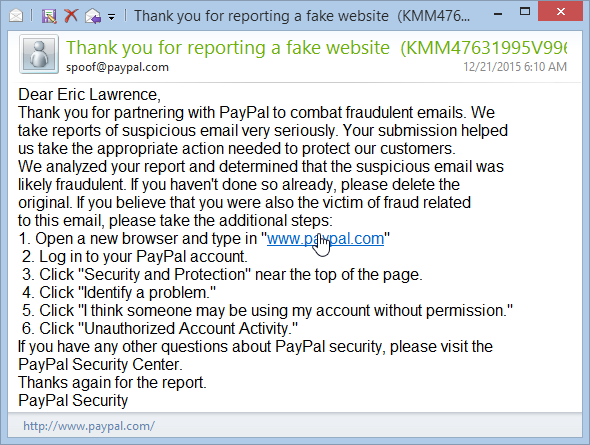
Every morning, I forward all of the PayPal phishing scams I receive to PhishTank, Netcraft, and Spoof@Paypal. Today, I took a closer look at the response I got to the last of these:

HTTP link to paypal in email

PayPal was carefully instructing me to visit their site using an unsecure HTTP url. While plenty of sites make this mistake, PayPal has a large security team and they should certainly know better… especially when the email is from their security team!

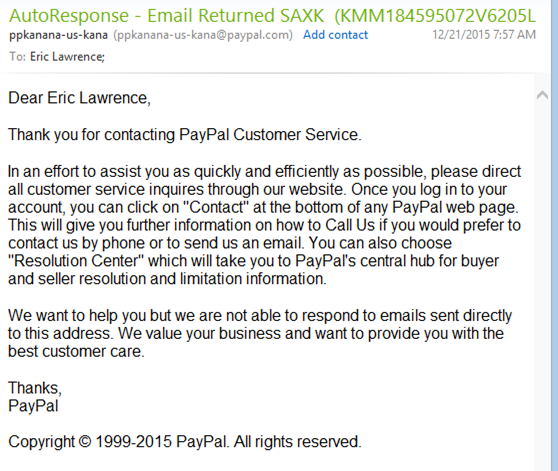
I dutifully dashed off a note to security@paypal, suggesting that they stop giving out bad security advice. Only to learn that they’ve decided not to follow an obvious best practice, instead auto-replying to say that they don’t accept email at that address and suggesting I follow some convoluted process on their website:

Autoreply - go to our website

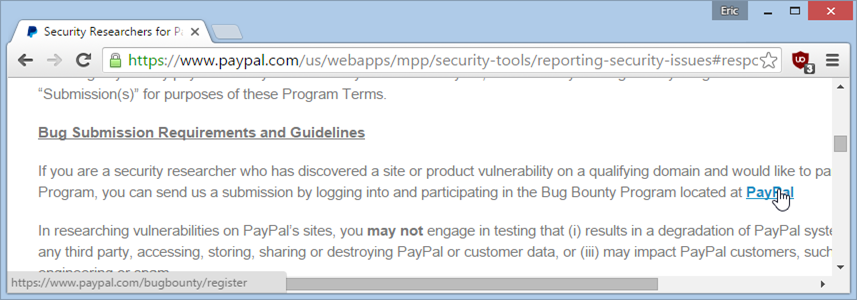
Gah. Okay, fine, I’ll just Google around to find out how to report a security vulnerability to PayPal. I find a very nice “Reporting Security Issues” page, which contains a LOT more text than I’d like to read, but hey, it’s a bug bounty program too so I guess they need lots of legalese. Okay, so I’ll just click the link to register:

Link to registration for bounty

Except that, oops… this link doesn’t go anywhere, automatically redirecting to PayPal’s homepage.


If you can’t manage your own security response process, you should seriously look into getting an account at HackerOne; researchers are far less likely to get fed up when the process is clear, simple, and well-managed.

-Eric Lawrence