Certificate Revocation in Microsoft Edge

When you visit a HTTPS site, the server must present a certificate, signed by a trusted third-party (a Certificate Authority, aka CA), vouching for the identity of the bearer. The certificate contains an expiration date, and is considered valid until that date arrives. But what if the CA later realizes that it issued the certificate in error? Or what if the server’s private key (corresponding to the public key in the certificate) is accidentally revealed?

Enter certificate revocation. Revocation allows the trusted third-party to indicate to the client that a particular certificate should no longer be considered valid, even if it’s unexpired.

There are several techniques to implement revocation checking, and each has privacy, reliability, and performance considerations. Back in 2011, I wrote a long post about how Internet Explorer handles certificate revocation checks.

Back in 2018, the Microsoft Edge team decided to match Chrome’s behavior by not performing online OCSP or CRL checks for most certificates by default.

Wait, What? Why?

The basic arguments are that HTTPS certificate revocation checks:

  • Impair performance (tens of milliseconds to tens of seconds in latency)
  • Impair privacy (CAs could log what you’re checking and know where you went)
  • Are too unreliable to hard-fail (too many false positives on downtime or network glitches)
  • Are useless against most threats when soft-fail (because an active MITM can block the check)

For more context about why Chrome stopped using online certificate revocation checks many years ago, see these posts from the Chromium team explaining their thinking:

Note: Revocation checks still happen

Chromium still performs online OCSP/CRL checks for Extended Validation certificates only, in soft-fail mode. Update: Chromium has announced that v106+ will no longer revocation check for EV. If the check fails (e.g. offline OCSP responder) the certificate is just treated as a regular TLS certificate without the EV treatment. Users are very unlikely to ever notice because the EV treatment, now buried deep in the security UX, is virtually invisible. Notably, however, there is a performance penalty– if your Enterprise blackholes or slowly blocks access to a major CA’s OCSP responder, TLS connections from Chromium will be 🐢 very slow.

Even without online revocation checks, Chromium performs offline checks in two ways.

  1. It calls the Windows Certificate API (CAPI) with an “offline only” flag, such that revocation checks consult previously-cached CRLs (e.g. if Windows had previously retrieved a CRL), and certificate distrust entries deployed by Microsoft.
  2. It plugs into CAPI an implementation of CRLSets, a Google/Microsoft deployed list of popular certificates that should be deemed revoked.

On Windows, Chromium prior to version ~110 used the CAPI stack to perform revocation checks. I would expect this check to behave identically to the Internet Explorer check (which also relies on the Windows CAPI stack). Specifically, I don’t see any attempt to set dwUrlRetrievalTimeout away from the default. How CAPI2 certificate revocation works. Sometimes it’s useful to enable CAPI2 diagnostics.

CRLSets are updated via the Component Updater; if the PC isn’t ever on the Internet (e.g. an air-gapped network), the CRLSet will only be updated when a new version of the browser is deployed. (Of course, in an environment without access to the internet at large, revocation checking is even less useful.)

After Chromium moved to use its own built-in verifier, it began performing certificate revocation checks using its own revocation checker. Today, that checker supports only HTTP-sourced CRLs (the CAPI checker also supports HTTPS, LDAP, and FILE). Learn more here.

Group Policy Options

Chromium (and thus Edge and Chrome) support two Group Policies that control the behavior of revocation checking.

The EnableOnlineRevocationChecks policy enables soft-fail revocation checking for certificates. If the certificate does not contain revocation information, the certificate is deemed valid. If the revocation check does not complete (e.g. inaccessible CA), the certificate is deemed valid. If the certificate revocation check successfully returns that the certificate was revoked, the certificate is deemed invalid.

The RequireOnlineRevocationChecksForLocalAnchors policy allows hard-fail revocation checking for certificates that chain to a private anchor. A “private anchor” is not a “public Certificate Authority”, but instead e.g. the Enterprise root your company deployed to its PCs for either its internal sites or its Monster-in-the-Middle MITM network traffic inspection proxy). If the certificate does not contain revocation information, the certificate is deemed invalid. If the revocation check does not complete (e.g. inaccessible CA), the certificate is deemed invalid. If the certificate revocation check successfully returns that the certificate was revoked, the certificate is deemed invalid.

If you do choose to enable revocation checks, ensure that your certificates’ revocation information is compatible with the new verifier (served over HTTP, DER encoded) in Edge 112+.

Other browsers

Note: This section may be outdated!

Here’s an old survey of cross-browser revocation behavior.

By default, Firefox still queries OCSP servers for certificates that have a validity lifetime over 10 days. If you wish, you can require hard-fail OCSP checking by navigating to about:config and toggling security.OCSP.require to true. See this wiki for more details. Mozilla also distributes a CRLSet-like list of intermediates that should no longer be trusted, called OneCRL.

For the now-defunct Internet Explorer, you can set a Feature Control registry DWORD to convert the usual soft-fail into a slightly-less-soft fail:

HKEY_CURRENT_USER\SOFTWARE\Microsoft\Internet Explorer\Main\FeatureControl\FEATURE_WARN_ON_SEC_CERT_REV_FAILED

iexplore.exe=1

Edge Legacy did not have any option for non-silent failure for revocation checks.

Under the Hood: Viewing the CRLSet’s Content

You can see the current CRLSet version number inside edge://components, but how can you see the content?

The same tool that dumps Google’s CRLSet (https://github.com/agl/crlset-tools) works with Edge, except that you need to point it to a copy in the Edge install folder:

go run crlset.go dump "%LocalAppData%\Microsoft\Edge\User Data\CertificateRevocation\6498.2023.3.1\crl-set"

2025 Update – OCSP Fading Away

The great TLS Newsletter explains that LetsEncrypt is going to stop supporting OCSP, and explains the history and justification: https://www.feistyduck.com/newsletter/issue_121_the_slow_death_of_ocsp

New Recipes for 3rd Party Cookies

Last Updated: 11 April 2025

For privacy reasons, the web platform is moving away from supporting 3rd-party cookies, first with lockdowns, and eventually with removal of support starting at 1% in Q1 2024 (was late 2023) and slated for completion in the third quarter of 2024. UPDATE: In Summer 2024, Chrome announced a new plan:

…we are proposing an updated approach that elevates user choice. Instead of deprecating third-party cookies, we would introduce a new experience in Chrome that lets people make an informed choice that applies across their web browsing, and they’d be able to adjust that choice at any time. We’re discussing this new path with regulators, and will engage with the industry as we roll this out.

The Edge team will almost certainly follow the Chrome team, perhaps on a slightly delayed timeline.

Background: What Does “3rd-Party” Mean?

A 3rd-party cookie is one that is set or sent from a 3rd-party context on a web page.

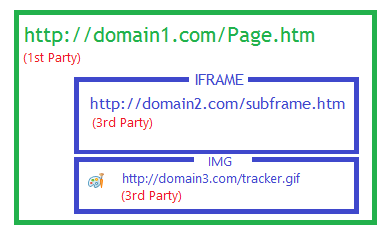
A 3rd-party context is a frame or resource whose registrable domain (sometimes called eTLD+1) differs from that of the top-level page. This is sometimes called “cross-site.” In this example:

domain2.com and domain3.com are cross-site 3rd-parties to the parent page served by domain1.com. (In contrast, a resource from sub.domain1.com is cross-origin, but same-site/1st Party to domain1.com).

Importantly, frames or images[1] from domain2.com and domain3.com cannot see or modify the cookies in domain1.com‘s cookie jar, and script running at domain1.com cannot see or set cookies for the embedded domain2.com or domain3.com contexts.

Background: Existing Restrictions

Q: Why do privacy advocates worry about 3rd-party cookies?
A: Because they are a simple way to track a given user’s browsing across the web.

Say a bunch of unrelated sites include ads from an advertising server. A 3rd-party cookie set on the content from the ad will allow that ad server to identify the set of sites that the user has visited. For example, consider three pages the user visits:

The advertiser, instead of simply knowing that their ad is running on Star Trek’s website, is also able to know that this specific user has previously visited sites related to running and a medication, and can thus target its advertisements in a way that the visitor may deem a violation of their privacy.

For this reason, browsers have supported controls on 3rd-party cookies for decades, but they were typically off-by-default or trivially bypassed.

More recently, browsers have started introducing on-by-default controls and restrictions, including the 2020 change that makes all cookies SameSite=Lax by default.

However, none of these restrictions will go as far as browsers will go in the future.

A Full Menu of Replacements

In order to support scenarios that have been built atop 3rd-party cookies for multiple decades, new patterns and technologies will be needed.

The Easy Recipe: CHIPS

In 2020, cookies were made SameSite=Lax by default blocking cookies from being set and sent in 3rd-party contexts by default. The workaround for Web Developers who still needed cookies in 3rd-party contexts was simple: when a cookie is set, adding the attribute SameSite=none will disable the new behavior and allow the cookie to be set and sent freely. Over the course of the last two years, most sites that cared about their cookies began sending the attribute.

The CHIPS proposal (“Cookies having independent partitioned state”) offers a new but more limited escape hatch– a developer may opt-in to partitioning their cookie so that it’s no longer a “3rd party cookie”, it’s instead a partitioned cookie. A partitioned cookie set in the context of domain3.com embedded inside runnersworld.com will not be visible in the context domain3.com embedded inside startrek.com. Similarly, setting the cookie in the context domain3.com embedded inside gas-x.com will have no impact on the cookie’s value in the other two pages. If the user visits domain3.com as a top-level browser navigation, the cookies that were set on that origin’s subframes in the context of other top-level pages remain inaccessible.

Using the new Partitioned attribute is simple; just add it to your Set-Cookie header like so:

Set-Cookie: __Host-id=4d5e6;Partitioned;SameSite=None; Secure;Path=/; 

Support for CHIPS is expected to be broad, across all major browsers.

I was initially a bit skeptical about requiring authors to explicitly specify the new attribute– why not just treat all cookies in 3rd-party contexts as partitioned? I eventually came around to the arguments that an explicit declaration is desirable. As it stands, legacy applications already needed to be updated with a SameSite=None declaration, so we probably wouldn’t be able to keep any unmaintained legacy apps working even if we didn’t require the new attribute.

Chromium-based browsers will support CHIPS by default in v114+. Safari added support in v18.4. Firefox does not have support as of April 1, 2025.

The Explicit Recipe: The Storage Access API

The Storage Access API allows a website to request permission to use storage in a 3rd party context. Microsoft Edge joined Safari and Firefox with support for this API in 2020 as a mechanism for mitigating the impact of the browser’s Tracking Prevention feature.

The Storage Access API has a lot going for it, but lack of universal support from major browsers means that it’s not currently a slam-dunk.

A Niche Recipe: Related Website Sets (née: First Party Sets)

In some cases, the fact that cookies are treated as “3rd-party” represents a technical limitation rather than a legal or organizational one. For example, Microsoft owns xbox.com, office.com, and teams.microsoft.com, but these origins do not today share a common eTLD+1, meaning that pages from these sites are treated as cross-site 3rd-parties to one another. Related Website Sets (formerly First Party Sets) would allow sites owned and operated by a single-entity to be treated as first-party when it comes to privacy features.

Originally, a new cookie attribute, SameParty, would allow a site to request inclusion of a cookie when the cross-origin sub-resource’s context is in the same First Party Set as the top-level origin, but a recent proposal removes that attribute.

The Authentication Recipe: FedCM API

As I explained three years ago, authentication is an important use-case for 3rd-party cookies, but it’s hampered by browser restrictions on 3P cookies. The Federated Credential Management API proposes that browsers and websites work together to imbue the browser with awareness and control of the user’s login state on participating websites. As noted in Google’s explainer:

We expect FedCM to be useful to you only if all these conditions apply:

  1. You’re an identity provider (IdP).
  2. You’re affected by the third-party cookie phase out.
  3. Your Relying Parties are third-parties.

FedCM is a big, complex, and important specification that aims to solve exclusively authentication scenarios.

Other Authentication Recipes

Update: I wrote a whole post on alternatives to 3rd Party cookies for Auth flows.

Complexity Abounds

The move away from supporting 3rd-party cookies has huge implications for how websites are built. Maintaining compatibility for desirable scenarios while meaningfully breaking support for undesirable scenarios (trackers) is inherently extremely challenging– I equate it to trying to swap out an airliner’s engines while the plane is full of passengers and in-flight.

Combinatorics

As we add multiple new approaches to address the removal of 3P cookies, we must carefully reason about how they all interact. Specifications need to define how the behavior of CHIPS, First-Party-Sets, and the Storage Access API all intersect, for example, and web developers must account for cases where a browser may support only some of the new features.

Cookies Aren’t The Only Type of Storage

Another compexity is that cookies aren’t the only form of storage– IndexedDB, localStorage, sessionStorage, and various other cookie-like storages all exist in the web platform. Limiting only cookies without accounting for other forms of storage wouldn’t get us to where we want to be on privacy.

That said, cookies are one of the more interesting forms of storage when it comes to privacy, as they

  1. are sent to the server before the page loads,
  2. operate without JavaScript enabled,
  3. operate in cases like <img> elements where no script-execution context exists
  4. etc.

Cookies Are Special

Another interesting aspect of migrating scenarios away from cookies is that we lose some of the neat features that have been added over the years.

One such feature is the HTTPOnly declaration, which prevents a cookie from being accessible to JavaScript. This feature was designed to blunt the impact of a cross-site scripting attack — if script injected into a compromised page cannot read a cookie, that cookie cannot be leaked out to a remote attacker. The attacker is forced to abuse the XSS’d page immediately (“a sock-puppet browser”) limiting the sorts of attacks that can be undertaken. Some identity providers demand that their authentication tokens be carried only via HTTPOnly cookies, and if an authentication token must be available to JavaScript directly, the provider mints that token with a much shorter validity lifetime (e.g. one hour instead of one week).

Another cookie feature is TLS Token Binding, an obscure capability that attempts to prevent token theft attacks from compromised PCs. If malware or a malicious insider steals Token-bound cookie data directly from a PC, that cookie data will not work from another device because the private key material used to authenticate the cookies cannot be exported off of the compromised client device. (This non-exportability property is typically enforced by security hardware like a TPM.) While Token binding provides a powerful and unique capability for cookies, for various reasons the feature is not broadly supported.

Deprecating 3rd-Party Cookies is Not a Panacea

Unfortunately, getting rid of 3rd-party cookies doesn’t mean that we’ll be rid of tracking. There are many different ways to track a user, ranging from the obvious (they’re logged in to your site, they have a unique IP address) to the obscure (various fingerprinting mechanisms). But getting rid of 3rd-party cookies is a valuable step as browser makers work to engineer a privacy sandbox into the platform.

It’s a fascinating time in the web platform privacy space, and I can’t wait to see how this all works out.

Nov ’23 Update: The Chrome team published some additional guidance and resources in Preparing for the end of 3P Cookies. This includes details of various opt-out mechanisms for Enterprises.

-Eric

[1] Interestingly, if domain1.com includes a <script> element pointed at a resource from domain2.com or domain3.com, that script will run inside domain1.com‘s context, such that calls to the document.cookie DOM property will return the cookies for domain1.com, not the domain that served the script. But that’s not important for our discussion here.

My Next Opportunity

This is the farewell email I sent to my Edge teammates yesterday.


IWebBrowser3::BeforeNavigate()

When I left the Internet Explorer team in 2012 to work on Fiddler full-time, I did so with a measure of heartbreak, absolutely certain that I would never be quite as good at anything else. When I came back to the Edge team in 2018, I looked back with amusement at the naïveté of my earlier melancholy. I had learned a huge amount during my six years away, and I brought new skills and knowledge to bear on the ambitious challenge of replatforming Edge atop Chromium. While it’s still relatively early days, our progress over these last four years has truly been amazing—we’ve adopted tens of millions of lines of code as our own, grown the team, built a batteries-included product superior to the market leader, and started winning share for the first time in years. More importantly, we’ve modernized our team culture: more inclusive, heavily invested in learning, with faster experimentation and more transparent public communication. It’s been an inspiring journey.

In the fifty months since my return, I’ve written 124 blog posts and landed 168 changelists in upstream Chromium (plus one or two downstream :), dwarfing the 94 CLs I landed back when I was a Chrome engineer. I had the honor of leading PMs in both the Pixels and Bytes subteams in Web Platform, presented the Edge Privacy Story, and travelled around the world (Lyon and Fukuoka) for W3C TPAC meetings. I’ve had the opportunity to help many other teams as a member of “Microsoft’s team in Chromium”, and to engage directly with Enterprise customers as they migrated off of IE and onto a modern standards-based web platform. I’ve helped to interview and hire a set of awesome new PMs. Throughout it all, I’ve strived to maximize my impact to benefit the billions of humans who browse the web.

This Friday (July-22-2022) will be the last day of my current tour. I leave things in good hands: Erik is an amazing engineering manager, and I’ll miss racing him to discover the root cause of gnarly networking problems. I’ve spent this second tour doing my very best to write everything down– if anything, I’m but a caching proxy server for my archive of blog posts. I didn’t write an encyclopedic guide on ramping up on browser dev, or an opinionated set of career advice just for fun— I’ve been quietly working to keep my bus factor as low as possible. I encourage everyone to take full advantage of the democratization of knowledge-sharing provided by our internal wikis and public docs site—seize every opportunity to “leave it better than you found it.”

Thank you all for the years of awesome collaborations on building a browser to delight our users.

Next Monday, I’ll be moving over to join some old friends on Microsoft’s Web Protection team, working to help protect users from all manner of internet-borne threats.

I’m not going far; please stay in touch via Twitter, LinkedIn, or good old-fashioned email.

Until next time,

-@ericlaw

Edge URL Schemes

The microsoft-edge: Application Protocol

Microsoft Edge implements an Application Protocol with the scheme microsoft-edge: that is designed to launch Microsoft Edge and pass along a web-schemed URL and/or additional arguments. A basic invocation might be as simple as:

microsoft-edge:http://example.com/

However, as is often the case with things I choose to write about, there’s a bit of hidden complexity that may not be immediately obvious.

Non-Public

The purpose of this URL scheme is to enable Windows and cooperating applications to invoke particular user-experiences in the Edge browser.

This scheme is not considered “public” — there’s no official documentation of the scheme, and the Edge team makes no guarantees about its behavior. We can (and do) add or modify functionality as needed to achieve desired behaviors.

Over the last few years, we’ve added a variety of functionality to the scheme, including the ability to invoke UX features, launch into a specific user profile, and implement other integration scenarios. By way of example, Windows might advertise the Edge Surf game and, if the user chooses to play, the game is launched by ShellExecuting the URL microsoft-edge:?ux=surf_game.

Because of the non-public and inherently unstable (not backward-compatible) nature of this URL scheme, it is not an extensibility point and it is not supported to configure the handler to be anything other than Microsoft Edge.

Under the hood: handling of this scheme can be found in Edge’s non-public version of the StartupBrowserCreator::ProcessCmdLineImpl function I wrote about recently as a part of my post on Chromium Startup.

Tricky Bits

One (perhaps surprising) restriction on the microsoft-edge scheme is that it cannot be launched from inside Edge itself. If a user inside Edge clicks a link to the microsoft-edge: scheme, nothing visibly happens. Only if they open the F12 Console will they see an error message:

The microsoft-edge protocol is blocked inside Edge itself to avoid “navigation laundering” problems, whereby going through the external handler path would result in loss of context. Losing the context of a navigation can introduce vulnerabilities in both security and abuse. For example, a popup blocker bypass existed on Android when Android Chrome failed to block the Chrome version of this protocol.

Similarly, anti-CSRF restrictions on SameSite=Strict cookies could be circumvented because such cookies are deliberately suppressed on “cross-site” navigations but not suppressed for “external” navigations. Android had a similar issue.

The Edge WebView2 control also blocks navigation to the microsoft-edge protocol, although I expect that an application which wants to allow such navigations could probably do so with the appropriate event handlers.

Another tricky bit concerns the fact that a user may have multiple different channels of Edge (Stable, Beta, Dev, Canary) installed, but the microsoft-edge protocol can only be claimed by one of them. This can be potentially confusing if a user has different channels selected to handle HTTPS: and microsoft-edge links:

…because some links will open in Edge Canary while others will open in Edge Beta.


The edge: Built-In Scheme

Beyond the aforementioned application protocol, Microsoft Edge also supports a Built-In Scheme named edge:. In contrast to the microsoft-edge: application protocol, this scheme is only available within the browser. You can not invoke an edge: URL elsewhere in Windows, or pass it to Edge as a command-line argument.

The edge: scheme is simply an alias for the chrome: and about: schemes used in Chromium to support internal pages like about:flags, about:settings, and similar (see edge:about for a list).

For security reasons, regular webpages cannot navigate to or load subresources from the edge/chrome schemes. Years ago, a common exploit pattern was to navigate to chrome:downloads and then abuse its privileged WebUI bindings to escape the browser sandbox. There are also special debug urls like about:inducebrowsercrashforrealz that will do exactly as they say.

End of Q2 Check-in

Back in January, I wrote about my New Years’ Resolutions. I’m now 177 days in, and things are continuing to go well.

  • Health and Finance: A dry January. Exceeded. I went from 2 or 3 drinks a night six times a week to around 6 drinks per month, mostly while on vacations.
  • Health: Track my weight and other metrics. I’ve been using the FitBit Sense smartwatch to track my workouts and day-to-day, and I’ve been weighing in on a FitBit smart scale a few days per week. I’m down a bit over 50 pounds. This is considerably beyond where I expected to end up (-25 pounds).
  • Health: Find sustainable fitness habits. Going great. I’ve been setting personal records for both speed and distance.
  • TravelI cruised to Mexico with the kids over Spring break, went to Seattle for work in Maywill be taking the kids to Maryland in July, and have booked an Alaska cruise for September.
  • Finance: The stock market is way down, and inflation is way up. Getting divorced turns out to be really terrible for feeling financially stable. Uncertainty at work has made things significantly worse.
  • LifeProduce moreI’ve been blogging a bit more lately. I decided to keep going with HelloFresh– it’s much more expensive than I’d like, but it’s more enjoyable/rewarding than I expected.

Fitness – Mechanics

When you get right down to it, losing weight is simple (which is different than easy). Every pound of fat is 3500 calories. To lose two pounds of fat per week, burn 1000 calories more than you eat for each day of the week. There are two ways to do this: intentional eating, and increased exercise. I embarked upon both.

When I first moved into my new house, I designated the old dining room as a library and installed a sofa and three large bookshelves. But over the first year here, I found that I almost never used the room, so when I resolved to start working out, it was a natural place to put my fitness equipment. So my Library has become my Gym.

Over the last two years, I’ve accumulated a variety of equipment related to improving fitness:

…of these, I’d rate the Treadmill, Bike, Fitbit Watch, Paper Calendar, and Scale as the most important investments; everything else is a nice-to-have at best.

My Gym has the major advantage of being directly in the middle of my house, between my bedroom and my home office, so there’s simply no ignoring it on my morning “commute.”

Action shows with cliffhangers are a wonderful “nudge” to get on the exercise bike on days when I’m feeling on the fence and looking for excuses not to work out. I asked my Tweeps for suggestions on what TV shows I should watch and got a bunch of good suggestions. After I finished The Last Ship, I moved on to Umbrella Academy, then The Orville, and now I’m sweating my way through Ozark.

For running, I’m using the training programs on iFit. They’re expensive (hundreds of dollars a year) but for me, have proven entirely worth it. I’ve done training series in Costa Rica, the Azores, one-off 5K and 10K races all over, did a half-marathon (split over two days) in the shadow of Kilimanjaro, and on June 29th ran my first full half-marathon (in NYC). While it’s true that they sometimes feel a bit cheesy (having a recorded trainer who can’t see you cheering you on) it’s still quite motivational to have the ability to run in a new and exotic place at any hour of the day, in the comfort of my A/C with three different fans blowing at me. I got started slowly (various short walks with comedians, who were only slightly funny) and then ramped up into a weight-loss series with Chris and Stacie Clark. Leah Rosenfeld got me ready for my first 10K, and now I’m running with Knox Robinson.

Intentional Eating

A lot of getting in shape turns out to be mental, and on this front things have been going pretty well. While I’ve had a lot of stress in my life this year, much of it has been conducive to switching things up, and changing my diet and adding lots of exercise fits into that new approach.

  • I’ve stopped my longstanding practice of “magical eating” where I don’t look at the calorie counts for stuff I want to eat when I know it’s “bad.” Sometimes the number is not as bad as I think, sometimes I realize that there’s something else I’ll like more that’s not as bad, and sometimes I just think “I don’t really want this that bad” and go eat something healthy instead.
  • I rarely deny myself anything: I’ll just procrastinate or save something for a special occasion. “I’ll just have that later” is much easier on the willpower than “No.
  • Eating unhealthy food less often results in greater pleasure (and quicker satisfaction) when you do indulge. One of my heroes describes this sort of change as stepping off of the hedonic treadmill.
  • Avoiding alcohol has allowed me to be a lot more intentional about what I choose to eat at night.
  • I hate wasting food, but I’ve stopped finishing whatever’s left on my kids’ plates when they’re done.
  • Cooking (HelloFresh) a few times per week makes it much simpler to keep meal calories under control– I pick lower calorie menus, and cut down on ingredients (like butter) that I don’t really care for. There’s no question that there’s an Ikea-effect at play– food that I prepare simply tastes better than it would if I didn’t make it myself.
  • Seeing progress week-to-week has been hugely motivating. Rigor in tracking has been really important in proving to myself that the choices I make day-to-day are inexorably reflected in my outcomes.

Progress

There are different ways to view progress.

Beyond letting my devices track my weight and workouts, I also have a paper calendar and a notepad; these are both a backup, and a tangible reminder of the progress I’ve made.

Bike, Treadmill and other workouts

Numbers don’t tell the whole story, of course. I can look at clothes that stopped fitting as I went from a 40″ to a 35″:

…or my profile (traced to avoid scarring you for life)

…or just poke my legs, which went from squishy to extremely firm.

What’s Next

In large part, I’ve achieved the first phase of my plan– proving to myself that eating well and exercising a lot determines the shape of my body. It seems idiotic to think otherwise, of course, but I assure you that at the start of this process I was skeptical of the strength of the relationship, and of my ability to control it.

For the next phase, I’d like to start adding more upper-body workouts (my reduced weight means I can do unassisted pull ups for the first time in decades) and continue to add more endurance workouts in preparation for an ambitious fitness and life adventure that I expect to commit to soon. [Update: ProjectK]

-Eric