Recently, a developer asked me how to enable Brotli content-compression support in FiddlerCore applications, so that APIs like oSession.GetResponseBodyAsString() work properly when the entity body has been compressed using brotli.
Right now, support requires two steps:
Put brotli.exe (installed by Fiddler or off Github) into a Tools subfolder of the folder containing your application’s executable.
Ensure that the Environment.SpecialFolder.MyDocuments folder exists and contains a FiddlerCore subfolder (e.g. C:\users\username\documents\FiddlerCore).
Step #1 allows FiddlerCore to find brotli.exe. Alternatively, you can set the fiddler.config.path.Tools preference to override the folder.
Step #2 allows FiddlerCore to create necessary temporary files. Sadly, this folder cannot presently be overridden [Bug].
One day, Fiddler might not need brotli.exe any longer, as Brotli compression is making its way into the framework.
Every non-empty response from a web server should contain a Content-Type response header that declares the type of content contained in the response. This declaration helps the browser understand how to process the response and can help prevent a number of serious security vulnerabilities.
Setting this header properly is more important than ever.
The Old Days
Many years ago, an easy way to exploit a stored-XSS vulnerability on a web server that accepted file uploads was to simply upload a file containing a short HTML document with embedded JavaScript. You could then send potential victims a link to http://vulnerable.example.com/uploads/123/NotReallyA.jpeg and when the victim’s browser rendered the document, it would find the JavaScript and run it in the security context of vulnerable.example.com, allowing it to steal the contents of cookies and storage, reconfigure your account, rewrite pages, etc.
Sites caught on and started rejecting uploads that lacked the “magic bytes” indicating a JPEG/GIF/PNG at the start of the file. Unfortunately, browsers were so eager to render HTML that they would “sniff” the bytes of the file to see if they could find some HTML to render. Bad guys realized they could shove HTML+Script into metadata fields of the image binary, and the attack would still work. Ugh.
In later years, browsers got smarter and stopped sniffing HTML from files served with an image/ MIME type, and introduced a new response header:
X-Content-Type-Options: nosniff
…that declared that a browser should not attempt to sniff HTML from a document at all.
Use of the nosniff directive was soon expanded to help prevent responses from being interpreted as CSS or JavaScript, because clever attackers figured out that the complicated nature of Same Origin Policy meant that an attacking page could execute a cross-origin response and use side-effects (e.g. the exception thrown when trying to parse a HTML document as JavaScript) to read secrets out of that cross-origin response.
Browser makers have long dreamed of demanding that a response declare Content-Type: application/javascript in order for the response to be treated as JavaScript, but unfortunately telemetry tells us that this would break a non-trivial number of pages. So for now, it’s important to continue sending X-Content-Type-Options: nosniff on responses to mitigate this threat.
The Modern World
Chrome’s security sandbox helps ensure that a compromised (e.g. due to a bug in V8 or Blink) Renderer Process cannot steal or overwrite data on your device. However, until recently, a renderer compromise was inherently a UXSS vector, allowing data theft from every website your browser can reach.
Nearly a decade ago, Microsoft Research proposed a browser with stronger isolation between web origins, but as the Security lead for Internet Explorer, I thought it hopelessly impractical given the nature of the web. Fast forward to 2017, and Chrome’s Site Isolation project has shipped after a large number of engineer-years of effort.
Site Isolation allows the browser to isolate sites from one another in different processes, allowing the higher-privilege Browser Process to deny resources and permissions to low-privilege Renderers that should not have access. Sites that have been isolated are less vulnerable to renderer compromises, because the compromised renderer cannot load protected resources into its own process.
Isolation remains tricky because of complex nature of Same Origin Policy, which allows a cross-origin response to Execute without being directly Read. To execute a response (e.g. render an image, run a JavaScript, load a frame), the renderer process must itself be able to read that response, but it’s forced to rely upon its own code to prevent JavaScript from reading the bytes of that response. To address this, Chrome’s Site Isolation project hosts cross-origin frames inside different processes, and (crucially) rejects the loading of cross-origin documents into inappropriate contexts. For instance, the Browser process should not allow a JSON file (lacking CORS headers) to be loaded by an IMG tag in a cross-origin frame, because this scenario isn’t one that a legitimate site could ever use. By keeping cross-site data out of the (potentially compromised) renderer process, the impact of an arbitrary-memory-read vulnerability is blunted.
Of course, for this to work, sites must correctly mark their resources with the correct Content-Type response header and a X-Content-Type-Options: nosniff directive. (See the latest guidance on Chromium.org)
When Site Isolation blocks a response, a notice is shown in the Developer Tools console:
Console Message: Blocked current origin from receiving cross-site document
The Very Modern World
You may have heard about the recent “speculative execution” attacks against modern processors, in which clever attackers are able to read memory to which they shouldn’t normally have access. A sufficiently clever attacker might be able to execute such an attack from JavaScript in the renderer and steal the memory from that process. Such an attack on the CPU’s behavior results in the same security impact as a renderer compromise, without the necessity of finding a bug in the Chrome code.
In a world where a malicious JavaScript can read any byte in the process memory, the renderer alone has no hope of enforcing “No Read” semantics. So we must rely upon the browser process to enforce isolation, and for that, browsers need the help of web developers.
You can read more about Chrome’s efforts to combat speculative execution attacks here.
Guidance: Serve Content Securely
If your site serves JSON or similar content that contains non-public data, it is absolutely crucial that you set a proper MIME type and declare that the content should not be sniffed. For example:
Of course, you’ll also want to ensure that any Access-Control-Allow-Origin response headers are set appropriately (lest an attacker just steal your document through the front door!).
Recently, there’s been some excitement over the discovery that some sites are (ab)using browser password managers to identify users even when they’re not logged in.
This technique (I call it the “NameTag vulnerability”) isn’t new or novel, but the research showing that it’s broadly being used “in the wild” is certainly interesting1, and may motivate changes in password managers to combat the abuse.
Most browser password managers already protect against the NameTag vulnerability when you surf in the browsers’ Incognito or InPrivate modes. When IE11 shipped and accidentally removed the mitigation, I complained and it was silently patched. Similarly, we patched a version of this issue in Chrome 54.
Because users often wish to use the password manager even in while Incognito, the feature isn’t disabled, but instead enters a mode called “Fill on account select” (FOAS) whereby the user must manually select an account from a dropdown in order to fill the username and password. This helps prevent a site from silently identifying a user.
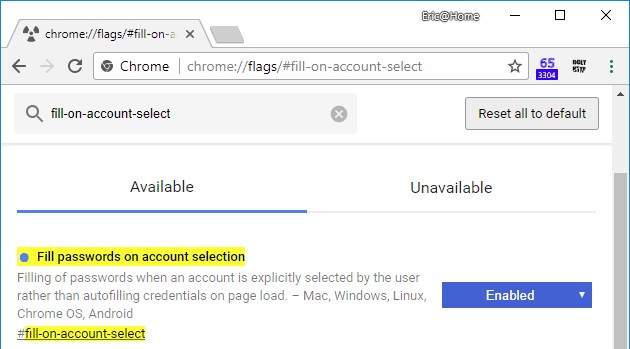
If you’d prefer to use the FOAS mode even when you’re not browsing in Incognito, you can enable this via a flag. Navigate to chrome://flags/#fill-on-account-select and change the setting to Enabled and restart.
To make a similar change in Firefox, navigate to about:config and change the signon.autofillForms setting to false.
The Chrome team is discussing other potential mitigations in https://crbug.com/798492; feel free to “star” the issue to follow along.
Update: Chrome 65.0.3316 introduces a partial mitigation for this issue. Chrome has long had a feature called the PasswordValueGatekeeper that prevents JavaScript on a page from reading the .value property of an autofilled Password field until the user has interacted with the page in some way (a keystroke or mouse click). The Gatekeeper is designed to provide a (weak) mitigation against automated password harvesting attacks (e.g. in the event of a malicious router or UXSS vulnerability). In Chrome 65, the protection of the PasswordValueGatekeeper has been extended to also cover auto-filled Username fields, providing some mitigation against the threat described in this post. The FOAS option provides stronger protections but remains off-by-default.
-Eric
[1] Similarly, a recent study found that many sites also have third-party scripts that spy on users’ interactions with pages, something every developer knows is possible, but most humans never think about.
If you haven’t read For a Lark yet, please go read that first.
What If?
I like to think.
Well, actually, I’m not sure I like to think, but I find it really hard to relax and let my brain rest… given a few minutes of idle time, I usually find myself deep in thought about some random nonsense. One topic that I’ve gone back to for years is thinking of vignettes to write in my years-overdue memoir, which started as a pleasant diversion into nostalgia but now haunts me with its incompleteness as I continually fail to translate those thoughts into text. But nevertheless, I still love to write and when I play with the thought experiment “What if I was born a hundred years ago? Or a hundred years from now, what would I do for a living?” I often come up with “I’d write, if I could make a living at it.”
I spend a lot of time thinking about “What if” scenarios, most of which you wouldn’t consider remotely interesting.
Bitcoin, however, is interesting, and I keep coming back to “What if…” questions about it.
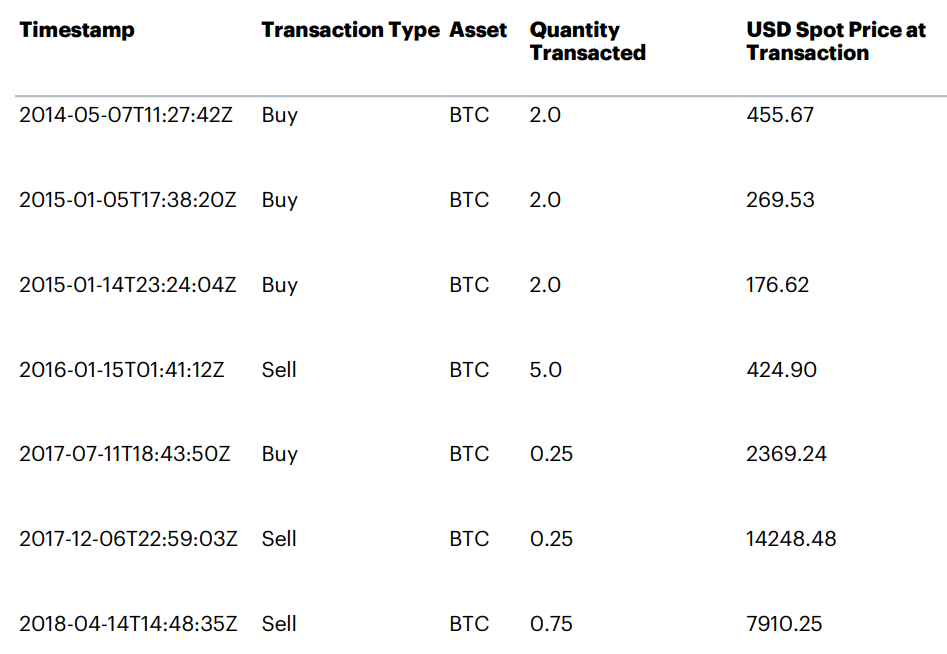
My boss at Telerik was almost obsessed with Bitcoin back in 2014 and finally I ended up buying six Bitcoins just so I’d feel slightly invested in the topic and might manage to avoid rolling my eyes when he talked excitedly about it.
I watched Bitcoin’s price float around through 2014 and 2015. A blog post published in January 2016 by one of the early Bitcoin developers persuaded me to sell five of my six Bitcoins at a small profit (I recouped what I paid for the six, effectively keeping the last coin “for free”).
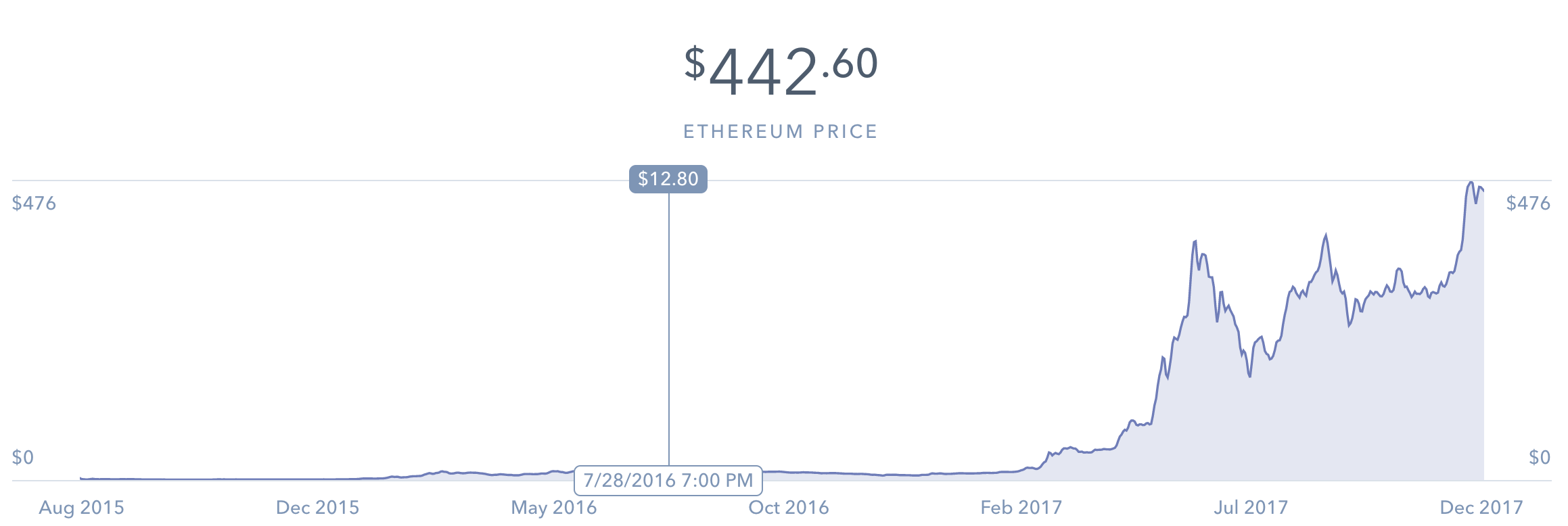
I later decided that perhaps I’d sold prematurely, but not having enough “play money” to buy another Bitcoin in July of 2016, I instead bought twenty Ethereum, a new and more exotic cryptocurrency which had recently started trading on Coinbase.
After watching it grow, I bought Litecoin almost as soon as it became available on Coinbase, buying 20 at just under $20 each.
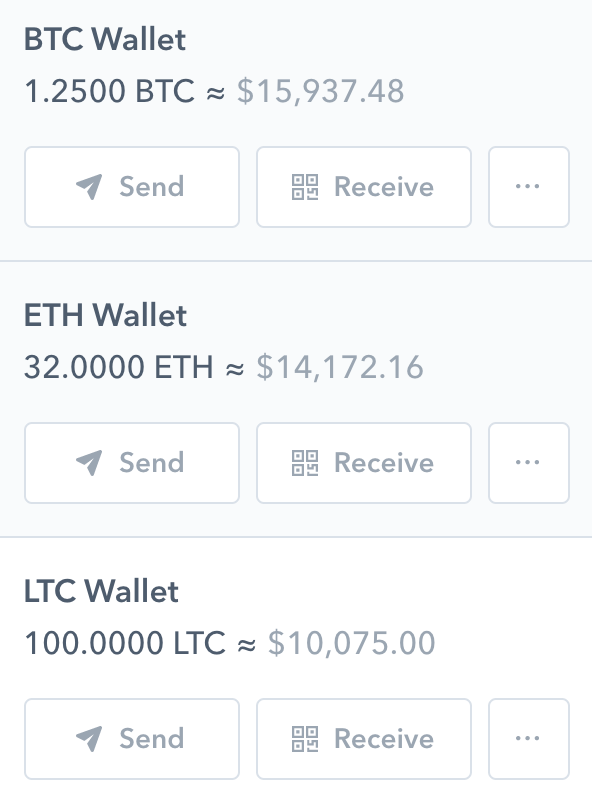
Over time, I increased my holdings a bit, swapping between the coins and cashing out as they appreciated to recover my initial USD investments. So, at this point, my coin holdings are pure, unrealized profit.
Almost 40 grand worth, assuming that I cash them out before they crash. And crashing seems almost certain, considering the underlying nature of the currencies. Bitcoin is a venture-capital backed ponzi scheme, a legal casino open 24/7/365 and as close as your nearest mobile phone or tablet. It’s also pretty terrible for the environment.
But that doesn’t make Bitcoins any less fun from a “What if” perspective. I recently found myself thinking about what I’d’ve done if I had any inkling of the eventual price of Bitcoins back in 2010. I quickly settled on the idea of giving out small gifts of 100 BTC to everyone I knew. To minimize taxes, I’d have to give out the coins when they were without value, and somehow prevent the recipient from cashing them out too early. 100 BTC seemed like a good amount, where recipients would be ecstatic but not crippled by their sudden wealth.
It’s too easy when playing “What if” to imagine some trivial change (“Aluminum was priced 15% lower in 1935”) spiraling into the root cause of World War III, or whatever, but I think the Bitcoin story is interesting in how little impact it would’ve had globally– a few people would get a bit richer, but beyond their immediate circles, nobody would even necessarily know it had happened.
Eventually, I decided I’d write up the idea as a short story, changing the amount to 1000 BTC to make things more interesting and perhaps somewhat less believable. I wrote it from the point-of-view of a recipient, because the story isn’t very interesting from the perspective of the giver.
Random factoids:
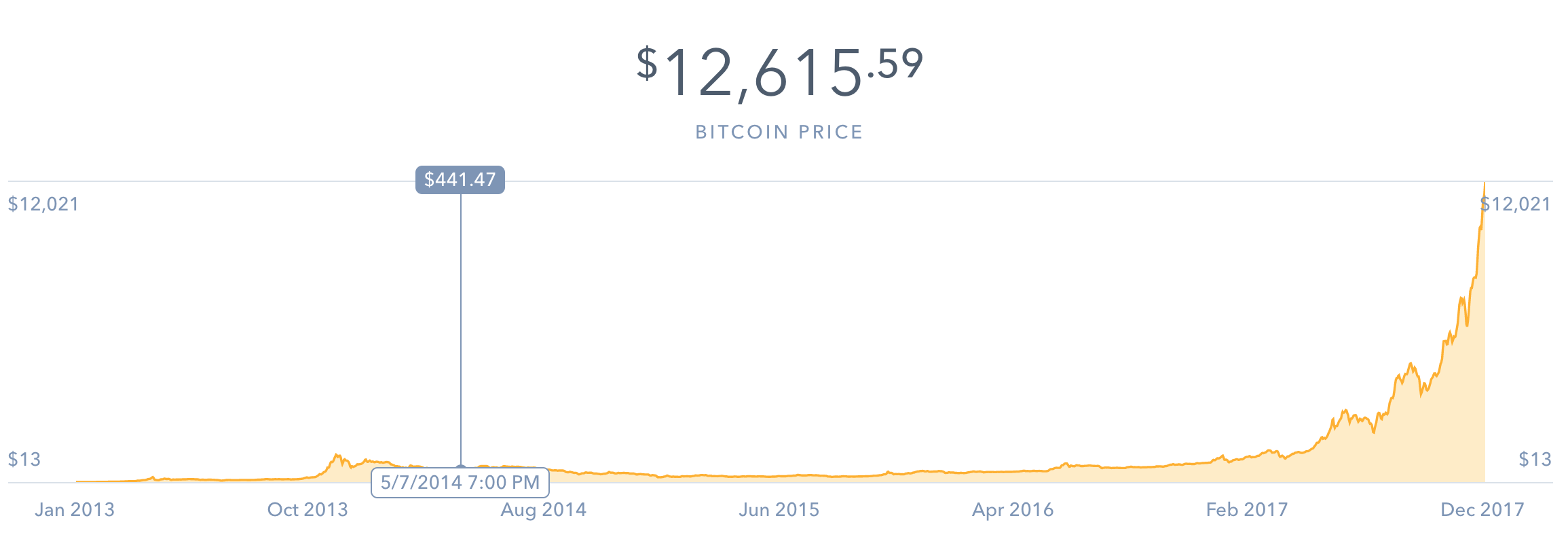
Bitcoin has appreciated 160 million percent since “David” bought or mined his coins in the summer of 2010.
If the recipient of the gift had sold it as soon as Coinbase started trading in 2013, they’d reap a windfall of $13300 and be overjoyed at receiving such a wonderful gift.
An early-seller’s joy would likely turn to crippling dismay or horror as the price rose to $11M when the story-teller opened the card last week. Or, $12.5M today.
Bitcoin profit would be taxed at the long-term capital gains rate, meaning recipients selling today would clear a cool $10 Million after taxes.
The Bitcoin Pizza account tracks the value of the 10000 bitcoins an early user spent on two pizzas; currently around $120M. An early Bitcoin buyer who forgot he’d bought 5000 coins spent a fifth of his Bitcoin on an apartment in 2013; that Bitcoin has appreciated about 14x since then.
“David” in my story is an amalgamation of a few engineers I worked with at Microsoft; Dave is a super-smart guy who’s into all sorts of geeky projects, Christine went to Africa to work with the Peace Corps, and Herman left to go do a startup in San Francisco.
My wife, reading the story, deemed it implausible. “Why?” I asked. “Because in the story you cleaned the garage not once, but twice!” she retorted.
After publishing the story, I got a few kind words about it being a nice story, but it seemed that not everyone recognized it as fiction. Some of the reactions were so interesting that I decided not to explicitly correct anyone. Most reactions were of the form “Wow, congrats” which I deemed ambiguous (maybe they liked the story?).
A few people asked whether it was fact or fiction. An early direct message hit upon one of the themes I was trying to convey with the story:
If that article is real, congrats! Amazing story either way, draws parallels to what planting a small seed or a small act of kindness can flourish into. I think about things like that every time I get to help newer folks learn new tech like git. And seeing what things they do later always makes me proud that I might have had a part in what they’ve accomplished
But overall, there were very few comments, even from people who believed the story was true. Only one person (a Microsoft colleague) asked “which David was the gift giver,” and no one asked about the fate of the other gifts David was handing out. I was amused at the idea that people who know me would think I’d casually announce on Twitter that I was suddenly worth over ten million dollars. Nobody asked for money.
Nobody asked what I’d do with the money either. While I’d probably brainstorm a million ideas, I think reality would turn out to be pretty boring. Why? When Telerik acquired Fiddler, my offer came with what seemed like a comically small number of stock options at an absurdly high price. When I asked, no one was willing to tell me how many shares the non-public company had issued, what fraction my stake might represent, or when the company might go public. I then naturally valued the options at zero (which is approximately how much I made from options when hired at Microsoft) and ignored them for years. Then, Telerik got acquired by Progress at the end of 2014 and my options were bought out for a bit over half what I paid for my house. I came home and that night I asked my wife “Hey, remember those worthless options? Well…” and eagerly awaited her reaction and the inevitable brainstorming of what we’d do with the sudden windfall. Ultimately, we bought a case of our favorite wine and put the remainder into savings.
-Eric
PostScript: It’s 2021 and I’m basically out of the Crypto market entirely.
Some web developers host their pre-production development sites by configuring their DNS such that hostnames ending in .dev point to local servers. Such configurations were not meaningfully impacted when .dev became an official Generic Top Level Domain a few years back, because even as smart people warned that developers should stop squatting on it, Google (the owner of the .dev TLD) was hosting few (if any) sites on the gTLD.
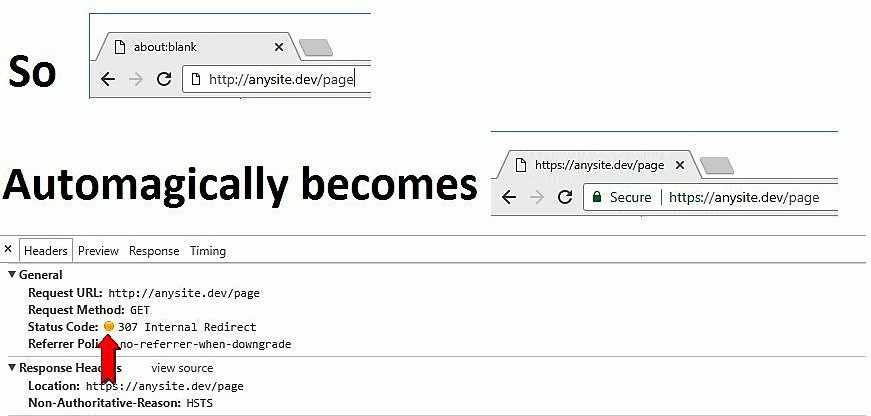
With Chrome 63, shipping to the stable channel in the coming days, things have changed. Chrome has added .dev to the HSTSPreload list (along with the .foo, .page, .app, and .chrome TLDs). This means that any attempt to visit http://anything.dev will automatically be converted to https://anything.dev.
Other major browsers use the same underlying HSTS Preload list, and we expect that they will also pick up the .dev TLD entry in the coming weeks and months.
Of course, if you were using HTTPS with valid and trusted certificates on your pre-production sites already (good for you!) the Chrome 63 change may not impact you very much right away. But you’ll probably want to move your preproduction sites off of .dev and instead use e.g. .test, a TLD reserved for this purpose.



 text/plain
