Getting Started with Profile Guided Optimization

For the convenience of the Windows developer community, I periodically compile the Zopfli and Brotli compressors from source, building for Win32 and code-signing the binaries (Interested? Get Zopfli.exe and Brotli.exe). After announcing the latest build on Twitter, I got an interesting question in reply:

Do you even PGO?

While I try to use the latest compiler (VS2015 U1), I’ve never used PGO with C++ myself. Profile guided optimization requires that you first compile a special instrumented binary that you run against a training set of data. The generated profiling data is fed into the compiler and it compiles an optimized binary based on the observed execution of the code, tuning the hottest paths for speed.

As with any technology-adoption question, I wondered: 1> Is using PGO hard? and 2> Will it noticeably improve performance?

Spoiler alert: The answers are “No” and “Yes.”

I started by skimming this old blog about PGO in Visual Studio; it looks pretty simple.

Optimizing a compressor with PGO is pretty straightforward. Unlike a GUI application with thousands of different operations, a compressor really only does one thing—compress.

I created a folder with files that I felt reasonably represent the types of data that I’ll be compressing with Zopfli (eight files captured via Fiddler). I could’ve experimented using a broader sample, but this seemed like a fine corpus of data with which to begin.

Click Build > Profile Guided Optimization > Instrument to generate an instrumented binary:

Build > Profile Guided Optimization > Instrument

Right-click the project in the Solution Explorer pane and choose Debugging under the Configuration Properties category. Edit the Command Arguments to specify the training scenario. Zopfli accepts a list of files to compress, so we simply list all eight:

Edit Command arguments

Close the dialog and click Build > Profile Guided Optimization > Run Instrumented/Optimized Application to run our application and generate profiling data:

Run Instrumented/Optimized Application

The scenario then runs; it takes a bit of extra time due to the cost of the profiling instructions in the instrumented binary. After it completes, a new file (Zopfli!1.pgc) is written to the \Release\ folder; if we’d run the application multiple times to train different scenarios, Zopfli!2.pgc, Zopfli!3.pgc, etc would be present as well.

Finally, click Build > Profile Guided Optimization > Optimize to generate a new build using the profiling data to select paths for optimization. You can see the effect of the profiling database on the Build in the Output window:

Build output shows optimizations

Now your executable has been optimized.

Pretty simple, right?

Proper benchmarking is an entire field itself, but let’s do the simplest thing that could possibly work to check the effectiveness of the optimizations:

Script runs optimized and unoptimized

We run the script a few times and see that the original unoptimized binary takes ~64 seconds to compress the corpus and the optimized binary takes ~46 seconds, a savings of almost 30%.

ZopFli PGO vs non PGO

You should run the same benchmark against a new set of data, just to ensure that your changes yield similar improvements (or at least no regression!) given different input data. A few runs of my PNGDistill tool (which uses Zopfli internally) show improvements of 10% to 25% when using the optimized compressor.

Pretty cool, right?

-Eric Lawrence

What’s New in Fiddler 4.6.2

TLDR? – Get the newest Fiddler here.

It’s been just over two months since the last significant release, and Fiddler 4.6.2.0 (and v2.6.2.0) are now available.

As always, the latest build includes a slew of bugfixes and minor tweaks, as well as a number of features described in this post.

Default Certificate Generator Changed

Changes coming to certificate validation in browsers and other clients mean that certificates generated by makecert.exe (previously Fiddler’s default generator) will soon be rejected. To address this problem, the default certificate generator on Windows 7 and later has been changed to CertEnroll. (Windows XP and Vista users should consider installing the similar CertMaker Addon).

Unfortunately, if you’re upgrading from an earlier version of Fiddler which used a different certificate generator, you may need to explicitly reset Fiddler’s certificates. Doing so is simple:

  1. Click Tools > Fiddler Options.
  2. Click the HTTPS tab.
  3. Ensure that the text says Certificates generated by CertEnroll engine.
  4. Click Actions > Reset Certificates. This may take a minute.
  5. Accept all prompts
  6. If you are using Fiddler to capture secure traffic from a mobile device or Firefox, you will need to remove the old Fiddler root certificate from that device (or Firefox) and install the newly-generated Fiddler certificate.

If necessary, you can read more about resetting Fiddler’s Certificates or read more about Fiddler’s Certificate Generators.

SAZ Repair

From time to time, users have asked for help with Fiddler Session Archive files (.SAZ or .RAZ files) that are corrupt, either because they are incomplete (e.g. power failed) or they were mangled by an incomplete download or a failing disk drive.

Fiddler 4.6.2 includes a new feature that can recover data from corrupt Session Archive files. If the Session Archive fails to load due to corruption, you’ll be prompted to attempt a repair of the file. Data recovered from the SAZ file will be stored in a new archive and loaded for display.

Notably, this feature may also be useful to recover corrupt .zip, .docx, .xlsx, .pptx, etc files that have nothing to do with Fiddler; give it a try!

FiddlerHook Removed

This release removes the FiddlerHook extension for Firefox. Mozilla is changing their add-on model for Firefox extensions. Short-term, Firefox requires that extensions be signed (and Mozilla has declined to sign FiddlerHook) and over the next year, Mozilla will be removing the XUL Overlay extension model upon which FiddlerHook was based.

Fortunately, you don’t really need FiddlerHook to use Fiddler with Firefox. For HTTP traffic, it will often “just work” and for HTTPS traffic, only minor configuration updates are needed. You can read this post for tips on using Fiddler with Firefox.

Decryption Control

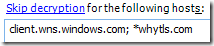
Previously, Fiddler UI only allowed you to exempt certain hosts from HTTPS decryption; if you wanted to only decrypt from a small number of hosts, you were forced to use the script engine. That limitation has been removed via a new option on the Tools > Fiddler Options > HTTPS tab. Simply click the link to toggle between exclusion and inclusion:

imageimage

Extensibility Improvements

This release adds a number of improvements to Fiddler’s extensibility, from both FiddlerScript and .NET extensions.

BindUIButton

You can now add buttons to Fiddler’s toolbar in a supported way. Simply add a new BindUIButton attribute to a static method in your FiddlerScript file; the string argument is the caption with which to label the button.

For instance:

    BindUIButton("Copy HAR")

yields:
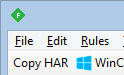
toolbar button

Toolbar buttons are added to the left of the toolbar in the order opposite of their listing within the FiddlerScript. Adding images is not supported from FiddlerScript but you can use Unicode Emoji symbols if you’d like.

Fiddler extensions may add to the toolbar using the static method FiddlerToolbar.AddToolstripItem() and may remove entries using .RemoveToolstripItem().

Export to String

In many cases, you may wish to generate a string representing one or more Sessions in either HTTPArchive (HAR) or cURL format. While you can manually use File > Export to generate files of either format, you can now skip the middle-man and export to these types in memory. To do so, simply set the ExportToString option and do not set a Filename option. After the DoExport command completes, the output is found in the OutputAsString option.

For instance, you can add the following to your FiddlerScript:

BindUIButton("Copy HAR")
ContextAction("Copy HAR")
public static function doCopyHar(arrSess: Session[])
{
var oExportOptions = FiddlerObject.createDictionary();

// If you’d prefer to save to a file, set the Filename instead
//oExportOptions.Add(“Filename”, “C:\\users\\lawrence\\desktop\\out1.har”);

oExportOptions.Add(“ExportToString”, “true”);
oExportOptions.Add(“MaxBinaryBodyLength”, 1000000);
oExportOptions.Add(“MaxTextBodyLength”, 1000000);

FiddlerApplication.DoExport(“HTTPArchive v1.2”, arrSess, oExportOptions, null);
var sOutput: String = oExportOptions[“OutputAsString”];

Utilities.CopyToClipboard(sOutput);
FiddlerApplication.UI.SetStatusText(“Copied Sessions as HAR”);
}

…and Fiddler will add a toolbar button and context menu command that copies the Selected Sessions to the clipboard in HAR format. (Tip: You can choose Edit > Paste As Sessions in Fiddler to create new Sessions based on HAR text that you’ve copied from browser tools.)

Alternatively, you can add a similar command to copy the Selected Sessions as a set of cURL commands:

BindUIButton("Copy cURL")
ContextAction("Copy cURL")
public static function doCopyCurl(arrSess: Session[])
{
var oExportOptions = FiddlerObject.createDictionary();

// If you’d prefer to save to a file, set the Filename instead
//oExportOptions.Add(“Filename”, “C:\\users\\lawrence\\desktop\\out1.bat”);

oExportOptions.Add(“ExportToString”, “true”);

  FiddlerApplication.DoExport("cURL Script", arrSess, oExportOptions, null);
var sOutput: String = oExportOptions["OutputAsString"];

Utilities.CopyToClipboard(sOutput);
FiddlerApplication.UI.SetStatusText(“Copied Sessions as cURL”);
}

Invoking on the UI Thread

Fiddler processes Sessions on background threads, but you should only ever manipulate Fiddler’s UI using the UI thread. Only a few of Fiddler’s UI calls are thread-safe; if you’re not sure, your script should use the new FiddlerObject.uiInvoke or FiddlerObject.uiInvokeAsync methods to avoid crashing or corrupting the user-interface.

Load Extensions at Runtime

To support some exciting new work from the community, Fiddler now has the ability to load additional Extensions and Inspectors at runtime; this enables building of more complex add-on systems atop Fiddler’s existing system. To use these APIs, invoke any of these four methods from the UI thread:


FiddlerApplication.oExtensions.InstantiateInspectorsFromPath(string sPathToInspectors)
FiddlerApplication.oExtensions.InstantiateExtensionsFromPath(string sPathToExtensions)
FiddlerApplication.oExtensions.InstantiateExtensionsInFile(FileInfo oFile, bool bWriteToLog, bool bRethrowExceptions)
FiddlerApplication.oExtensions.InstantiateExtensionByType(Type typeExtension, bool bWriteToLog)

Thank You!

Lastly, I’d like to thank everyone for all of your support over the last twelve years, as Fiddler has evolved from a side project to a fully-supported debugging platform used around the world. I’m excited to see where Telerik takes Fiddler next, and while I’ll be keeping plenty busy in my new job, I expect I’ll remain involved in the Fiddler community (updating the book, and haunting the forum) for quite some time.

Wishing you all the best in 2016 and beyond!

-Eric Lawrence

My Next Adventure

Back in 2004, I couldn’t get the tiny IE team interested in fixing caching bugs that were causing my team’s website to break in bizarre and unpredictable ways. I figured I’d hop over there, fix some bugs, and move along. I quickly realized that I was hopelessly in love with browsers in general and security in particular. The hours were long, the problems were immense, but it was easy to make a big difference.

After eight years on the IE team, mostly working in Security, I felt like I’d crafted my dream job. I got to work with smart people every day, and help protect the browsing public from some very bad guys. It was very difficult to leave, but Telerik offered me a different dream job—building my side-project, Fiddler, on a full-time basis.

I spent three years here, doing important work on Fiddler to help take it from a side-project to a professional-caliber tool with the features and polish that users expect. And I’ve had a blast.

Alas…

I’ve missed working on browsers. And on security. While Fiddler has kept me close to that scene, it wasn’t quite close enough. As one of my old leads on the IE team once observed: “No matter what you add to Fiddler, your work on a browser used by almost a billion people will always have a greater impact.”

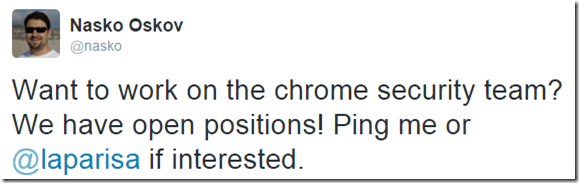
In the midst of this nostalgic longing, a former colleague posted the following tweet:

Tweet: Join the Chrome Security team

Casual conversations were had. Then more serious conversations. Then interviews. And more interviews.

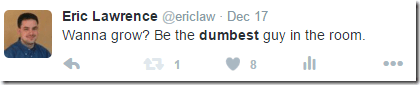
Philip Su, a brilliant guy whose tech talk inspired me to apply at Microsoft once said: “The team you want to join is the one that’s hard to get into.

Every single person I talked to was smarter than I am. It was crazy-intimidating. And inspiring.

Tweet: Wanna grow? Be the dumbest guy in the room

For my first few years on IE, there was ample speculation that Google would release a browser, presumably some slick skinning of Firefox with all the Google services bolted on. Then Chrome shipped and it was so much more interesting. So many things were done “right” from day 1, and the pace of evolution was amazing. And it wasn’t just the technical guts– I was astonished to see things like the Chrome comic book, which explained things like process isolation and integrity levels in a way that mere mortals could understand. Chrome continued to evolve and grow to take on its role as a platform; ChromeOS now powers a third of the machines in my house. The Chrome team is driving the security of the web as a whole.

I want users to win. To achieve that, I want the web to win, and I want to make life harder for the bad guys every day.

I’m thrilled, excited, honored, and more than a little intimidated to be joining the Chrome Security team on January 4th 2016.

Let the firehose-drinking begin!

Boy being knocked over by a stream of water from a firehose directed at his face

-Eric

Update: I wrote about my experiences after Year One and Year Two.

Segue

My last day at Telerik is December 31st, 2015.

More soon


Here’s a copy of my “Last day” blog post for posterity.

Fiddler—A Segue

 by Eric Lawrence  December 22, 2015 ProductivityDebugging11 Comments

In September 2012, Telerik completed the acquisition of the Fiddler Web Debugger, and I announced that I would join Telerik to upgrade my side project to my full-time job.

It’s been a busy three years, as we evolved Fiddler from version 2.4.1 to 4.6.2—the changelog alone grew by 1701 entries as we added dozens of major features, hundreds of tweaks, and thousands of fixes. Nearly every line has been touched, and performance and functionality have been improved throughout. We brought Fiddler to Linux, simplified running it in a VM on a Mac and worked to ensure that it remains compatible with all of the latest-version mobile platforms and desktop browsers, including Microsoft Edge. I was able to make long-awaited improvements in areas like Image AnalysisWebSocket inspectionAPI TestingextensibilityUI customization, PCAP import and many more. In my off-hours, I even released a Second Edition of my best-selling book “Debugging with Fiddler.” Perhaps most rewarding of all, I had the opportunity to interact with thousands of customers via issue reports, and speak to thousands more at conferences and webinars.

Telerik has honored its commitment to keep Fiddler for Windows available for free, even as we introduced a new fully-supported commercial offering that allows companies to build Fiddler-like functionality into their applications via the FiddlerCore class library.

Behind the scenes, many engineering process improvements were introduced. We migrated from “xcopy-to-NAS source control” to a private repo on GitHub. A Jenkins CI server was introduced to catch build breaks across our many targets (Windows v2, Window v4, FiddlerCore v2, v3, and v4), and we added unit tests for critical functionality. Issue tracking moved from a pile of scrawled napkins to tagged and prioritized GitHub issues, and code-signing was upgraded to use a hardware token.

While I love featuresmore than anything else, it’s these engineering process improvements that give me the confidence that Telerik will be able to continue to improve Fiddler as I move on to pursue an exciting opportunity outside the company in 2016.

I had no idea what I was signing up for when I released the first build of Fiddler almost thirteen years ago—it’s been an incredible adventure, and it’s time for a change. While I expect to remain involved in the Fiddler community via ongoing updates to the Fiddler book, hopping in to answer questions on StackOverflow & the forum and building useful extensions, I’ll pass the development baton to my colleagues at Telerik who have been building indispensable tools and controls for developers since 2002. I’m excited to see what’s coming next—projects like Telerik PlatformTelerik® Kendo UI® and NativeScript all have some pretty fantastic plans for 2016 that I think you’ll enjoy.

Thanks for everything, and happy holidays!

-Eric Lawrence