WebP–What Isn’t Google Telling Us?

Beyond their awesome work on Zopfli and Brotli, Google has brought their expertise in compression to bear on video and image formats. One of the most interesting of these efforts is WebP, an image format designed to replace the aging JPEG (lossy) and PNG (lossless) image formats.

WebP offers more efficient compression mechanisms than both PNG and JPEG, as you can see in this comparison of a few PNG files on Google’s top sites vs. WebP-Lossless versions that are pixel-for-pixel identical:

size table

You can see these savings everywhere, from Google’s homepage logo, which is 3918 bytes (29%) smaller, to Google applications’ image sprites (59% smaller!) to advertisements served by Google’s ad network (18% smaller). These compression savings are much greater than those provided by Zopfli, which is constrained by compatibility with the legacy PNG format.

As an additional benefit, WebP files don’t contain the sort of metadata bloat found in PNG, JPEG, and GIF.

So, the bandwidth and cache-size savings are obvious.

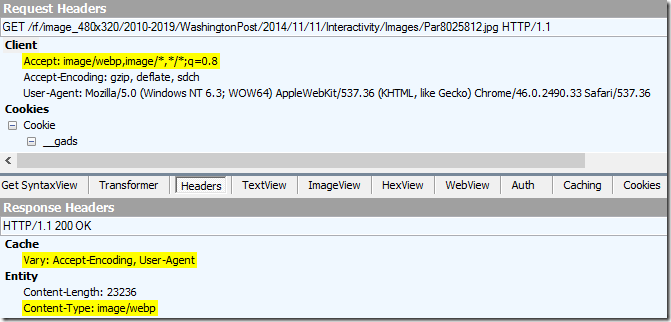
While the format is currently only supported in Chrome and Opera, web servers can easily serve WebP to only clients that request it via the Accept header:

Fiddler screenshot showing WebP in use

This approach to WebP adoption is in use today by major sites like the Washington Post.

Google invented the format, so it’s not a case of “not-invented-here.”

The non-adoption of their own format leads to a troubling question—is there something about WebP that Google isn’t telling us? Surely there must be a good reason that Google’s own properties aren’t reaping the benefits of the format they’ve invented?

Update: Alex Russell retorts “uh, we use webp in TONS of places.”

-Eric Lawrence

PS: WebP Status Tracking links for Firefox and IE/Edge

Help–The Whole Web Thinks I’m Using IE7!!!

Every few weeks for the last six or so years, I see someone complain on Twitter or in forums that the entire Internet seems to think they’re running an old version of IE. For instance, an IE11 user on Windows 8.1 might see the following warning on Facebook:

image

These warnings typically occur when the browser is using Compatibility View mode for a site and the site demands a browser that supports modern standards. Many customers used to find themselves accidentally in this state because they were overzealously clicking the “Compatibility View” button (back when IE had one) or clicking the “Display all sites in Compatibility View” checkbox (back when IE had it).

Since IE11 has cleaned that mess up (by hiding Compatibility View), you might wonder how a user could end up in such a broken state.

The answer is both complicated and interesting, deeply intertwined with nearly 15 years of subtle Internet Explorer behaviors.

When I ask the affected IE11 user to visit my User-Agent string test page, they see IE7’s Compatibility View user-agent string:

Mozilla/4.0 (compatible; MSIE 7.0; Windows NT 6.3; Win64; x64; Trident/7.0; .NET4.0E; .NET4.0C; Media Center PC 6.0; .NET CLR 3.5.30729; .NET CLR 2.0.50727; .NET CLR 3.0.30729)

But why?

Since IE no longer shows the Zone in the status bar, you must right-click the page and choose Properties to get your next clue:
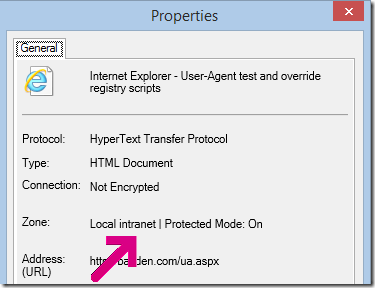
image

Wait, what?!? Why is some random site on the Internet in the privileged Local Intranet security zone?

Next the user does the same test on Facebook.com and finds that it too is in the Intranet Zone. In fact, the whole web is getting zoned as Intranet!

This represents a significant security hole, and the user has only discovered it because, by default, Tools > Compatibility View Settings has Display Intranet sites in Compatibility View set, and the unwanted CompatView causes sites like Facebook to complain.

So what’s going on here!?!

Click Tools > Internet Options > Connections > LAN Settings, and observe that the settings are the defaults:
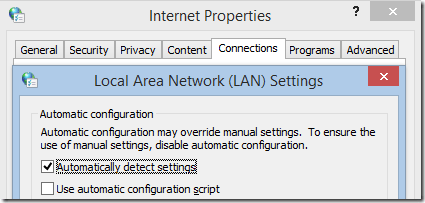
image

Wait… what exactly does that Automatically detect settings option do?

Why, it allows a computer on your network to decide what proxy server your client should use through a process called WPAD. The server in question gets to supply a proxy configuration script that implements a function FindProxyForUrl(). That function returns either a proxy (e.g. “PROXY myproxy:8080” or “DIRECT” to indicate that the request should be sent directly to the origin server and bypass the proxy.

And now we’re getting somewhere. Take a look at the checkboxes inside Tools > Internet Options > Security > Local Intranet > Custom Level, specifically the second checkbox:
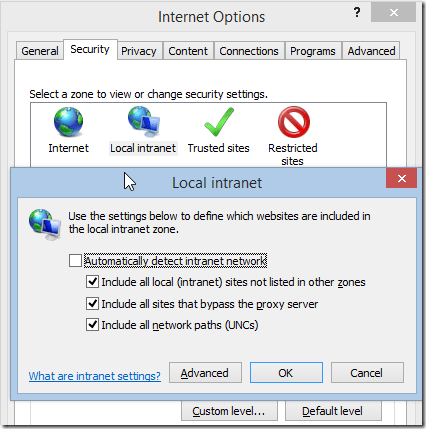
image

Yup, that’s right—if a proxy script returns DIRECT for a given site, IE defaults to treating that site as a part of the Local Intranet Zone, giving it additional privileges and also defaulting it to CompatView. Oops.

You might think: “well, surely a network proxy administrator would never make that mistake!”

Back in 2011, the IE team started getting email from all over the company complaining that “IE is broken. It doesn’t support HTML5!” Guess why not? Oops.

Recommendations

Unless you’re running IE on a Corporate Network that requires support for things like Negotiate Authentication and the like, you should untick the Automatically detect intranet network checkbox and all of the checkboxes beneath it. This improves security and enhances IE’s sandbox.

Unless you’re running a laptop that moves to corporate networks, you should also disable the Automatically detect settings checkbox to prevent IE from asking your network what proxy to use.

-Eric Lawrence

Ad Publishers–A TODO List

Where’s Google’s* blog on how they’re doing everything they can to make ads they serve as fast and small as possible?

Where’s Google’s blog on how many ads they’ve nuked as “deceptive” and trumpeting how policy forbids ads for “adware-wrapped” installers?

Where’s Google’s blog about how many billions of ad-generated dollars they’ve supplied to content sites and open-source products that people care about like Firefox?

Where’s Google’s blog on how much smaller they’ve made ads served using WebP instead of older formats? And Zopflinated PNGs for legacy browsers?

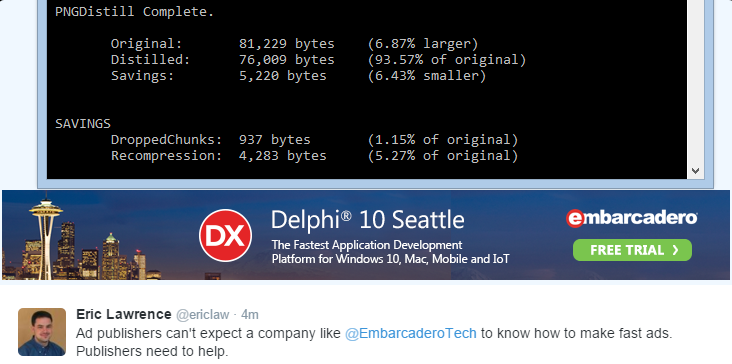
image

Ad publishers can’t expect a company like EmbarcaderoTech to know how to make fast ads. Publishers need to help.

image

Where’s the argument that the worst privacy impact of ads comes from trying to recover revenue lost through blocks and fraud?

Without good answers to these questions, ad publishers are going to have a very hard time regaining any control of the narrative. The entire industry is demonized for performance, security, and privacy problems, even though each publisher has different practices.

-Eric

*Note: Google does plenty of things right from an advertising point-of-view; I only mention them by name because they’re probably the biggest and I expect the best technology from them. They’ve invented much of the interesting technology in this space, including Zopfli and WebP.

Ad-Block: Current Status

Microsoft used to joke about cutting off a competitor’s air supply. Apple instead handed shears to devs, pointed at a hose, and walked out.

As iOS9 launches, here’s the list of top paid apps in the iTunes AppStore:

AppStore - Top Paid Screenshot

It’s only a question of when, not if, the top slot of the Free Apps category is an open-source alternative that will save users $3-$4 and offer the same functionality.

I’m pretty sure the Web is at exactly this moment:

grid lasers

The next year or so is going to be very very messy.

Update (Sept-18-2015): After 36 hours, the maker of the top-grossing blocker bowed out of the market. This is unexpected windmill tilting. I love it.