The Top Level Domain (TLD) is the final label in a fully-qualified domain name:

The most common TLD you’ll see is com, but you may be surprised to learn that there are 1479 registered TLDs today. This list can be subdivided into categories:
- Generic TLDs (gTLD) like
.com - Country Code TLDs (ccTLDs) like
.uk, each of which is controlled by specific countries - Sponsored TLDs (sTLDs) like
.museum, which are designed to represent a particular community - … and a few more esoteric types
Some TLD owners will rent domain names under the TLD to any buyer (e.g. anyone can register a .com site), while others impose restrictions:
- a ccTLD might require that a registrant have citizenship or a business nexus within their country to get a TLD in their namespace; e.g. to get a
.iedomain name, you have to prove Irish citizenship - a sTLD may require that the registrant meet some other criteria; e.g. to register within the
.bankTLD, you must hold an active banking license and meet other criteria
Zip and Mov
Recently, there’s been some excitement about the relatively-new .ZIP and .MOV top-level domains.
Why?
Because .zip and .mov are longstanding file extensions used to represent ZIP Archives and video files, respectively.
The argument goes that allowing .zip and .mov TLDs means that there’s now ambiguity: if a human or code encounters the string "example.zip", is that just a file name, or a bare hostname?
Alert readers might immediately note: “Hey, that’s also true of .com, the most popular TLD– COM files have existed since the 1970s!” That’s true, as far as it goes, but it is fair to say that .com files are rarely seen by users any more; on Windows, .com has mostly been supplanted by .exe except in some exotic situations. Thanks to the popularity of the TLD, most people hearing dotcom are going to think “website” not “application”.
(The super-geeks over on HackerNews point out that name collisions also exist for popular source code formats: pl is the extension for Perl Scripts and the ccTLD for Poland, sh is the extension for bash scripts and the ccTLD for St. Helena, and rs is the extension for Rust source code and the ccTLD for the Republic of Serbia.)
Okay, so what’s the badness that could result?
Automatic Hyperlinking
In poking the Twitter community, the top threat that folks have identified is concern about automatic hyperlinkers: If a user types a filename string into an email, or their blog editor, or twitter, etc, it might be misinterpreted as a URL and automatically converted into one. Subsequently, readers might see the automatically-generated link, and click it under the belief that the author intended to include a URL, effectively an endorsement.
This isn’t a purely new concern– for instance, folks mentioning the ASP.NET platform encounter the automatic linking behavior all the time, but that is a fairly constrained scenario, and the https://asp.net website is owned by the developers of ASP.NET, so there’s no real harm.
However, what if I sent an email to my family saying, “hey, check out VacationPhotos.zip” with a ZIP file of that name attached to my email, but the email editor automatically turned VacationPhotos.zip into a link to https://VacationPhotos.zip/.
I concede that this is absolutely possible, however, it does not seem terribly exciting as an attack vector, and I remain unconvinced that normal humans type filename extensions in most forms of communication.
Having said that, I would agree that it probably makes sense to exclude .mov and .zip from automatic hyperlinkers. Many (if not most) such hyperlinkers do not automatically link any string that contains every individual instance of the 1479 current TLDs, and I don’t think introducing autolinking for these two should be a priority for them either.
(As an aside, if I was talking to an author of an automatic hyperlinker library, my primary concern would be the fact that almost all such libraries convert example.com into a non-secure reference to http://example.com instead of a secure https://example.com URL.)
User Confusion
Another argument goes that URLs are already exceedingly confusing, and by introducing a popular file extension as a TLD, they might become more so.
I do not find this argument compelling.
URLs are already incredibly subtle, and relying on users to mentally parse them correctly is a losing proposition in multiple dimensions.
There’s no requirement that a URL contain a filename at all. Even before the introduction of the ZIP TLD, it was already possible to include .zip in the Scheme, UserInfo, Hostname, Path, Filename, QueryString, and Fragment components of a URL. The fact that a fully-qualified hostname can now end with this string does not seem especially more interesting.
Omnibox Search
When Google Chrome was first released, one of its innovations was collapsing the then-common two input controls at the top of web browsers (“Address” and “Search”) into a single control, the aptly-named omnibox. This UX paradigm, now copied by basically every browser, means that the omnibox must have code to decide whether a given string represents a URL, or a search request.
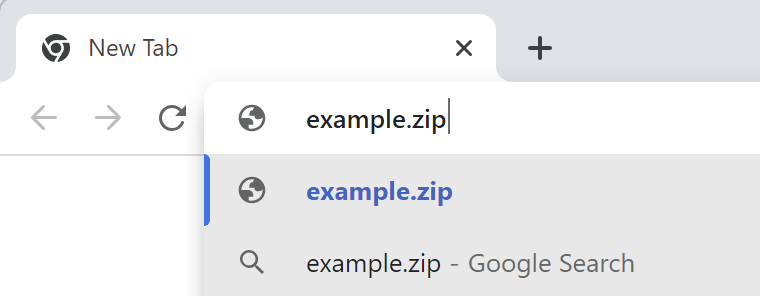
One of the inputs into that equation is whether the string contains a known TLD, such that example.zi and example.zipp are treated as search queries, while example.zip is assumed to mean https://example.zip/ as seen here:
If you’d like to signal your intent to perform a search, you can type a leading question mark to flip the omnibox into its explicit Search mode:
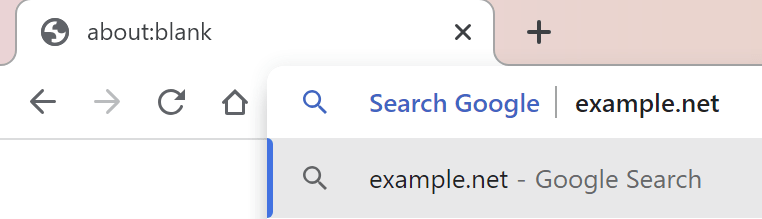
If you’d like to explicitly indicate that you want a navigation rather than a search, you can do so by typing a leading prefix of // before the hostname.
As with other concerns, omnibox ambiguity is not a new issue: it exists for .com, .rs, .sh, .pl domains/extensions, for example. The omnibox logic is also challenged when the user is on an Intranet that has servers that are accessed via “dotless” (aka “plain”) hostnames like https://payroll, (leading to a Group Policy control).
General Skepticism
Finally, there’s a general skepticism around the introduction of new TLDs, with pundits proclaiming that they simply represent an unnecessary “money grab” on the part of ICANN (because the fees to get an official TLD are significant, and a brand that wants to get their name under every TLD will have to spend a lot).
“Why do we even need these?” pundits protest, making an argument that boils down to “.com ought to be enough for anybody.”
This does not feel like a compelling argument for a number of reasons:
- COM was intended for “commercial entities”, and many domain owners are not commercial at all
- COM is written in English, a language not spoken by many of the world’s population
- The legacy COM/NET/ORG namespace is very crowded, and name collisions are common. For example, one of my favorite image editors is
Paint.Net, but that domain name was, until recently, owned by a paint manufacturer. Now it’s “parked” while the owner tries to sell it (likely for thousands of dollars).
Other pundits will agree that new TLDs are generally acceptable, but these specific TLDs are unnecessarily confusing due to the collision with popular file extensions and the lack of an obviously compelling scenario (e.g. “why do we need a .mov TLD when we already have .movie TLD?“). It’s a reasonable debate.
Some pundits argue “Hey, domains under new TLDs are often disproportionately malicious”, pointing at .xyz as an example.
That tracks, insofar as the biggest companies tend to stick to the most common TLDs. However, most malicious registrations under non-.COM TLDs don’t happen because getting a domain in a newer TLD is “easier” or subject to fewer checks or anything of that sort. If anything, new TLDs are likely to have more stringent registration requirements than a legacy TLD. And if the bad guys want to identify themselves by hanging out in a low-reputation TLD neighborhood, that seems like a net good for security.
New TLDs Represent New, More Secure Opportunities
One very cool thing about the introduction of a new TLD is that it gives the registrar the ability to introduce new requirements of the registrants without the fear of breaking legacy usage.
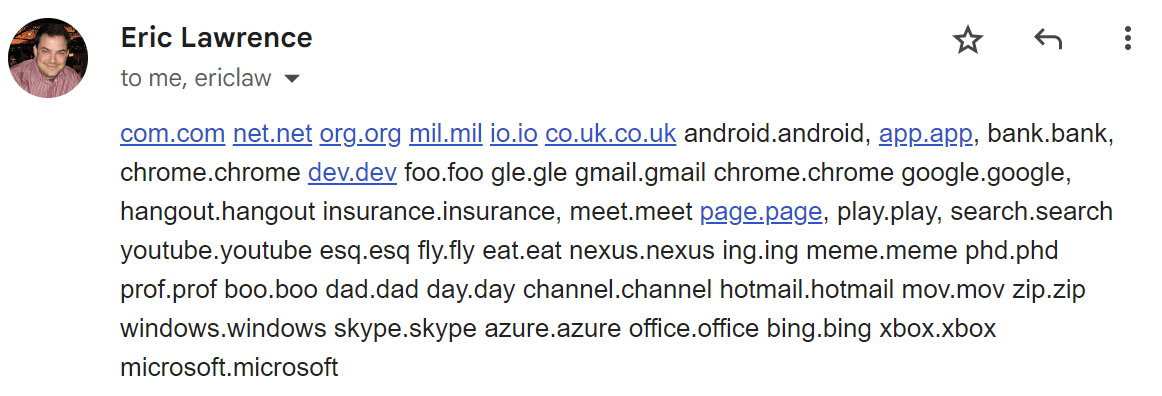
In particular, a common case is HSTS Preloading: a TLD owner can add the TLD to the browser’s HSTS preload list, such that every link to every site within that namespace is automatically HTTPS, even if someone (a human or an automatic hyperlinker) specifies a http:// prefix. There are now 40 such TLDs: android, app, bank, chrome, dev, foo, gle, gmail, google, hangout, insurance, meet, page, play, search, youtube, esq, fly, eat, nexus, ing, meme, phd, prof, boo, dad, day, channel, hotmail, mov, zip, windows, skype, azure, office, bing, xbox, microsoft, notably including ZIP and MOV.
One especially fun fact about requiring HTTPS for an entire TLD is that it means that every site within that TLD requires a HTTPS certificate. To get a HTTPS certificate from a public CA requires that the certificate be published to Certificate Transparency, a public ledger of every certificate. Security software and brand monitors can watch the certificate transparency logs and get immediate notification when a suspicious domain name appears.
Beyond HSTS-preload, some TLDs have other requirements that can reduce the likelihood of malicious behavior within their namespace; for example, getting a phony domain under bank or insurance is harder because of the registration requirements that demand steps that can lead to real-world prosecution.
Unfortunately, software today does little to represent a TLD’s protections to the end-user (there’s nothing in the browser that indicates “Hey, this is a .bank URL so it’s much more likely to be legitimate“), but a domain’s TLD can be used as an input into security software’s URL reputation services to help avoid false positives.
MakeA.zip
I decided to play around with the new TLD by registering a new site MakeA.zip which will point at a simple JavaScript program for creating ZIP files. The DNS registration is $15/year, and Cloudflare provides the required TLS certificate for free.
Now I just have to write the code. :)
-Eric