Understanding CONNECT Tunnels

When a browser needs to send a HTTPS request through a proxy (like Fiddler), there’s a bit of a problem.

The proxy needs to know where to send the client’s request, but the whole point of protecting traffic with HTTPS is that the content is encrypted and cannot be read by anyone else on the network, including the proxy!

To resolve this Catch-22, a trick is used– the browser sends a HTTP request with the method CONNECT and the target hostname and port to which the client would like a connection:

  CONNECT bayden.com:443 HTTP/1.1
  Host: bayden.com:443
  Connection: keep-alive
  User-Agent: Chrome/47.0.2526.58

Upon receiving such a request, the proxy is expected to establish a TCP/IP connection to the requested hostname and port and signal its success by returning a HTTP/200 response indicating that the requested connection was made:

  HTTP/1.1 200 Connection Established
  Connection: close

Subsequently, the proxy is expected to just blindly shuffle all bytes back and forth between the client and the server connections without looking at them. The client and server perform their HTTPS handshakes and then exchange encrypted traffic (typically, one or more HTTPS requests and responses). When the connection is no longer needed, either side closes the connection and the proxy, upon receiving notice that one side has closed the connection, closes the other side of the connection too.

We often refer to connections established in this way Proxy Tunnels.

In Fiddler, tunnels are represented by a grey lock icon with the text “Tunnel to” in place of the Host field; the URL field shows the target hostname and port, as seen in the first line of the screenshot:

image

Notably, Fiddler isn’t limited to blind proxy tunnels, it can execute a man-in-the-middle against both sides of the connection, pretending to the client that it is the server and pretending to the server that it is the client. When you enable HTTPS decryption in Fiddler, the proxy tunnel in the Web Sessions list is followed by all of the requests and responses that were transferred through that tunnel (as shown in the second and third lines in the screenshot).

-Eric

The Sad State of HAR

Spring 2017 Update: Some of these issues have been fixed.

The HTTP Archive Format (HAR) was designed to allow tools to exchange network traffic using a standard format; this format is akin to Fiddler’s Session Archive Zip format but is supported natively by browser developer tools. Unlike SAZ files, it is not compressed by default, and often includes redundant text to simplify parsers.

Unfortunately, none of the four major browsers (IE, Edge, Chrome, Firefox) generates HAR correctly.

Internet Explorer 11 and below: Generates the file in XML instead of the proper JSON, due to a misreading of the specification. The export is also limited by numerous bugs in the F12 Network Capture tool, including missing data and misrepresentation of certain response types (e.g. 304s).

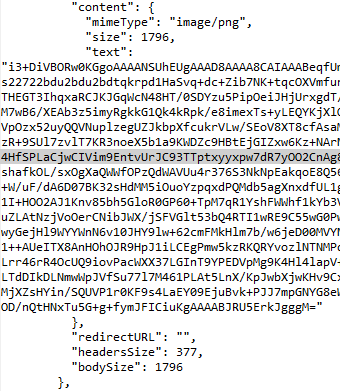
Firefox 45: Attempts to store GZIP’d response bodies as text.

Fails to include the encoding=”base64″ attribute when storing binary bodies using base64 encoding.

Embedded image permalink

Microsoft Edge: Fails to include the encoding=base64 token when storing binary bodies using base64 encoding.

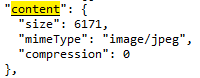
Chrome 47: “Save as HAR with content” doesn’t save the content.

Embedded image permalink

Unfortunately, there seems to be little effort to clean these problems up; the IE bug is at least four years old, the Edge bug is at least four months old. I filed bugs on Chrome and Firefox after failing to find any duplicates.

The HAR format specification itself has a number of shortcomings that have yet to be corrected, for instance:

  • No specified way to encode binary request bodies
  • No specified way to encode WebSocket messages

Perhaps the name of HAR spec-author Jan Odvarko’s blog is prescient: Software is hard.

-Eric

Reset Fiddler’s HTTPS certificates

I’ve made changes to the latest versions of Fiddler to improve the performance of certificate creation, and to avoid problems with new certificate validation logic coming to Chrome and Firefox. The biggest of the Fiddler changes is that CertEnroll is now the default certificate generator on Windows 7 and later.

Unfortunately, this change can cause problems for users who have previously trusted the Fiddler root certificate; the browser may show an error message like NET::ERR_CERT_AUTHORITY_INVALID or The certificate was not issued by a trusted certificate authority.

Please perform the following steps to recreate the Fiddler root certificate:

Fiddler 4.6.1.5+

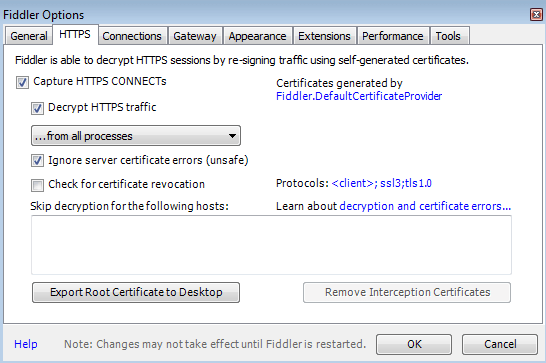
  1. Click Tools > Fiddler Options.
  2. Click the HTTPS tab.
  3. Ensure that the text says Certificates generated by CertEnroll engine.
  4. Click Actions > Reset Certificates. This may take a minute.
  5. Accept all prompts

Fiddler 4.6.1.4 and earlier

  1. Click Tools > Fiddler Options.
  2. Click the HTTPS tab
  3. Uncheck the Decrypt HTTPS traffic checkbox
  4. Click the Remove Interception Certificates button. This may take a minute.
  5. Accept all of the prompts that appear (e.g. Do you want to delete these certificates, etc)
  6. (Optional) Click the Fiddler.DefaultCertificateProvider link and verify that the dropdown is set to CertEnroll
  7. Exit and restart Fiddler
  8. Click Tools > Fiddler Options.
  9. Click the HTTPS tab
  10. Re-check the Decrypt HTTPS traffic checkbox
  11. Accept all of the prompts that appear (e.g. Do you want to trust this root certificate)

image

If you are using Fiddler to capture secure traffic from a mobile device or Firefox, you will need to remove the old Fiddler root certificate from that device (or Firefox) and install the newly-generated Fiddler certificate.

I apologize for the inconvenience, but I believe that the new certificate generator will help ensure smooth debugging with current and future clients.

-Eric Lawrence

DotNet Makes Me Sad, In Pictures

.NET Framework KB 3088956:

image

Ouch, that sounds pretty severe.

I guess I’d better go manually install a hotfix?

image

Seriously? An email address and a CAPTCHA? Fine.

image

Oh, an email delivered HTTP URL pointed at an executable file? That seems totes legit.

image

Yup, definitely legit, it says “Microsoft” right there at the top!

image

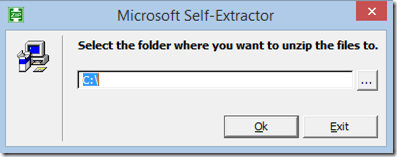
Sure, let’s put those files in the root of the C:\ drive. I’m sure that’ll work.

image

Oh, guess it did. Magic!

Oh, wait. No files in C:\. No magic, I guess.

Let’s use Process Monitor to watch the file writes… that’s what all the cool kids have to do to install patches, right?

image

Ah, there you are! UAC virtualization like it’s 2006!

image

Of course I must, Microsoft, of course I must.

-Eric

The Budget

“Don’t tell me what you value, show me your budget, and I’ll tell you what you value.” – Joe Biden

Across the political spectrum, Americans have thoughts on how the government should spend the money we send its way. That’s great (and it’d be better if more of us voted), but many arguments about spending are based on very misguided notions of how we’re currently spending our money. So, today, some charts.

Source: OMB.

image

See that blue piece? That’s what has a lot of folks worried. That’s the interest on the $18.4T national debt, which grew by another $426 billion dollars this year. So how much is $426 billion? Just over a third of what the US government got to spend on discretionary spending this year:

image

That military chunk is huge (54%), but it’s worth keeping in mind that this money isn’t just disappearing; we’re spending it on American-built weapons, salaries for Americans, etc. It’s fair to question whether we should be bringing those resources to bear on other challenges.

So, where does the money go when you include everything?

image

Social Security and Medicare are a huge chunk of where our money goes, but a large percentage of Americans seem very confused about how these programs work; politicians on both sides of the aisle are guilty of deliberately confusing the public about them.

If you ask Americans how much we spend on Foreign Aid, the average guess is 28%; in actuality, it’s about 1%.

Interestingly the government also publishes how much money it forgoes in the form of explicit tax breaks:

image

To whom do we owe that money?

Today, we owe most of the money to ourselves.


Other Stuff

  • Not all debt is bad—if you’re investing what you’re borrowing and getting a greater return on that investment, you’re doing it right.
  • Comparisons of national income and spending to household income and spending are often trite and very misleading. But the counterarguments against such comparisons tend to obscure their own weaknesses too.
  • XKCD did a comic on money.
  • The White House Calligrapher’s Office spends $277k per year on salaries for its three employees.