Last year, I wrote about how the new Microsoft Edge browser mostly ignores Security Zones (except in very rare circumstances) to configure security and permissions decisions. Instead, in Chromium per-site permissions are controlled by settings and policies expressed using a simple syntax with limited wildcarding support. Settings Page’s Site Permissions and Group Policy Internet ExplorerContinue reading “Per-Site Permissions in Edge”
Tag Archives: UX
Securely Displaying URLs
One of my final projects on the Chrome team was writing an internal document outlining Best Practices for Secure URL Display. Yesterday, it got checked into the public Chromium repro, so if this is a topic that interests you, please have a look! Additionally, at Enigma 2019, the Chrome team released Trickuri (pronounced “trickery”) a tool forContinue reading “Securely Displaying URLs”
Inspecting Certificates in Chrome
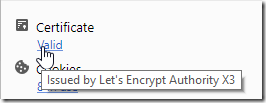
Chrome 60 introduces a new option to quickly show Certificate information for the current page.
The Trouble with Magic
“Magic” is great… except when it isn’t. Software Design is largely about tradeoffs, and one of the more interesting tradeoffs is between user experience and predictability. This has come up repeatedly throughout my career and in two independent contexts yesterday that I’ll describe in this post. Developer Magic I’m working on a tiny UX changeContinue reading “The Trouble with Magic”
Certified Malice
One unfortunate (albeit entirely predictable) consequence of making HTTPS certificates “fast, open, automated, and free” is that both good guys and bad guys alike will take advantage of the offer and obtain HTTPS certificates for their websites. Today’s bad guys can easily turn a run-of-the-mill phishing spoof: …into a somewhat more convincing version, by obtainingContinue reading “Certified Malice”
 text/plain