Mark-of-the-Web: Additional Guidance

I’ve been writing about Windows Security Zones and the Mark-of-the-Web (MotW) security primitive in Windows for decades now, with 2016’s Downloads and MoTW being one of my longer posts that I’ve updated intermittently over the last few years. If you haven’t read that post already, you should start there.

Advice for Implementers

At this point, MotW is old enough to vote and almost old enough to drink, yet understanding of the feature remains patchy across the Windows developer ecosystem.

MotW, like most security primitives (e.g. HTTPS), only works if you use it. Specifically, an application which generates local files from untrusted data (i.e. anywhere on “The Internet”) must ensure that the files bear a MoTW to ensure that the Windows Shell and other applications recognize the files’ origins and treat them with appropriate caution. Such treatment might include running anti-malware checks, prompting the user before running unsafe executables, or opening the files in Office’s Protected View.

Similarly, if you build an application which consumes files, you should carefully consider whether files from untrusted origins should be treated with extra caution in the same way that Microsoft’s key applications behave — locking down or prompting users for permission before the file initiates any potentially-unwanted actions, more-tightly sandboxing parsers, etc.

Writing MotW

The best way to write a Mark-of-the-Web to a file is to let Windows do it for you, using the IAttachmentExecute::Save() API. Using the Attachment Execution Services API ensures that the MotW is written (or not) based on the client’s configuration. Using the API also provides future-proofing for changes to the MotW format (e.g. Win10 started preserving the original URL information rather than just the ZoneID).

If the URL is not known, but you wish to ensure Internet Zone handling, use the special url about:internet.

You should also use about:internet if the URL is longer than 2083 characters (INTERNET_MAX_URL_LENGTH), or if the URL’s scheme isn’t one of HTTP/HTTPS/FILE.

Ensure that you write the MotW to any untrusted file written to disk, regardless of how that happened. For example, one mail client would properly write MotW when the user used the “Save” command on an attachment, but failed to do so if the user drag/dropped the attachment to their desktop. Similarly, browsers have written MotW to “downloads” for decades, but needed to add similar marking when the File Access API was introduced. Recently, Chromium fixed a bypass whereby a user could be tricked into hitting CTRL+S with a malicious document loaded.

Take care with anything that would prevent proper writing of the MotW– for example, if you build a decompression utility for ZIP files, ensure that you write the MotW before your utility applies any readonly bit to the newly extracted file, otherwise the tagging will fail.

Update: One very non-obvious problem with trying to write the :Zone.Identifier stream yourself — URLMon has a cross-process cache of recent zone determinations. This cache is flushed when a user reconfigures Zones in the registry and when CZoneIdentifier.Save() is called inside the Attachment Services API. If you try to write a zone identifier stream yourself, the cache won’t be flushed, leading to a bug if you do the following operations:

1. MapURLToZone("file:///C:/test.pdf"); // Returns LOCAL_MACHINE
2. Write ZoneID=3 to C:\test.pdf:Zone.Identifier // mark Internet
3. MapURLToZone("file:///c:/test.pdf"); // BUG: Returns LOCAL_MACHINE value cached at step #1.

Beware Race Conditions

In certain (rare) scenarios, there’s the risk of a race condition whereby a client could consume a file before your code has had the chance to tag it with the Mark-of-the-Web, resulting in a security vulnerability. For instance, consider the case where your app (1) downloads a file from the internet, (2) streams the bytes to disk, (3) closes the file, finally (4) calls IAttachmentExecute::Save() to let the system tag the file with the MotW. If an attacker can induce the handler for the new file to load it between steps #3 and #4, the file could be loaded by a victim application before the MotW is applied.

Unfortunately, there’s not generally a great way to prevent this — for example, the Save() call can perform operations that depend on the file’s name and content (e.g. an antivirus scan) so we can’t simply call the API against an empty file or against a bogus temporary filename (i.e. inprogress.temp).

The best approach I can think of is to avoid exposing the file in a predictable location until the MotW marking is complete. For example, you could download the file into a randomly-named temporary folder (e.g. %TEMP%\InProgress\{guid}\setup.exe), call the Save() method on that file, then move the file to the predictable location.

Note: This approach (extracting to a randomly-named temporary folder, carefully named to avoid 8.3 filename collisions that would reduce entropy) is now used by Windows 10+’s ZIP extraction code.

Correct Zone Mapping

To check the Zone for a file path or URL, use the MapUrlToZone (sometimes called MUTZ) function in URLMon.dll. You should not try to implement this function yourself– you will get burned.

Because the MotW is typically stored as a simple key-value pair within a NTFS alternate data stream:
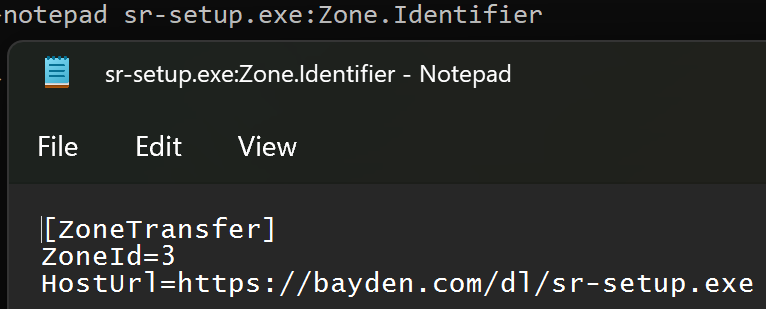
…it’s tempting to think “To determine a file’s zone, my code can just read the ZoneId directly.”

Unfortunately, doing so is a recipe for failure.

Firstly, consider the simple corner cases you might miss. For instance, if you try to open with read/write permissions the Zone.Identifier stream of a file whose readonly bit is set, the attempt to open the stream will fail because the file isn’t writable.

Aside: A 2023-era vulnerability in Windows was caused by failure to open the Zone.Identifier due to an unnecessary demand for write permission.

Second, there’s a ton of subtlety in performing a proper zone mapping.

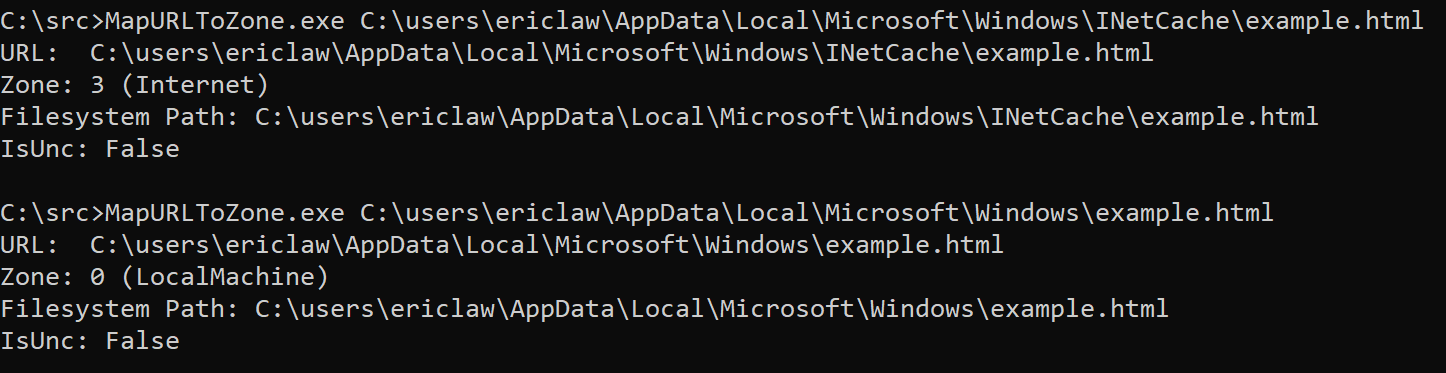
2a: For example, files stored under certain paths or with certain Integrity Levels are treated as Internet Zone, even without a Zone.Identifier stream:
2b: Similarly, files accessed via a \\UNC share are implicitly not in the Local Machine Zone, even if they don’t have a Zone.Identifier stream. Origin information can come from either the location of the file (e.g. C:\test\example.txt or \\share.corp\files\example.txt), or any Zone.Identifier alternate data stream on that file. The rules for precedence are tricky — a file on a “Trusted Zone” file share that contains a Zone.Identifier containing a ZoneId=3 (Internet Zone) marking must cause a file to be treated as Internet Zone, regardless of the file’s location. However, the opposite must not be true — a remote file with a Zone.Identifier specifying ZoneId=0 (Local Machine) must not cause that file to be treated as Local Machine.

Aside: The February 2024 security patch (CVE-2024-21412) fixed a vulnerability where the handler for InternetShortcut (.url) files was directly checking for a Zone.Identifier stream rather than calling MUTZ. That meant the handler failed to recognize that file://attacker_smbshare/attack.url should be treated with suspicion and suppressed an important security prompt.

2c: As of the latest Windows 11 updates, if you zone-map a file contained within a virtual disk (e.g. a .iso file), that file will inherit the MotW of the containing .iso file, even though the embedded file has no Zone.Identifier stream.

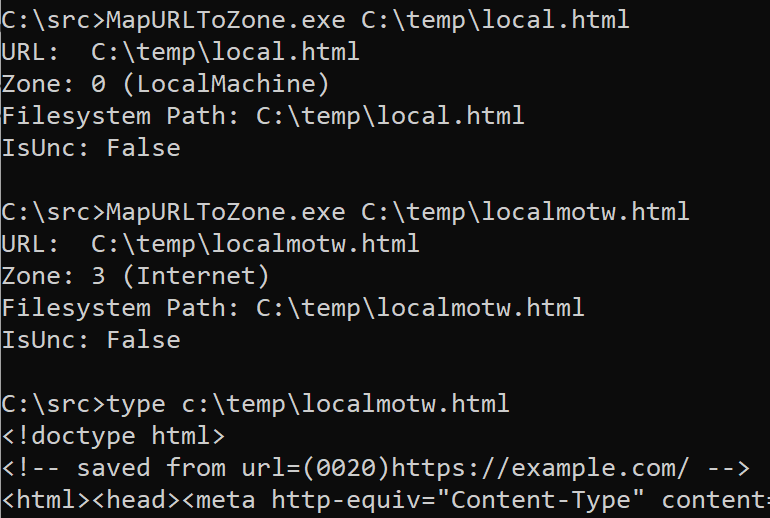
2d: For HTML files, a special saved from url comment allows specification of the original url of the HTML content. When MapUrlToZone is called on a HTML file URL, the start of the file is scanned for this comment, and if found, the stored URL is used for Zone Mapping:
Finally, the contents of the Zone.Identifier stream are subject to change in the future. New key/value fields were added in Windows 10, and the format could be changed again in the future.

Ensure You’re Checking the “Final” URL

Ensure that you check the “final” URL that will be used to retrieve or load a resource. If you perform any additional string manipulations after calling MapUrlToZone (e.g. removing wrapping quotation marks or other characters), you could end up with an incorrect result.

Respect Error Cases

Numerous security vulnerabilities have been introduced by applications that attempt to second-guess the behavior of MapURLToZone.

For example, MapURLToZone will return a HRESULT of 0x80070057 (Invalid Argument) for some file paths or URLs. An application may respond by trying to figure out the Zone itself, by checking for a Zone.Identifier stream or similar. This is unsafe: you should instead just reject the URL.

Similarly, one caller noted that http://dotless was sometimes returning ZONE_INTERNET rather the ZONE_INTRANET they were expecting. So they started passing MUTZ_FORCE_INTRANET_FLAGS to the function. This has the effect of exposing home users (for whom the Intranet Zone was disabled way back in 2006) to increased attack surface.

MutZ Performance

One important consideration when calling MapUrlToZone() is that it is a blocking API which can take from milliseconds (common case) to tens of seconds (worst case) to complete. As such, you should NOT call this API on a UI thread– instead, call it from a background thread and asynchronously report the result up to the UI thread.

It’s natural to wonder how it’s possible that this API takes so long to complete in the worst case. While file system performance is unpredictable, even under load it rarely takes more than a few milliseconds, so checking the Zone.Identifier is not the root cause of slow performance. Instead, the worst performance comes when the system configuration enables the Local Intranet Zone, with the option to map to the Intranet Zone any site that bypasses the proxy server:
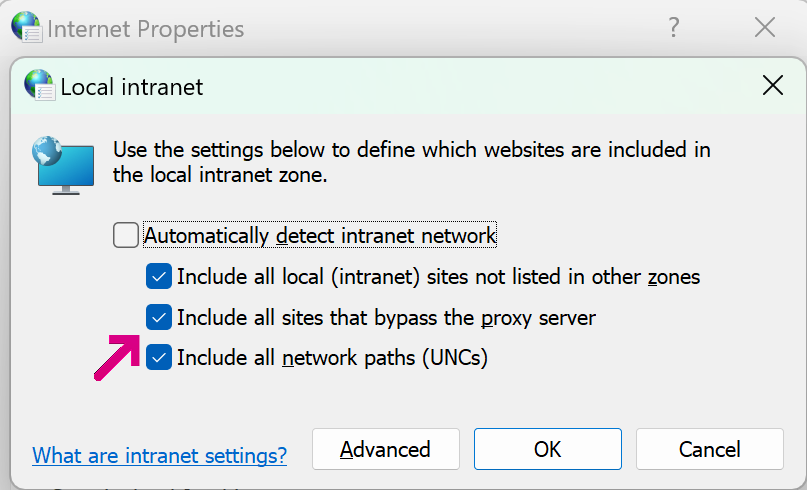
In this configuration, URLMon may need to discover a proxy configuration script (potentially taking seconds), download that script (potentially taking seconds), and run the FindProxyForURL function inside the script. That function may perform a number of expensive operations (including DNS resolutions), potentially taking seconds.

Fortunately, the “worst case” performance is not common after Windows 7 (the WinHTTP Proxy Service means that typically much of this work has already been done), but applications should still take care to avoid calling MapUrlToZone() on a UI thread, lest an annoyed user conclude that your application has hung and kill it.

Checking for “LOCAL” paths

In some cases, you may want to block paths or files that are not on the local disk, e.g. to prevent a web server from being able to see that a given file was opened (a so-called Canary Token), or to prevent leakage of the user’s NTLM hash.

When using MapURLToZone for this purpose, pass the MUTZ_NOSAVEDFILECHECK flag. This ensures that a downloaded file is recognized as being physically local AND prevents the MapURLToZone function from itself reaching out to the network over SMB to check for a Zone.Identifier data stream.

I wrote a whole post exploring this topic.

Comparing Zone Ids

In most cases, you’ll want to use < and > comparisons rather than exact Zone comparisons; for example, when treating content as “trustworthy”, you’ll typically want to check Zone<3, and when deeming content risky, you’ll check Zone>3.

Tool: Simple MapUrlToZone caller

Compile from a Visual Studio command prompt using csc mutz.cs:

using System;
using System.IO;
using System.Runtime.InteropServices;
namespace MUTZ
{
[ComImport, GuidAttribute("79EAC9EE-BAF9-11CE-8C82-00AA004BA90B")]
[InterfaceTypeAttribute(ComInterfaceType.InterfaceIsIUnknown)]
public interface IInternetSecurityManager
{
[return: MarshalAs(UnmanagedType.I4)][PreserveSig]
int SetSecuritySite([In] IntPtr pSite);
[return: MarshalAs(UnmanagedType.I4)][PreserveSig]
int GetSecuritySite([Out] IntPtr pSite);
[return: MarshalAs(UnmanagedType.I4)][PreserveSig]
int MapUrlToZone([In,MarshalAs(UnmanagedType.LPWStr)] string pwszUrl,
ref UInt32 pdwZone, UInt32 dwFlags);
[return: MarshalAs(UnmanagedType.I4)][PreserveSig]
int GetSecurityId([MarshalAs(UnmanagedType.LPWStr)] string pwszUrl,
[MarshalAs(UnmanagedType.LPArray)] byte[] pbSecurityId,
ref UInt32 pcbSecurityId, uint dwReserved);
[return: MarshalAs(UnmanagedType.I4)][PreserveSig]
int ProcessUrlAction([In,MarshalAs(UnmanagedType.LPWStr)] string pwszUrl,
UInt32 dwAction, out byte pPolicy, UInt32 cbPolicy,
byte pContext, UInt32 cbContext, UInt32 dwFlags,
UInt32 dwReserved);
[return: MarshalAs(UnmanagedType.I4)][PreserveSig]
int QueryCustomPolicy([In,MarshalAs(UnmanagedType.LPWStr)] string pwszUrl,
ref Guid guidKey, ref byte ppPolicy, ref UInt32 pcbPolicy,
ref byte pContext, UInt32 cbContext, UInt32 dwReserved);
[return: MarshalAs(UnmanagedType.I4)][PreserveSig]
int SetZoneMapping(UInt32 dwZone,
[In,MarshalAs(UnmanagedType.LPWStr)] string lpszPattern,
UInt32 dwFlags);
[return: MarshalAs(UnmanagedType.I4)][PreserveSig]
int GetZoneMappings(UInt32 dwZone, out System.Runtime.InteropServices.ComTypes.IEnumString ppenumString,
UInt32 dwFlags);
}
public class MUTZ
{
private readonly static Guid CLSID_SecurityManager = new Guid("7b8a2d94-0ac9-11d1-896c-00c04fb6bfc4");
public static int Main(string[] args)
{
UInt32 iZone=0;
string sURL = "https://example.com/&quot;;
if (args.Length > 0)
{
sURL = args[0];
}
else
{
Console.WriteLine("Usage: mutz.exe https://host/path?query#fragment\n\n");
}
Type t = Type.GetTypeFromCLSID(CLSID_SecurityManager);
object securityManager = Activator.CreateInstance(t);
IInternetSecurityManager ISM = securityManager as IInternetSecurityManager;
ISM.MapUrlToZone(sURL, ref iZone, 0); // TODO: Allow specification of flags https://learn.microsoft.com/en-us/previous-versions/windows/internet-explorer/ie-developer/platform-apis/dd759042(v=vs.85)
Marshal.ReleaseComObject(securityManager);
string sZone;
switch (iZone)
{
case 0: sZone = "LocalMachine"; break;
case 1: sZone = "LocalIntranet"; break;
case 2: sZone = "Trusted"; break;
case 3: sZone = "Internet"; break;
case 4: sZone = "Restricted"; break;
default: sZone = "~custom~"; break;
}
Console.WriteLine($"URL: {sURL}");
Console.WriteLine($"Zone: {iZone} ({sZone})");
Uri uri;
if (Uri.TryCreate(sURL, UriKind.Absolute, out uri)) {
if (uri.IsFile) {
string strPath = uri.LocalPath;
Console.WriteLine($"Filesystem Path: {strPath}");
Console.WriteLine($"IsUnc: {uri.IsUnc}");
if (uri.IsUnc) {
// 0x00000400 – MUTZ require saved file check
}
/*
// It would be nice if this worked, but it doesn't because .NET Framework doesn't support opening the alternate stream.
// See https://stackoverflow.com/questions/604960/how-to-read-and-modify-ntfs-alternate-data-streams-using-net
try {
string strMotW = File.ReadAllText($"{strPath}:Zone.Identifier");
Console.WriteLine(":ZoneIdentifier\n{strMotW}\n————————————-\n\n");
} catch (Exception eX) {
Console.WriteLine($"ZoneIdentifier stream could not be read ({eX.Message})");
}
*/
}
}
return (int)iZone;
}
}
}
view raw mutz.cs hosted with ❤ by GitHub

Update: I wrote a whole post with further discussion of properly checking a file’s zone.

Q4 2022 Races

I finished the first section of Tommy Rivers’ half-marathon training series (in Bolivia) and have moved on to the second section (Japan). I ran two Austin races in November, notching some real-world running experience in preparation for the 3M Half Marathon that I’ll be running at the end of January.

Run for the Water

On November 6th, I ran the “Run for the Water” ten miler, a charity race in support of providing clean water sources in Burundi.

Fortunately, everything that could’ve gone wrong with this race didn’t– the weather was nice, and my full belly had no complaints. This was my first race experience with music (my Amazon Fire phone to one Bluetooth headphone) and a carried snack (GU chews), and I figured out how to coax my watch into providing pacing information every half mile.

I had two goals for the race: To run the whole thing without stopping, and to beat 1:30 overall.

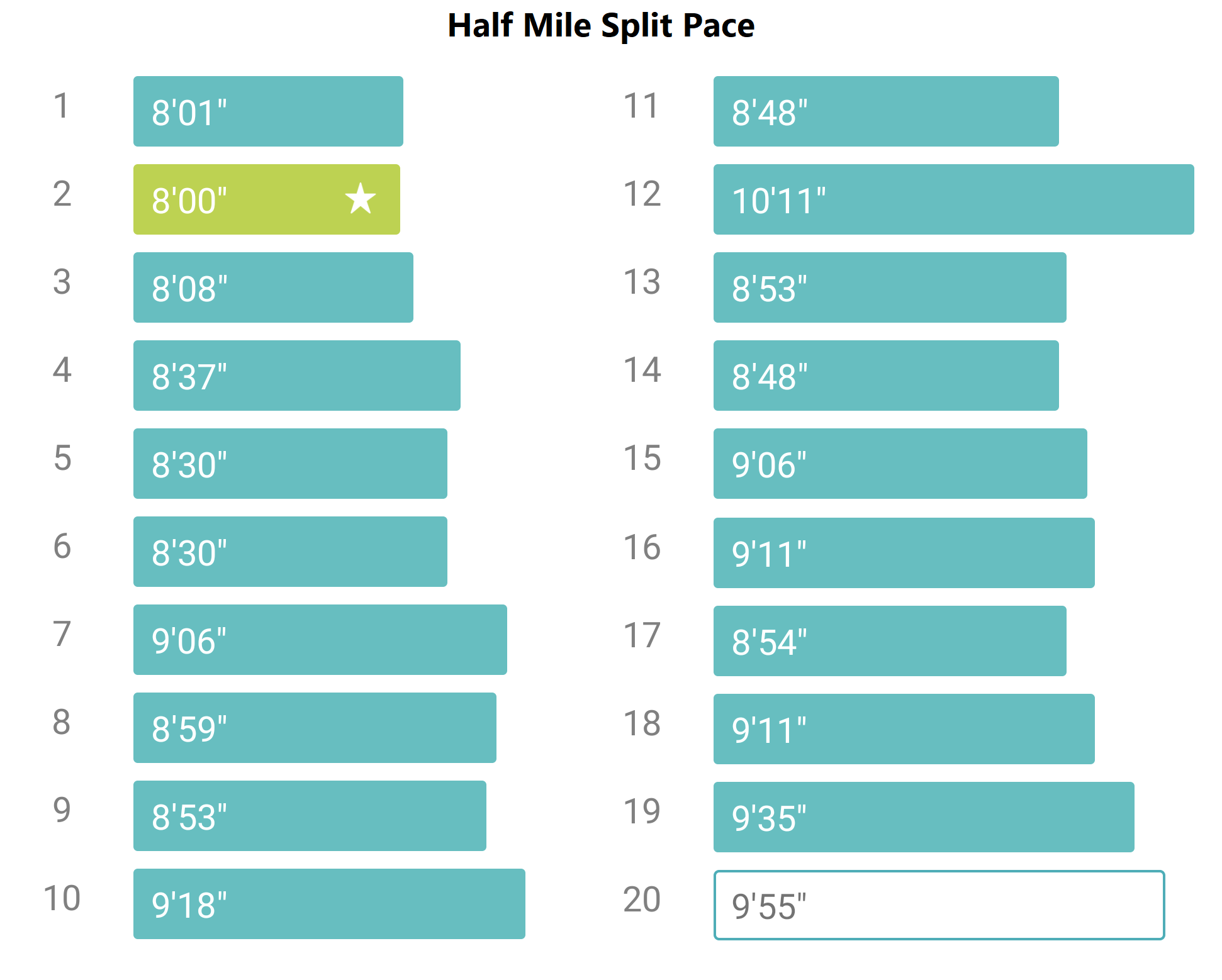
I achieved both, with a finishing time of 1:28:57, a pace of 8:53 per mile, and 1294 calories expended.

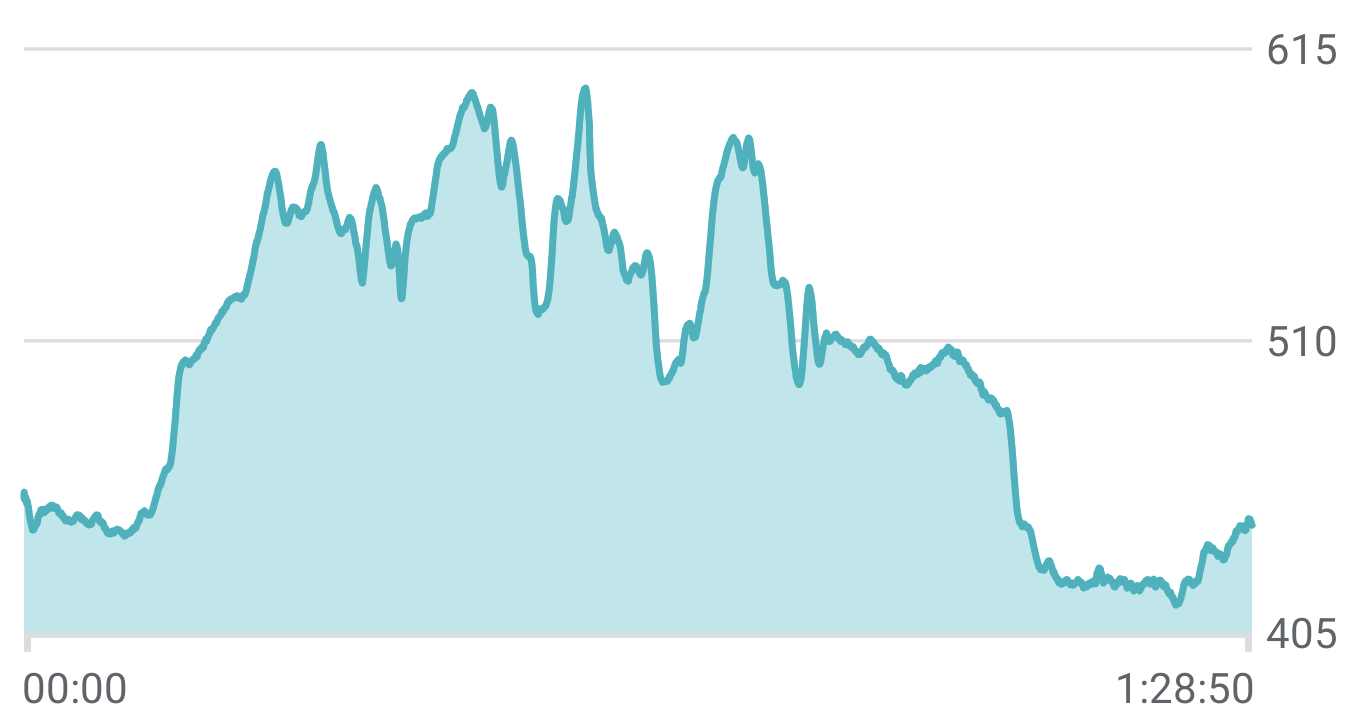
As predicted, I started at a faster pace before leveling out, with my slowest times in the hills around mile six:

The mid-race hills weren’t as bad as I feared, and I spent most of mile 6 and 7 psyching myself up for one final big hill that never arrived. By mile 8, I was daydreaming about blazing through miles 9 and 10, but started lagging and only sprinted at the very end. With an eye toward the half marathon, as I crossed the finish line, I asked myself whether I could run another 3.1 miles in thirty minutes and concluded “probably, but just barely.”

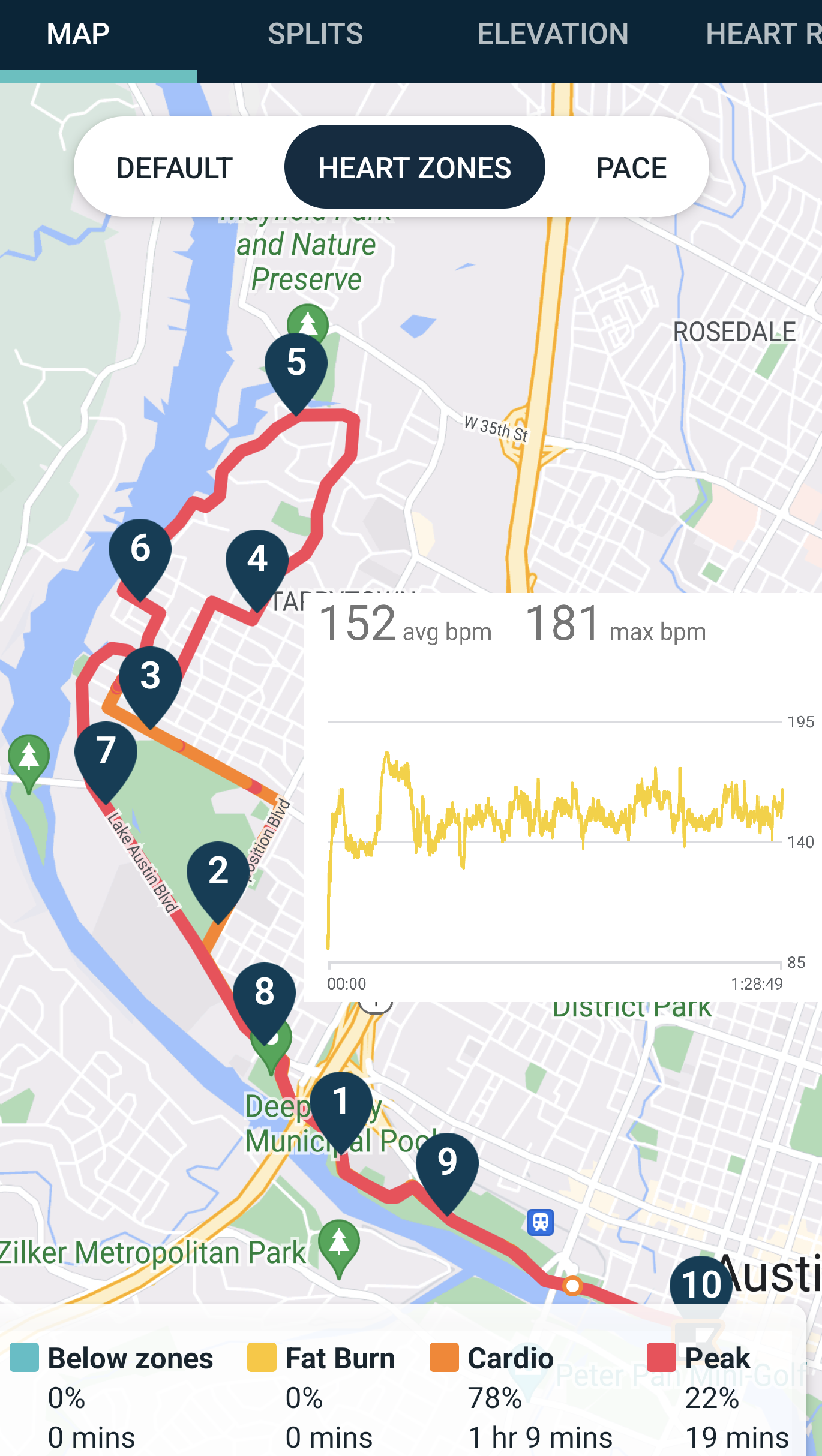
Notably, I managed to keep my heart rate under control for almost the whole race, running nearly the entire thing at just under 85% of my max:

The cool-but-not-cold weather undoubtably helped.

Turkey Trot

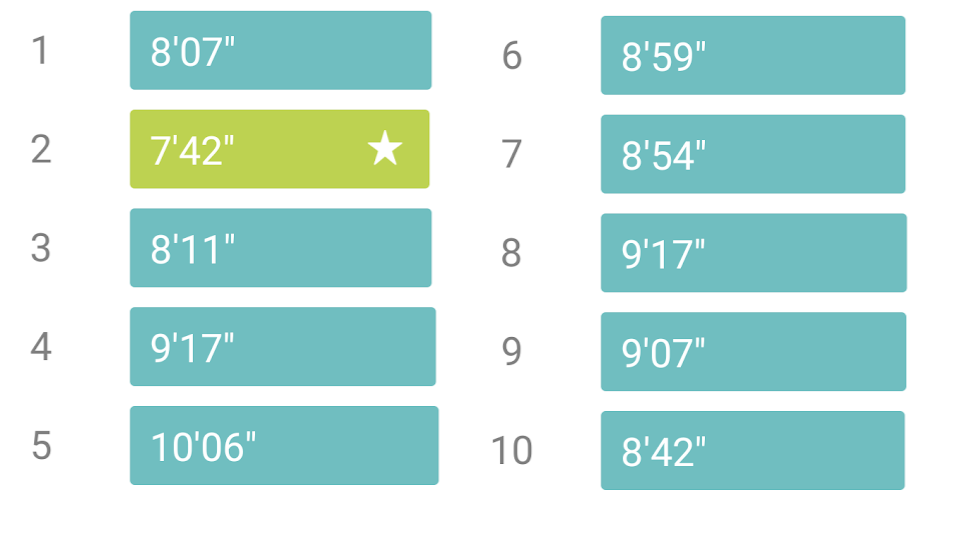
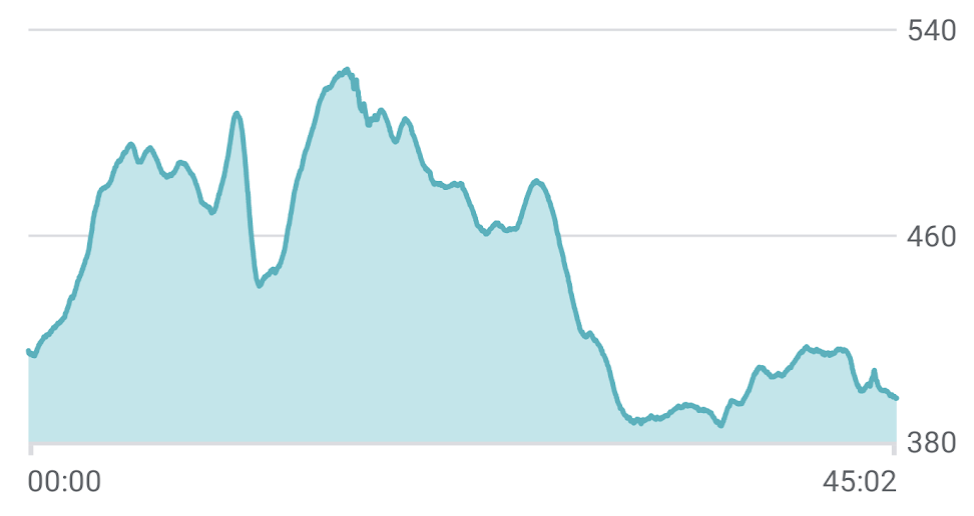
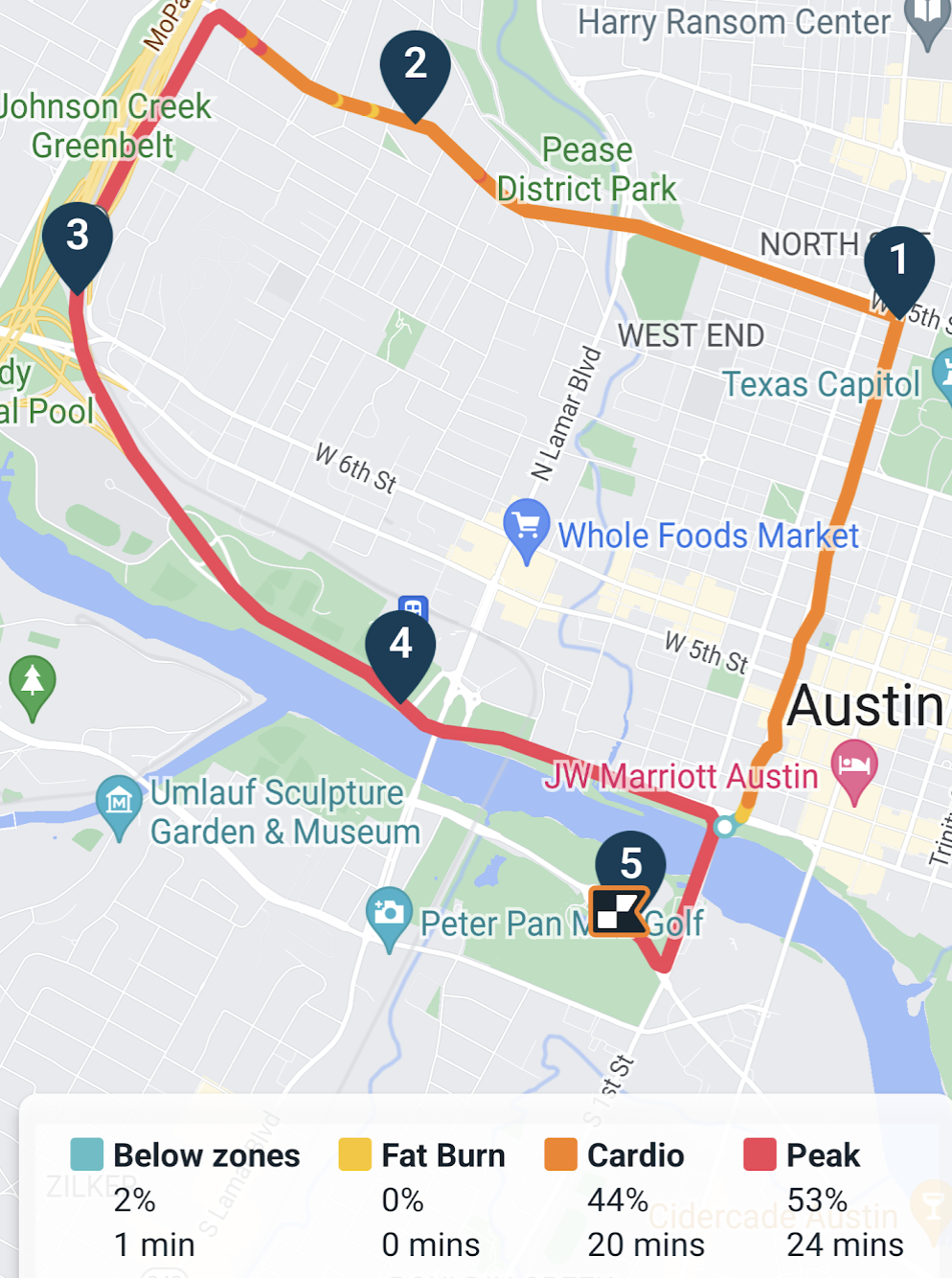
On a drizzly Thanksgiving morning, I ran the Turkey Trot 5-miler and had another solid run, although I didn’t take it as seriously and I ended up missing both of my goals: Run the entire thing, and finish in 42 minutes.

After the Capitol 10K in the spring, I was expecting the horde of runners at the start and was prepared for the temptation to join others in walking the hills early in the race. I wasn’t expecting the challenge of running on wet pavement, but I managed to avoid slipping. Alas, after topping the hills at mile 2, I then walked for a tenth of a mile to get my breathing and heart rate back under control.

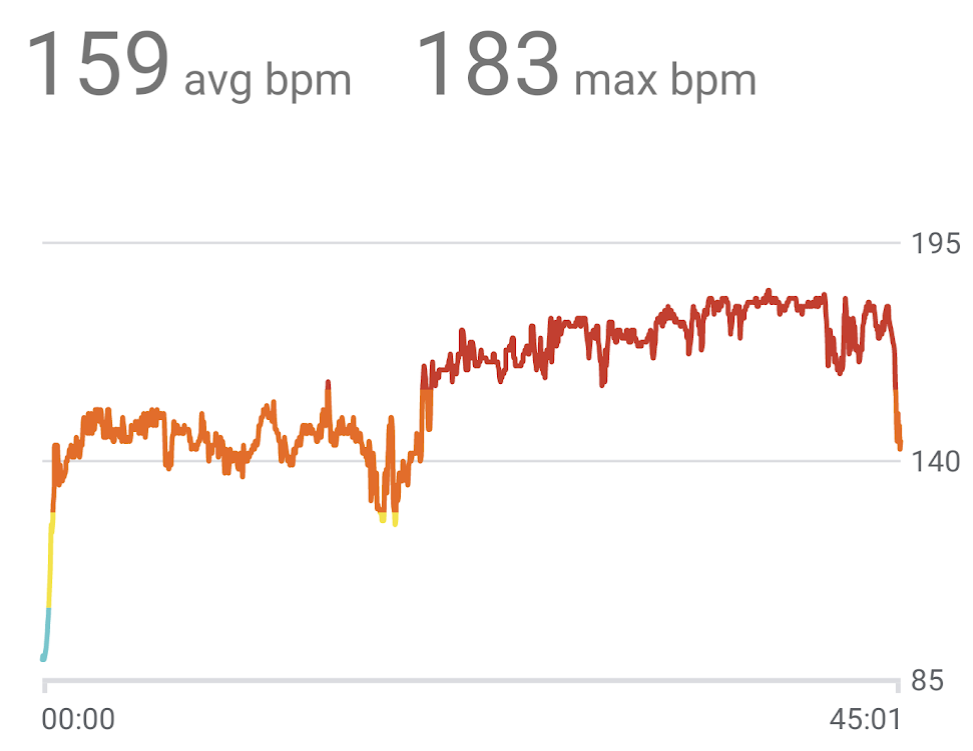
Despite the shorter distance, my heart rate was considerably higher than during the ten miler earlier in the month:

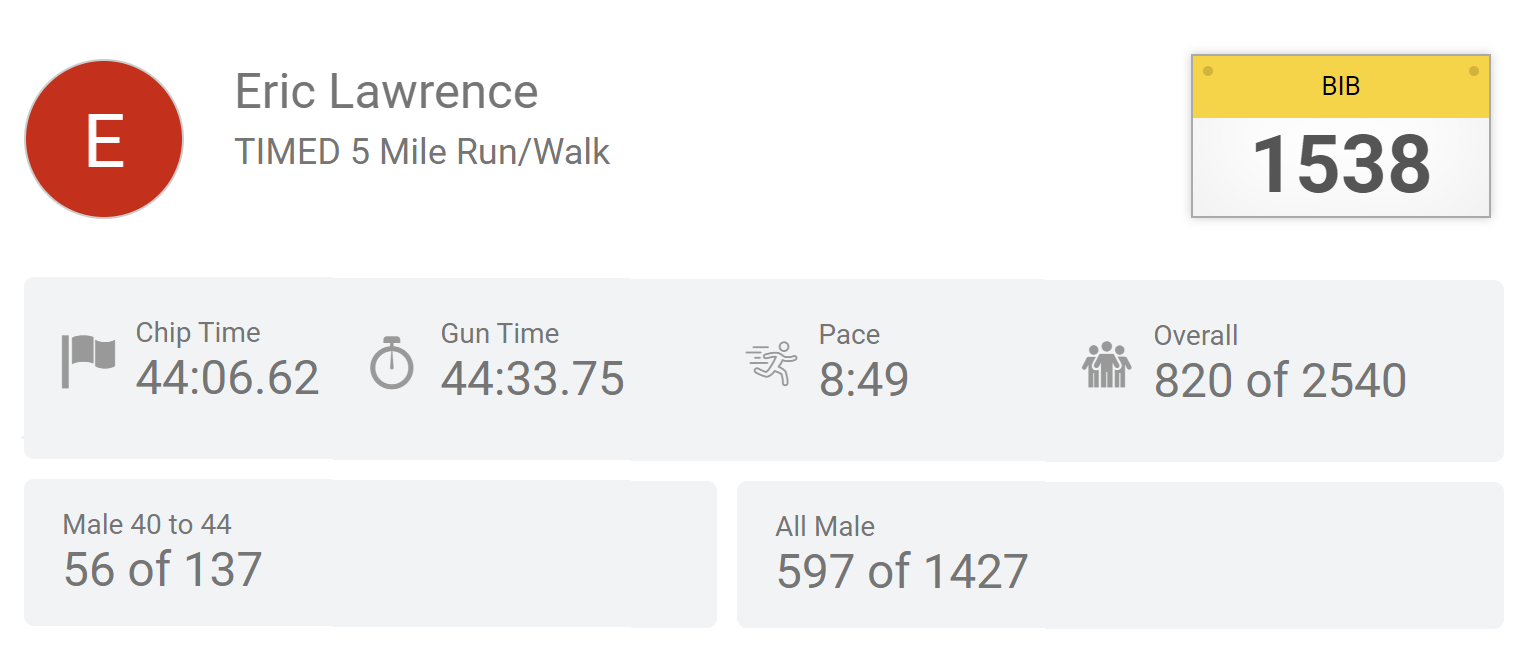
I ended with a time of 44:06, an 8:49 pace just a hair faster than the ten miler, burning 673 calories in the effort:

So, a set of mixed results: I’m now considering whether I should try running a slow half marathon in December just to prove to myself that I can cover the distance without stressing about my time.

Driving Electric

While my 2013 CX-5 is reasonably fuel-efficient (~28mpg in real world driving), this summer I watched in dismay as gas prices spiked. Even when my tank was almost full, watching prices tick up every time I drove past a gas station left me unsettled. I’d been idly considering getting an electric car for years, but between months of fuel price anxiety and upcoming changes in tax credits (that will leave me ineligible starting in 2023) this fall felt like the right time to finally pull the trigger.

On October 24th, I picked up a new 2023 Nissan Leaf.

I originally shopped for plug-in hybrid SUVs with the intent of replacing the Mazda, but none of the brands seemed to have any available, with waitlists stretching well into next year. So, instead I decided I’d look for a pure-electric to use for daily driving, keeping my CX-5 for family vacations and whenever I need to haul a bigger or messier load. (I worried a bit about the cost to have two cars on my insurance, but the new car initially added only $30 a month, which feels pretty reasonable.)

I got the shorter-range version of the Leaf (40kWh) which promises around 150 miles per charge. While it’s compact, it makes good use of its interior room, and I have plenty of headroom despite my long torso. The backseat is very tight, but my sons will still fit for a few more years. In the first 25 days, I’ve put about 550 miles on it, and the car has yielded slightly better than the expected 150-mile range. It’s fun to drive. The only significant disappointment is that my Leaf’s low-end “S” trim doesn’t include the smartphone integration to track charging and enable remote start/AC (which would’ve been very useful in Texas summers). Including tax and all of the assorted fees, I paid sticker at $32K (17 down, 15 financed at an absurdly low 2.25%), before discounting the soon-to-expire $7500 federal tax credit.

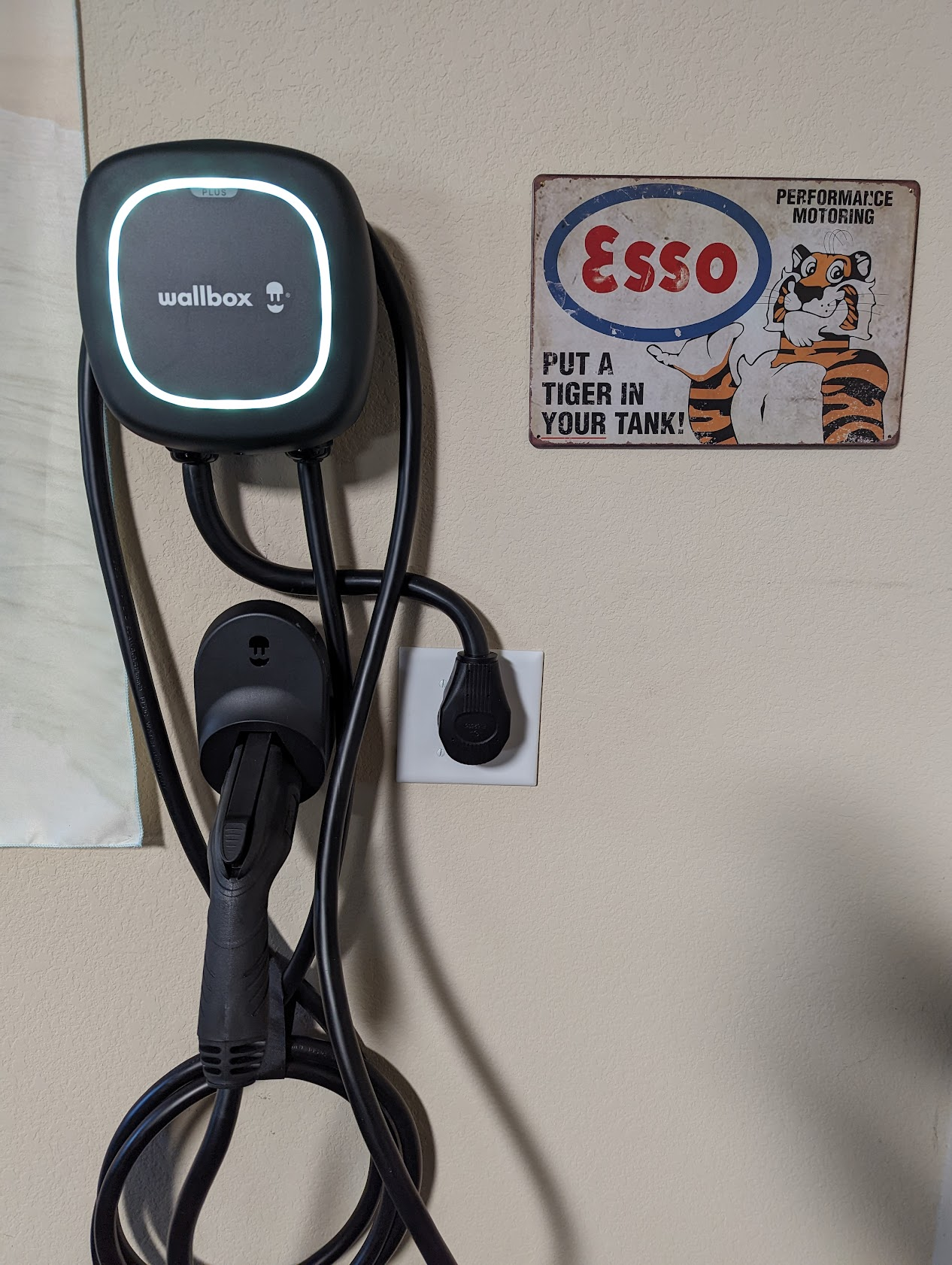
For the first few weeks, I was trickle-charging the car using a regular 120V (1.4kWh/h) household socket. While 120V takes more than a day to fully charge the Leaf, even slow charging was much more practical for my needs than I had originally expected. Nevertheless, I spent a total of $2550 on a Wallbox Pulsar Plus 40A Level 2 charger ($550 for the charger, a higher-than-expected $2000 for the new 240V high-amp socket in my garage) to increase the charge speed to the full 6.6kWh/h that the car supports. My current electrical panel only had 30 amps available, which is the max the Leaf will take, but I had the electrician pull a 50 amp wire to simplify things if I ever upgrade to a car and panel with higher capacity. My local electric company will reimburse me $1200 for the charger installation, and there’s also a federal tax credit of 30% capped at $1000. So if everything goes according to plan, L2 charging will only have a net cost of $600.

While I’m enjoying the car, it’s not for everyone– between the small battery and the nearly nonexistent public fast-charging support, the practical range of the Leaf is low. The Leaf only supports the losing CHAdeMO standard that seems likely to go away over the next few years, and the Austin metro area only has two such chargers today (Update: Wrong). It’s also not clear that the Leaf model line has much of a future; the 2023 edition might be the last, or at least the last before a major redesign. (Update: The 2024 Leaf appears to be basically identical to the 2023 model; Nissan’s electric SUV, the Ariya, has arrived in America).

Nevertheless, for my limited needs, the Leaf is a good fit. In a few years, I expect I’ll replace my CX-5 with a hybrid SUV, but for now, I’m stressing a lot less about gas prices (even as they’ve fallen back to under $3 a gallon in Austin 🤷‍♂️).

-Eric

Update: I wrote about my Leaf ownership, one year in.

Thoughts on Twitter

When some of the hipper PMs on the Internet Explorer team started using a new “microblogging” service called Twitter in the spring of 2007, I just didn’t “get it.” Twitter mostly seemed to be a way to broadcast what you’d had for lunch, and with just 140 characters, you couldn’t even fit much more.

As Twitter’s founder noted:

…we came across the word “twitter”, and it was just perfect. The definition was “a short burst of inconsequential information”, and “chirps from birds”. And that’s exactly what the product was.

https://en.wikipedia.org/wiki/Twitter#2006%E2%80%932007:_Creation_and_initial_reaction

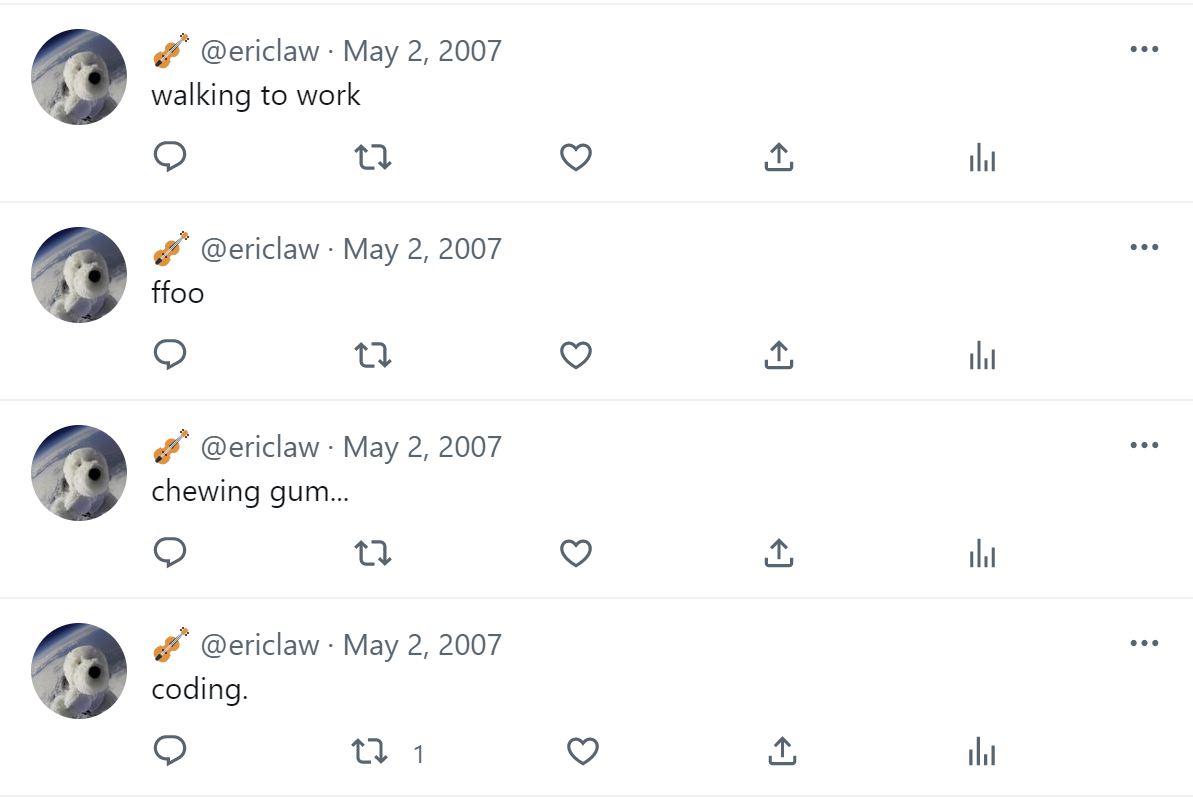
When I finally decided to sign up for the service (mostly to ensure ownership of my @ericlaw handle, in case I ever wanted it), most of my tweets were less than a sentence. I hooked up a SlickRun MagicWord so I could spew status updates out without even opening the website, and spew I did:

It looks like it was two years before I interacted with anyone I knew on Twitter, but things picked up quickly from there. I soon was interacting with both people I knew in real life, and many many more that I would come to know from the tech community. Between growing fame as the creator of Fiddler, and attention from improbable new celebrities:

…my follower count grew and grew. Soon, I was tweeting constantly, things both throwaway and thoughtful. While Twitter wasn’t a source of deep connection, it was increasingly a mechanism of broad connection: I “knew” people all over via Twitter.

This expanded reach via Twitter came as my connections in the real-world withered away from 2013 to 2015: I’d moved with my wife to Austin, leaving behind all of my friends, and within a few years, Telerik had fired most of my colleagues in Austin. Around that time, one of my internet-famous friends, Steve Souders confessed that he’d unfollowed me because I’d started tweeting too much and it was taking over his timeline.

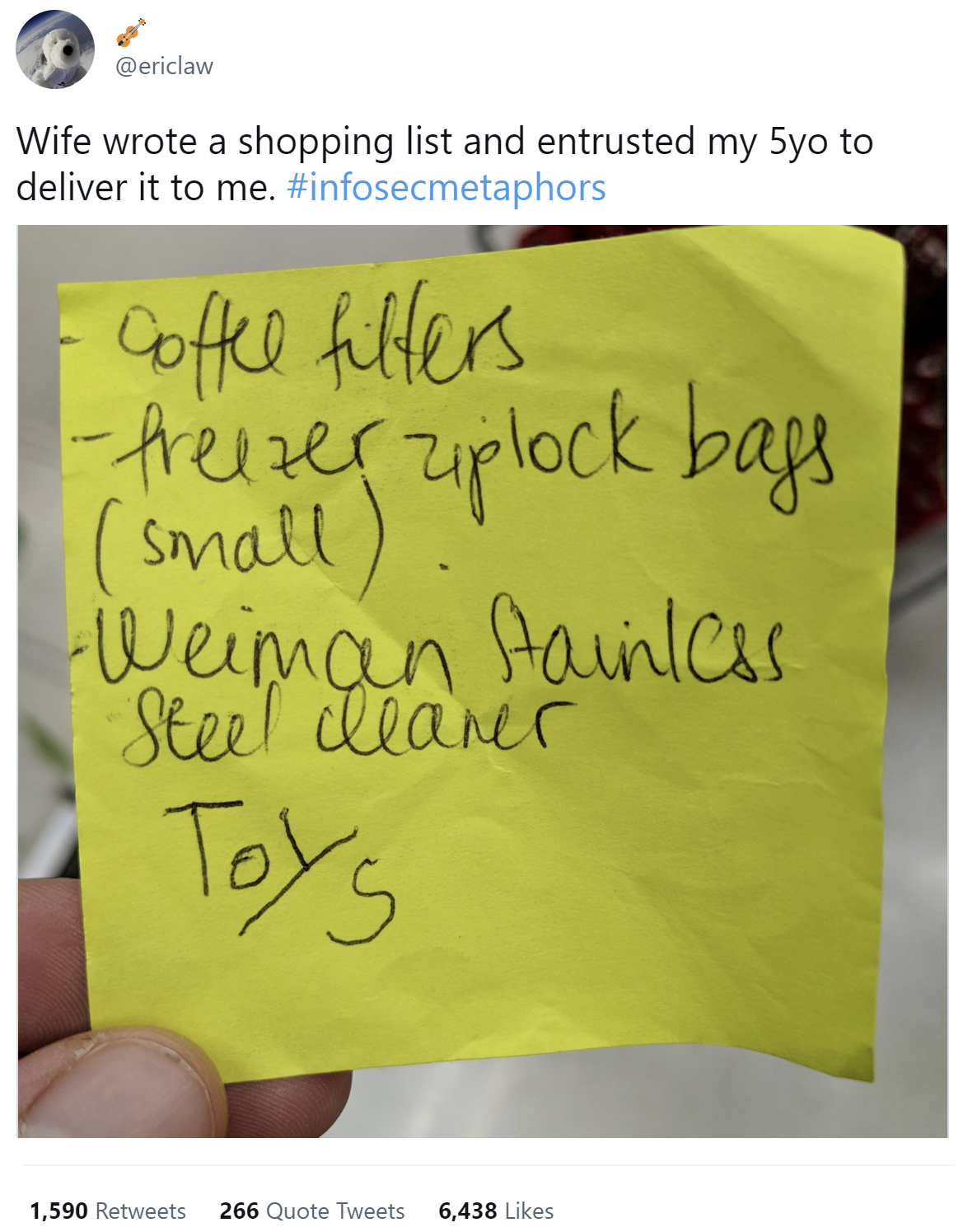
My most popular tweet came in 2019, and it crossed over between my role as a dad and as a security professional:

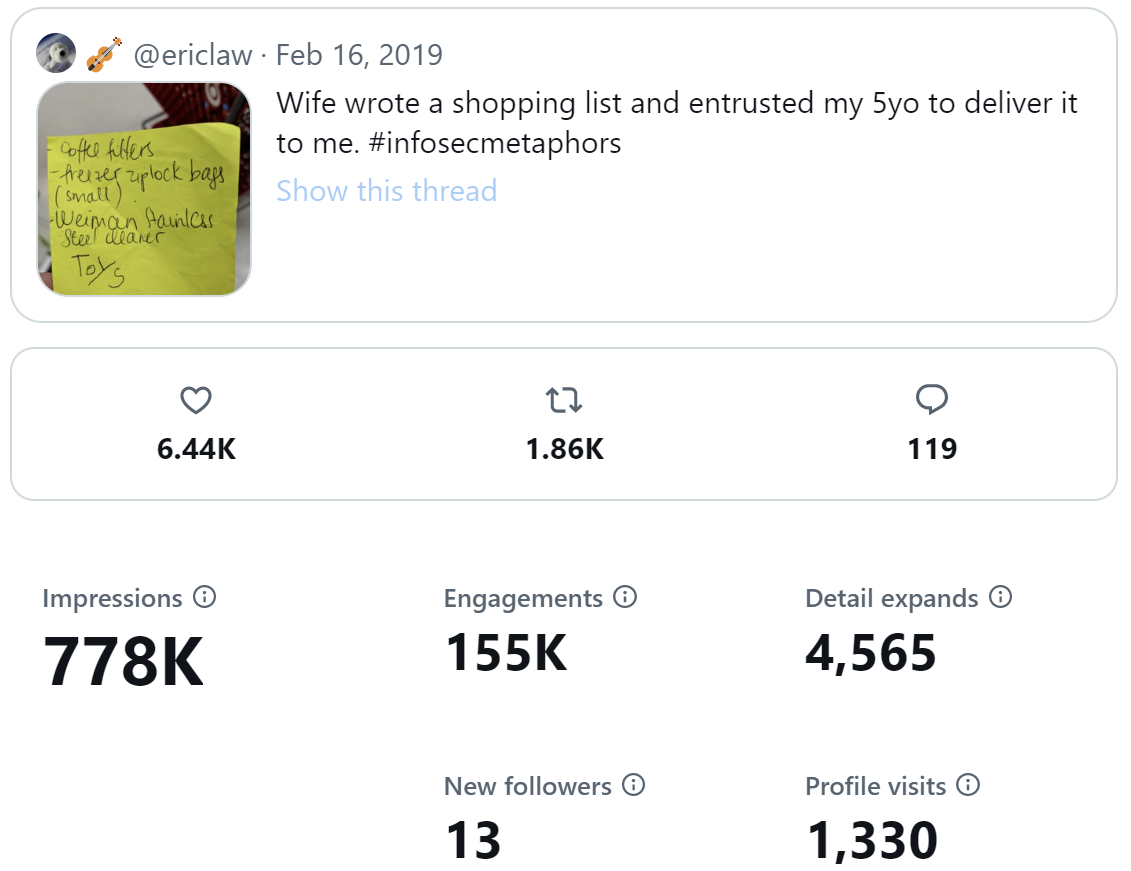
The tweet, composed from the ziplock bag aisle of Target, netted nearly a million views.

I even found a job at Google via tweet. Throughout, I vague-tweeted various life milestones, from job changes, to buying an engagement ring, to signing the divorce papers. Between separating and divorcing, I wrote up a post-mortem of my marriage, and Twitter got two paragraphs:


Twitter. Unquestionably designed to maximize usage, with all of the cognitive tricks some of the most clever scientists have ever engineered. I could write a whole book about Twitter. The tl;dr is that I used Twitter for all of the above (News, Work, Stock) as well as my primary means of interacting with other people/”friends.” I didn’t often consciously think about how much it messed me up to go from interacting with a large number of people every day (working at Microsoft) to engaging with almost no one in person except [my ex] and the kids. Over seven years, there were days at Telerik, Google, and Microsoft where I didn’t utter a word for nine workday hours at a time. That’s plainly not healthy, and Twitter was one crutch I tried to use to mitigate that. 

My Twitter use got worse when it became clear that [my ex] wasn’t especially interested in anything I had to say that wasn’t directly related to either us or the kids, either because our interests didn’t intersect, or because there wasn’t sufficient shared context to share a story in fewer than a few minutes. She’d ask how my day was, and interrupt if my answer was longer than a sentence or two without a big announcement. Eventually, I stopped answering if I couldn’t think of anything I expected she might find interesting. Meanwhile, ten thousand (mostly strangers) on the Internet beckoned with their likes and retweets, questions and kudos.


Now, Twitter wasn’t all just a salve for my crushing loneliness. It was a great and lightweight way to interact with the community, from discovering bugs, to sharing tips-and-tricks, to drawing traffic to blog posts or events. I argued about politics, commiserated with other blue state refugees in Texas, and learned about all sorts of things I likely never would have encountered otherwise.

Alas, Twitter has also given me plenty of opportunities to get in trouble. Over the years, I’ve been pretty open in sharing my opinions about everything, and not everyone I’ve worked for has been comfortable with that, particularly as my follower count crossed into 5 digits. Unfortunately, while the positive outcomes of my tweet community-building are hard to measure, angry PR folks are unambiguous about their negative opinions. Sometimes, it’s probably warranted (I once profanely lamented a feature that I truly believe is bad for safety and civility in the world) while other times it seems to be based on paranoid misunderstandings (e.g. I often tweet about bugs in products, and some folks wish I wouldn’t).

While my bosses have always been very careful not to suggest that I stop tweeting, at some point it becomes an IQ test and they’re surprised to see me failing it.

What’s Next?

While I nagged the Twitter team about annoying bugs that never got fixed over the years, the service was, for the most part, solid. Now, a billionaire has taken over and it’s not clear that Twitter is going to survive in anything approximating its current form. If nothing else, several people who matter a lot to me have left the service in disgust.

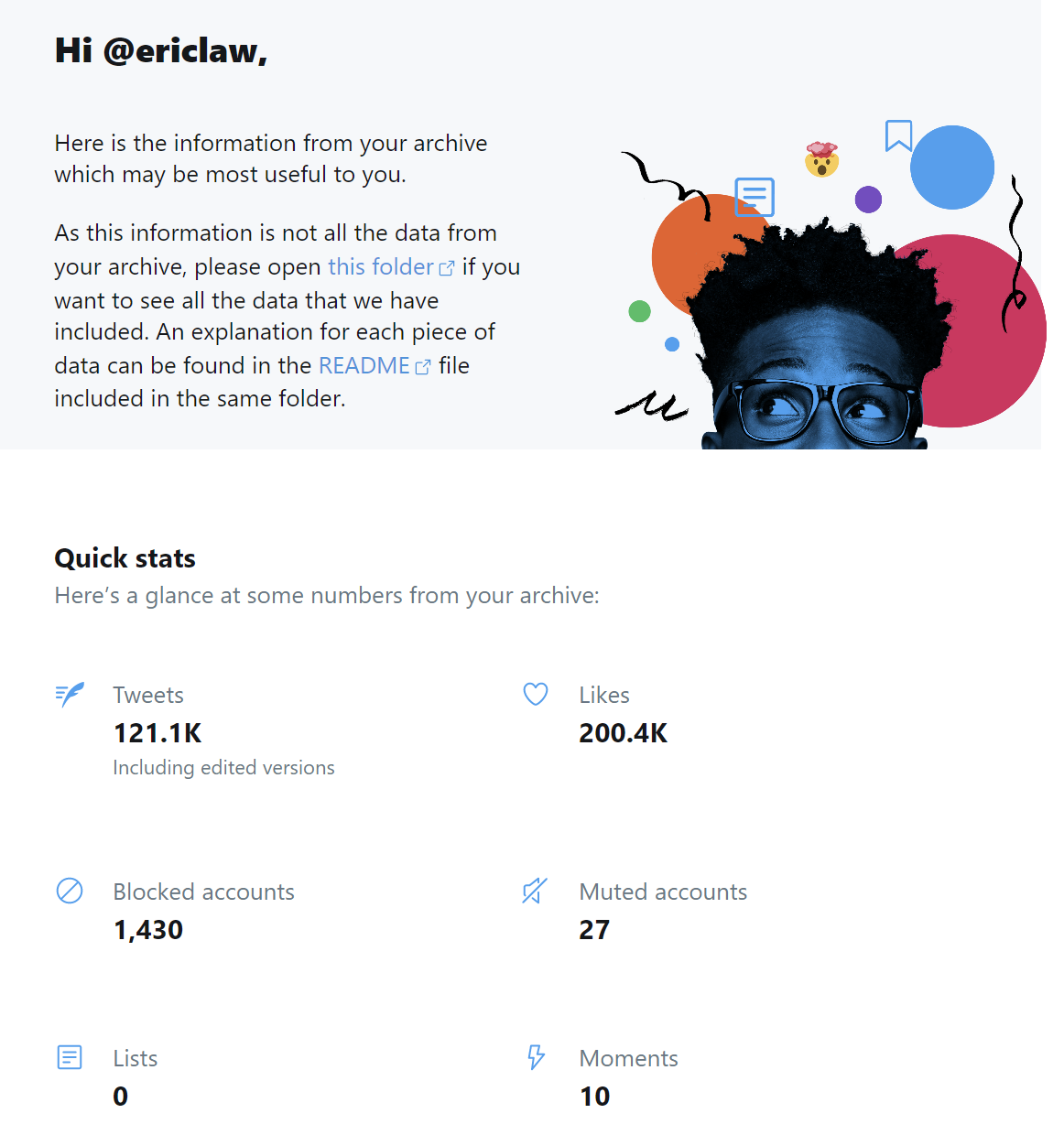
You can download an archive of all of your Tweets using the Twitter Settings UI. It takes a day or two to generate the archive, but after you download the huge ZIP file (3gb in my case), it’s pretty cool. There’s a quick view of your stats, and the ability to click into everything you’ve ever tweeted:

If the default features aren’t enough, the community has also built some useful tools that can do interesting things with your Twitter archive.

I’ve created an alternate account over on the Twitter-like federated service called Mastodon, but I’m not doing much with that account just yet.

Strange times.

-Eric

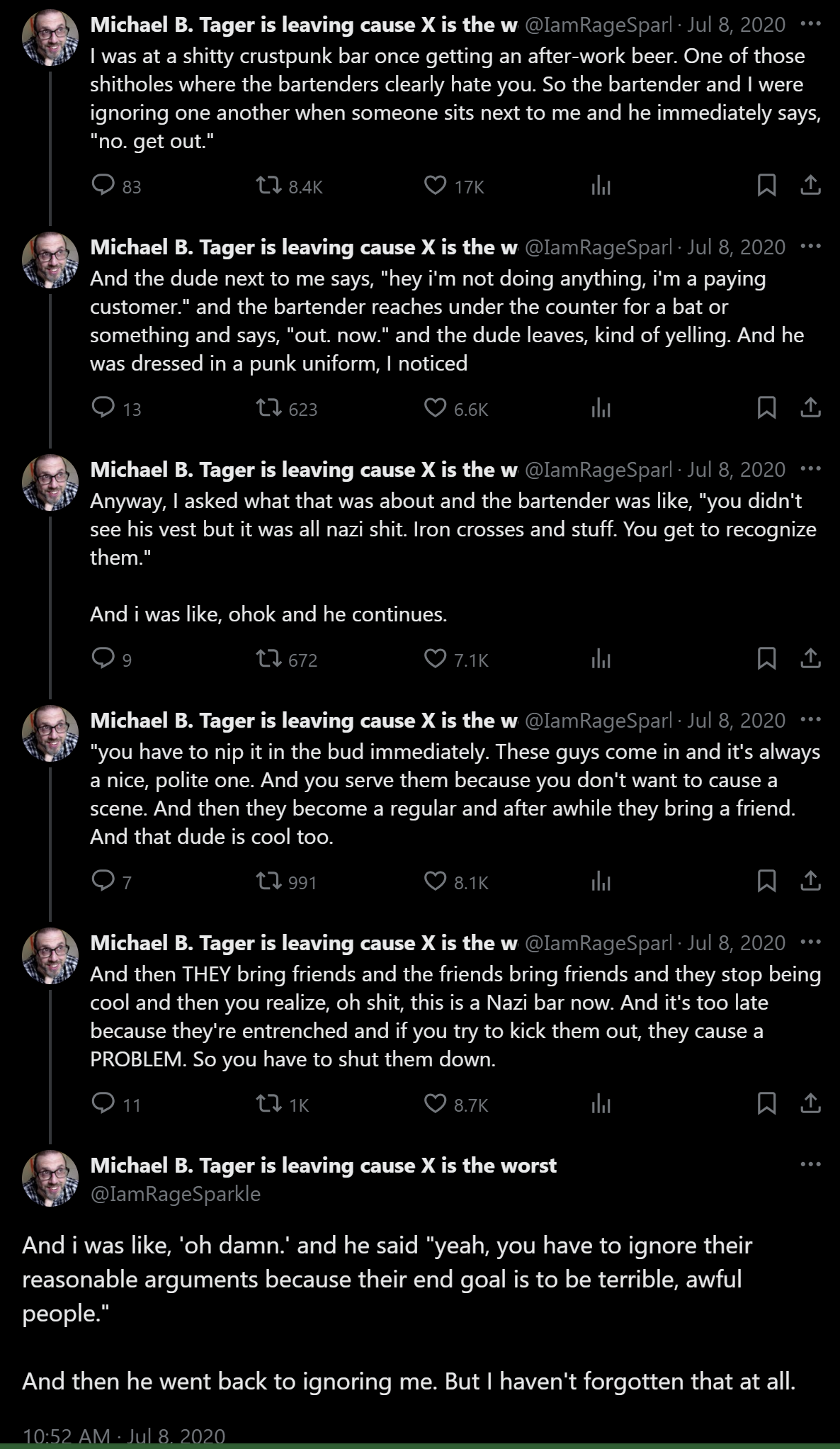
Update: As of November 2024, I’ve left the Nazi Bar and moved to BlueSky. Hope to see you there!

“Not Secure” Warning for IE Mode

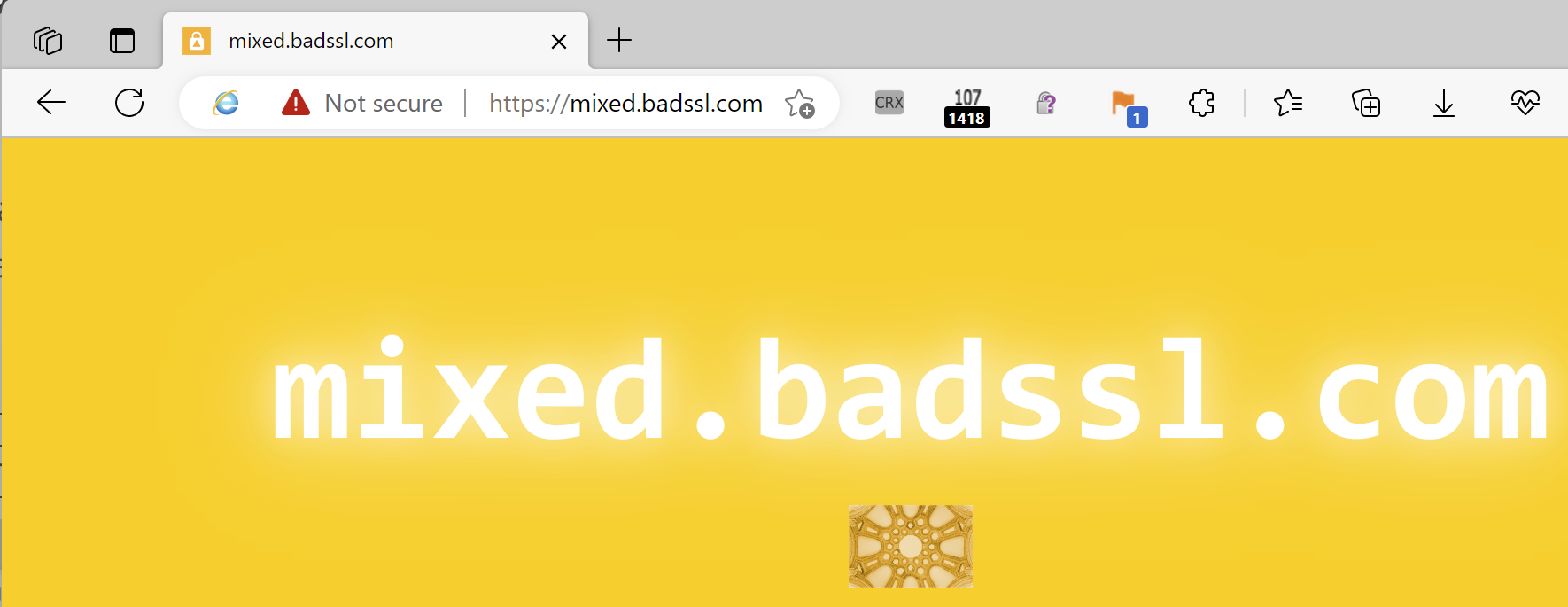
A customer recently wrote to ask whether there was any way to suppress the red “/!\ Not Secure” warning shown in the omnibox when IE Mode loads a HTTPS site containing non-secure images:

Notably, this warning isn’t seen when the page is loaded in modern Edge mode or in Chrome, because all non-secure “optionally-blockable” resource requests are upgraded to use HTTPS. If HTTPS upgrade doesn’t work, the image is simply blocked.

The customer observed that when loading this page in the legacy Internet Explorer application, no “Not Secure” notice was shown in IE’s address bar– instead, the lock icon just silently disappeared, as if the page were served over HTTP.

Background: There are two kinds of mixed content, passive (images, css) and active (scripts). Passive mixed content is less dangerous than active: a network attacker can replace the contents of a HTTP-served image, but only impact that image. In contrast, a network attacker can replace the contents of a HTTP-served script and use that script to completely rewrite the whole page. By default, IE silently allows passive mixed content (hiding the lock) while blocking active mixed content (preserving the lock, because the non-secure download was blocked).

The customer wondered whether there was a policy they could set to prevent the red warning for passive mixed content in Edge’s IE Mode. Unfortunately, the answer is “not directly.”

IE Mode is not sensitive to the Edge policies, so only the IE Settings controlling mixed content apply in this scenario.

When the IE Mode object communicates up to the Edge host browser, the security state of the page in IEMode is represented by an enum containing just three values: Unsecure, Mixed, and Secure. Unsecure is used for HTTP, Secure is used for HTTPS, and Mixed is used whenever the page loaded with mixed content, either active or passive. As a consequence, there’s presently no way for the Edge host application to mimic the old IE behavior, because it doesn’t know whether IEMode displayed passive mixed content, or ran active mixed content.

Because both states are munged together, the code that chooses the UI warning state selects the most alarming option:

     content_status |= SSLStatus::RAN_INSECURE_CONTENT;

…and that’s status is treated as a more severe problem:

SecurityLevel kDisplayedInsecureContentWarningLevel = WARNING;
SecurityLevel kRanInsecureContentLevel = DANGEROUS;

Now, even if the Edge UI code assumed the more benign DISPLAYED_INSECURE_CONTENT status, the browser would just show the same “Not secure” text in grey rather than red– the warning text would still be shown.

In terms of what a customer can do about this behavior (and assuming that they don’t want to actually secure their web content): they can change the IE Mode configuration to block the images in one of two ways:

Option #1: Change IE Zone settings to block mixed content. All mixed content is silently blocked and the lock is preserved:

Option #2: Change IE’s Advanced > Security Settings to “Block insecure images with other mixed content”, you see the lock is preserved and the IE-era notification bar is shown at the bottom of the page:

Stay secure out there!

-Eric