Strict-Transport-Security for *.dev, *.app and more

Some web developers host their pre-production development sites by configuring their DNS such that hostnames ending in .dev point to local servers. Such configurations were not meaningfully impacted when .dev became an official Generic Top Level Domain a few years back, because even as smart people warned that developers should stop squatting on it, Google (the owner of the .dev TLD) was hosting few (if any) sites on the gTLD.

With Chrome 63, shipping to the stable channel in the coming days, things have changed. Chrome has added .dev to the HSTS Preload list (along with the .foo, .page, .app, and .chrome TLDs). This means that any attempt to visit http://anything.dev will automatically be converted to https://anything.dev.

hstspreload

Other major browsers use the same underlying HSTS Preload list, and we expect that they will also pick up the .dev TLD entry in the coming weeks and months.

Of course, if you were using HTTPS with valid and trusted certificates on your pre-production sites already (good for you!) the Chrome 63 change may not impact you very much right away. But you’ll probably want to move your preproduction sites off of .dev and instead use e.g. .test, a TLD reserved for this purpose.

Secure all the things!

-Eric

PS: Perhaps surprisingly, the dotless (“plain”) hostnames http://dev, http://page, http://app, http://chrome, and http://foo are all impacted by new HSTS rules as well. There’s a policy.

For a Lark

Happy Holidays” David said as he poked his head into my office, handing me an unwrapped holiday card featuring a kitten in a Santa hat. As I took it, I nearly dropped a small white envelope that slipped out from inside. The inscription in the card read simply “Best wishes, David – 2010.”

Uh, thanks, you too!” I replied, both surprised and a bit uncomfortable that my colleague had gotten me a card. We were friendly but not friends. We’d only worked together a few times over the prior year, and it would’ve never occurred to me to get him anything for Christmas. He seemed like an archetypal geek, so we shared an interest in technology and science fiction, but we didn’t hang out or anything like that. Fortunately, he had a stack of cards in his hands, so it wasn’t like I’d been singled out or anything. Hoping he hadn’t gotten me anything fancy, I asked “What’s this?” as I flipped over the rigid envelope. In small print near the flap, it read “Do not open until Christmas 2017.”

His eyes twinkled and he grinned mischievously, an expression I’d never seen from him before. “Just a tiny gift. Well, maybe sort of a test. It’s very important that I give it to you now. But if you open it before 2017, it’ll be the crummiest gift you ever got. If you can wait, maybe it’ll be pretty nice.

I furrowed my brow. “So, like some sort of Savings bond thing?” I asked, thinking back to the bonds I’d gotten from far-off relatives as a little kid… I’d recently stopped dragging them around from apartment to apartment and taken them to the bank to collect the princely sum of $261, two decades after I’d ungratefully wished they were some action figures or a book instead.

David smiled. “Sure, sorta. Don’t lose it. Don’t get it wet. And don’t open it early!

“Uh, I won’t… Thanks?” I promised, and with that, David disappeared into Rob’s office next door to start his spiel all over.

Weird. Well, I’d already bought my direct reports gift cards for the IPic movie theatre and I had one extra left over… I’ll put that in a New Year’s card for David and leave it in his office sometime next week, I resolved. I tossed the card and envelope into the stack of RFC printouts on my bookshelf and went back to the email I was writing, hoping to get everything squared away before leaving for a short Christmas vacation.

The envelope sat on my bookshelf undisturbed, buried in an ever growing pile of paper. I might’ve remembered it the following year, but David had left the company that summer, off to do a volunteer tour with the Peace Corps before joining some startup out in San Francisco. Still buried in a pile of paper when I left the company two years later, the card made its way into an unsorted moving box labeled “office stuff” as we moved across the country to Texas. It then sat quietly in the box in my garage for five more years.

In the summer of 2017, I finally got around to digging through the garage, trashing what I could in an effort to make way for the growing proliferation of tricycles, big wheels, wagons, bikes, and pool toys that our two Texas-born children had collected. I spent a quiet Saturday afternoon in July mired in nostalgia, poring through boxes full of old books and papers and remembering a life before kids and so many responsibilities.

When I eventually uncovered the kitten card in the pile, I snorted and stretched to toss it in the “Recycle” pile before I remembered the weird little envelope. Sure enough, it was still inside, forgotten and untouched for the better part of a decade. I ignored the admonition of the faded green warning and tore it open, long-forgotten curiosity mounting.

The envelope contained a pile of papers folded in thirds. The outermost of these was a cleanly cut sheet of wax paper of the sort that was used for sandwiches back before ziplock bags took over the world. Odd, I mused as I discarded it. The next was a folded sheet of thick white cardstock, taped closed, which bore a short paragraph printed in Christmas-colored ink. It read simply:

Is it Christmas 2017 yet?

If so, happy holidays! Enjoy your present.
If not, please google ‘Marshmallow experiment’ and wait patiently.
You’ve been warned.

I paused as the marshmallow reference tickled something in my memory … some university lecture I’d forgotten long ago? Mildly annoyed, I dragged out my phone and searched as instructed. Oh yeah, that Stanford study about delayed gratification. It’s not like anyone will ever know… I mused as I put down my phone and started to peel back the tape holding the cardstock shut.

The door to the garage opened. “Nap’s over, Nate’s up.” my wife called, and I tossed the letter back in the box, eagerly grabbing the large pile of recycling I’d generated to show her my progress. Dancing around, building lego cars, and wrestling with my two kids, I completely forgot about David’s weird little present for another few months.

That December, off work for a two-week winter holiday vacation, I resolved to finish cleaning out the garage. Thirty minutes into the job, I came across the card. December… close enough. I tore open the cardstock. Inside lay a single laser-printed page with a letter printed on one side. The opening paragraph read:

Happy holidays, friend!

I hope you’ve waited patiently for this small gift and aren’t too annoyed at the oddity of its presentation, but it’s all for a purpose.

My accountant has instructed me to make it very clear that this is a GIFT, granted freely without any restrictions, from me to you on December 17th, 2010. It has an approximate market value of $250. Relax– it only cost me about 8 bucks, and it may well be worthless by the time you open it. (Market value is only possibly important for tax purposes)

Beneath the card was a black and white picture, one inch square, full of smaller squares, the sort of bar code you’ll find on the back of shampoo bottles.

code

The letter continued and I read on, confused but intrigued.

This is a QR code containing the private key for a digital wallet containing bitcoin. Bitcoins are a virtual currency that I’ve been playing with this year, and I thought it would be a lark to give some out as a present. (I’m not clever at picking presents– growing up, I got a new leather wallet every year for Christmas.)

Perhaps in 2017 bitcoins have become worthless (that seems like the most likely outcome), but I have a hunch that perhaps they’ll continue to appreciate over the years. If you’ve been patient, maybe it’s enough to buy you a nicer present now.

If so, happy holidays! If not, I hope my folly brings you at least a chuckle. :)

My heart started to pound in my chest. The page concluded with David’s signature, preceded by 7 hand-scrawled characters.

1000 BTC

Hands shaking with the instant weight of the letter, I dropped it and the universe entered slow motion as the paper fluttered to the ground.

-eric

post-script: https://textslashplain.com/2017/12/06/what-if/

Google Internet Authority G3

For some time now, operating behind the scenes and going mostly unnoticed, Google has been changing the infrastructure used to provide HTTPS certificates for its sites and services.

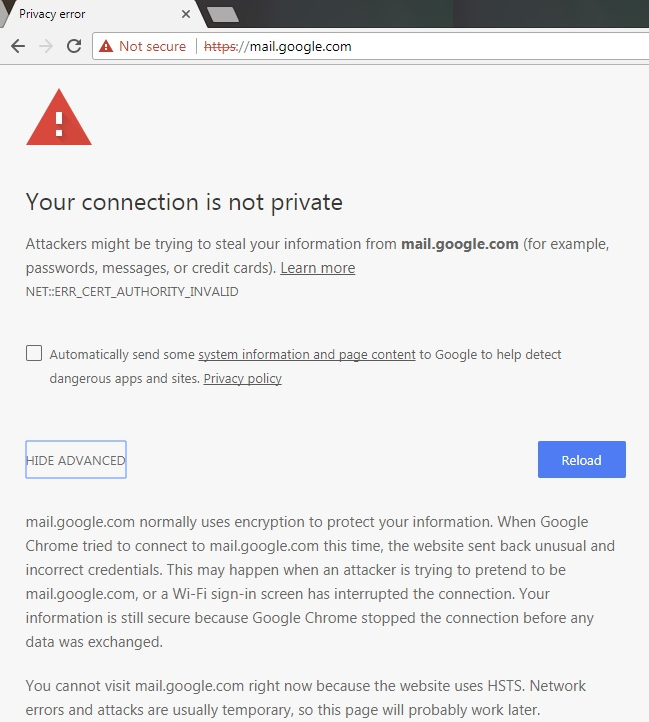
You’ll note that I said mostly. Over the last few months, I’ve periodically encountered complaints from users who try to load a Google site and get an unexpected error page:

certerror

Now, there are a variety of different problems that can cause errors like this one– in most cases, the problem is that the user has some software (security software or malware) installed locally that is generating fake certificates that are deemed invalid for various reasons.

However, when following troubleshooting steps, we’ve determined that a small number of users encountering this NET::ERR_CERT_AUTHORITY_INVALID error page are hitting it for the correct and valid Google certificates that chain through Google’s new intermediate Google Internet Authority G3. That’s weird.

What’s going on?

The first thing to understand is that Google operates a number of different certificate trust chains, and we have multiple trust chains deployed at the same time. So a given user will likely encounter some certificate chains that go through the older Google Internet Authority G2 chain and some that go through the newer Google Internet Authority G3 chain– this isn’t something the client controls.

G2vG3

You can visit this GIA G3-specific test page to see if the G3 root is properly trusted by your system.

More surprisingly, it’s also the case that you might be getting a G3 chain for a particular Google site (e.g. https://mail.google.com) while some other user is getting a G2 chain for the same URL. You might even end up with a different chain simply based on what Google sites you’ve visited first, due to a feature called HTTP/2 connection coalescing.

In order to see the raw details of the certificate encountered on an error page, you can click the error code text on the blocking page. (If the site loaded without errors, you can view the certificate like so).

Google’s new certificate chain is certainly supposed to be trusted automatically– if your operating system (e.g. Windows 7) didn’t already have the proper certificates installed, it’s expected to automatically download the root certificate from the update servers (e.g. Microsoft WindowsUpdate) and install it so that the certificate chain is recognized as trusted. In rare instances, we’ve heard of this process not working– for instance, some network administrators have disabled root certificate updates for their enterprise’s PCs.

On modern versions of Windows, you can direct Windows to check its trusted certificate list against the WindowsUpdate servers by running the following from a command prompt:

certutil -f -verifyCTL AuthRootWU

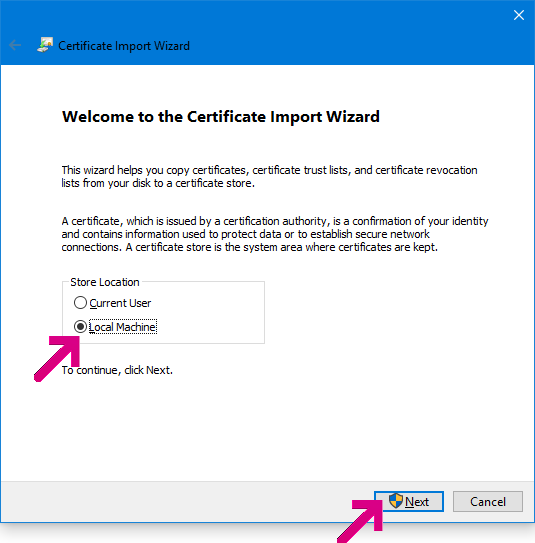
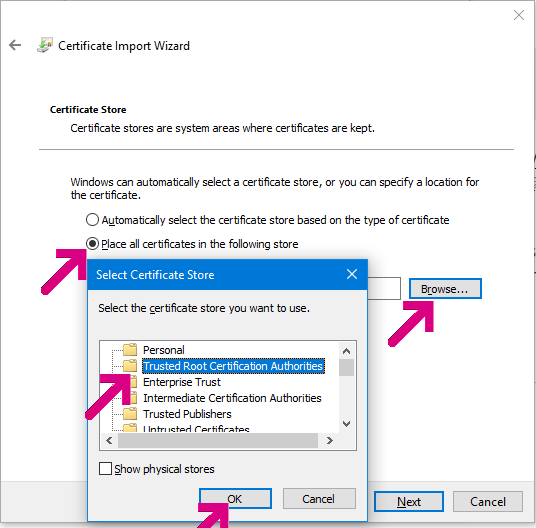
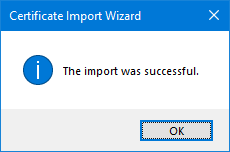
Older versions of Windows might not support the -verifyCTL command. You might instead try downloading the R2 GlobalSign Root Certificate directly and then installing it in your Trusted Root Certification Authorities:

InstallBtnLocalMachineTrustedRootFinishyay

Overall, the number of users reporting problems here is very low, but I’m determined to help ensure that Chrome and Google sites work for everyone.

-Eric

Chrome Field Trials

Back in April, we announced:

Beginning in October 2017, Chrome will show the “Not secure” warning in two additional situations: when users enter data on an HTTP page, and on all HTTP pages visited in Incognito mode.

This is true, but it’s perhaps a little misleading, based on some of the tweets we’ve seen:

Screen Shot 2017-10-18 at 8.05.25 AM

What isn’t mentioned in the blog post is exactly how this feature will roll out– many readers naturally assume that it’s as simple as: “If you have Chrome 62, then this feature is present.” After all, that’s how software usually works.

In Chrome, things are more interesting. Where possible, Chrome rolls out new features dynamically using the Field Trials platform. You can think of Field Trials as a set of server-controlled flags that allow Google to change Chrome’s behavior dynamically, at runtime, without shipping a new version. (Update: Google codenames their experimental system “Finch” while Microsoft Edge codenames theirs “ECS“- Experimental Configuration System).

We use Field Trials for two major purposes– for experimentation, and for feature rollouts.

Experimentally, we run many experiments where we create one or more experimental groups and then compare telemetry from those clients against a control group. If a feature isn’t performing as expected (e.g. its usage declines vs. the feature it replaces, or browser crashes increase, or memory usage increases or page load slows, etc), the feature is tuned or removed before it officially “ships.” Experiments are often conducted on the pre-release channels (e.g. Canary, Dev, and Beta) before deciding whether or not a feature should be rolled out to the Stable channel.

After a feature has proven itself via experiments, it’s ready to roll out to users in the Stable channel. Unfortunately, pre-release channels don’t get coverage nearly as broad as we’d like, so we have to take care when a feature is first rolled out to Stable. By using a field trial, we can enable the new feature for a huge number of Stable users while still keeping it at a low percentage of the Stable user base (e.g. 1% of a billion installs == 10 million clients). We keep an eagle eye on telemetry and user-feedback reports to spot any unexpected problems, and assuming we don’t find any, we can quickly ramp up the new feature rollout to 100% of users. If we discover the feature wasn’t fit to ship for whatever reason (e.g. introduces some serious bug), we can dial it back to 0% until a fix can be created.

Unfortunately, field trials are one of the very few inscrutable parts of the otherwise veryopen Chrome– Google does not publish information about the current percentage of users in a trial, and while chrome://version/?show-variations-cmd shows which trials are currently enabled for a given client, there’s no public explanation of what the experiments actually do. Update: Here is a tool to grab the configuration data from Google directly.

Rest assured that I’m eager to push the new Not Secure warnings to 100% and I expect to get to do so very soon. If you just can’t wait, you can override the field trial and turn it on yourself by changing chrome://flags/#mark-non-secure-as and restarting Chrome.

Screen Shot 2017-10-18 at 8.22.16 AM

Note that there’s not a 1:1 correspondence between Flags and Field Trials– while many trials can be overridden by flags, not all experiments have user-toggleable flags. If a feature is controlled by a flag and a field trial, when a flag hasn’t been manually configured, the field trial’s setting (if any) is not reflected in chrome://flags… the flag entry will just show Default.

Protecting your web traffic as fast as we can,

-Eric

UPDATE: See https://textslashplain.com/2019/07/16/updating-browsers-quickly-flags-respins-and-components/ for more discussion related to this topic.

Stealing your own password is not a vulnerability

By far, the most commonly-reported “vulnerability” reported to the Chrome Vulnerability Rewards program boils down to “I can steal my own password.” Despite having its very own FAQ entry, this gets reported to the VRP at varying levels of breathlessness, sometimes multiple times per day.

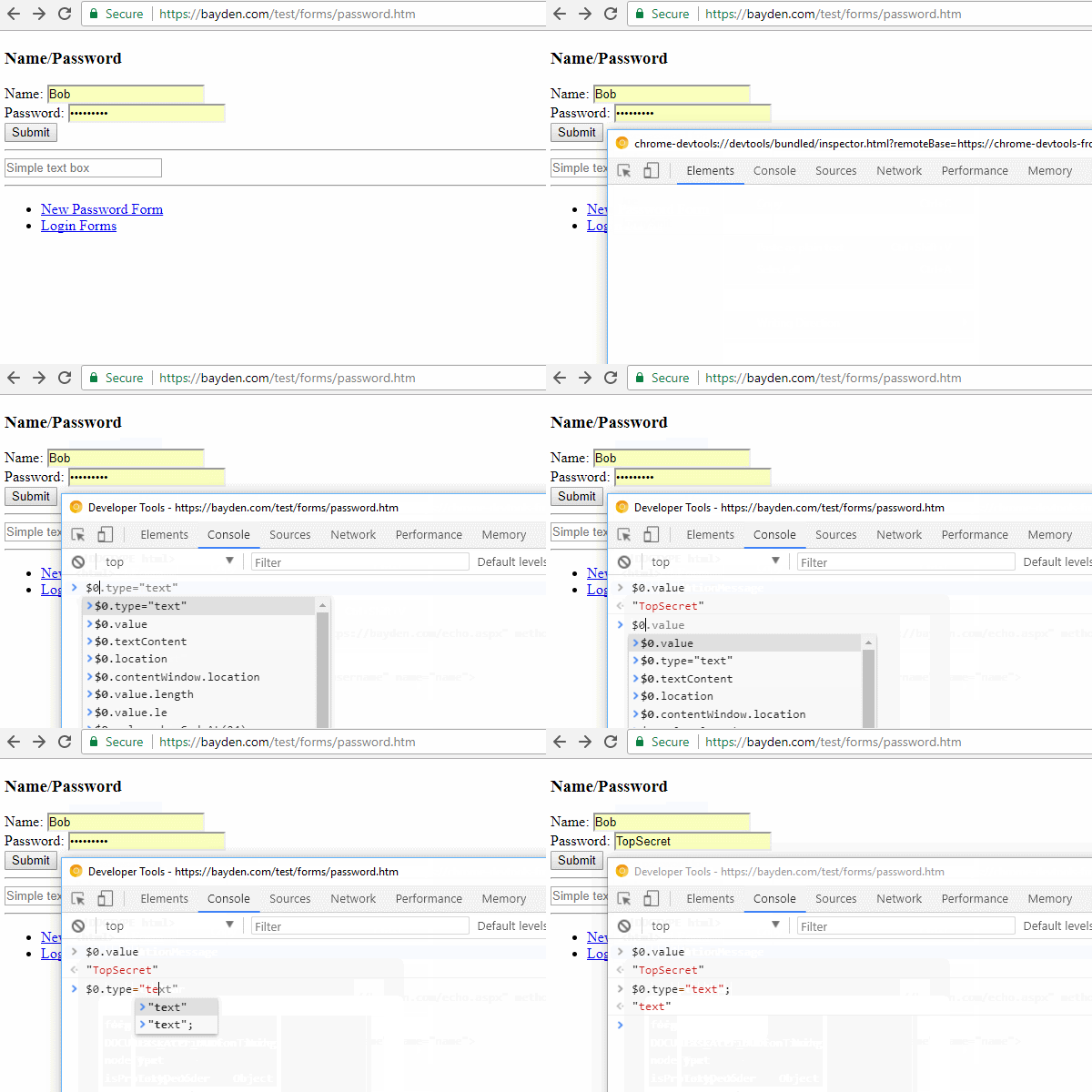
You can see this “attack” in action:

UnmaskPassword

Yes, it’s true, you can use Chrome (or Edge, or Firefox) to steal your own password.

-Eric

FAQ: What about Password-Stealing software?

PS: “But… but… what if I don’t want to use this easy trick and instead decide to steal my own passwords from myself by installing some software on my own PC? Isn’t that a security bug?”

No, although “Software can read passwords if I give it full permission to run on my computer” is probably the third or fourth most common non-bug reported to Chromium’s Security@ alias. crbug.com/678171 is one of many such filings.

FAQ: What about Group Policy lockdowns?

But… but… what if I’m a clever admin and I don’t allow my users to use the Developer Tools or run arbitrary software. Am I safe then?” Well, no. The user can enter JavaScript in the Omnibox/Address bar, or use the Settings page to view or export passwords to a file.

PPPS: “What about the “Reveal Password” (eye) icon shown in Microsoft Edge? Can that expose an autofilled password?” No.

FAQ: What about “Require A Password To Fill Passwords”?

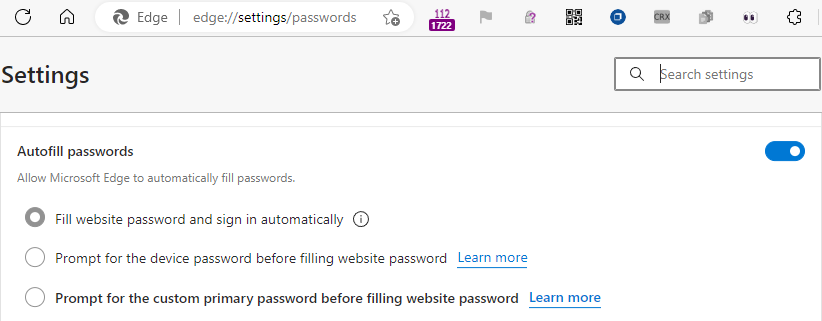
Edge offers a setting (on edge://settings/passwords) to control the behavior of auto-fill, but this is a speed-bump, not a security boundary. A user with unrestricted access to your logged-in user account can still grab passwords via slightly more cumbersome means.

Chromium uses encryption when storing passwords in almost all cases. However, the browser itself has the decryption key (necessarily). You can read more about why an attacker who has physical access or has compromised your machine is outside of the browser’s threat model in two of my blog posts: